Blu-Ray players are becoming more affordable, and many consoles and computers now offer playback of the format as standard. Many production companies are taking advantage of its high-definition capabilities and opting to release their projects on Blu-Ray, either alongside or opposed to the previous mainstay of DVD.
For all intents and purposes, Blu-Ray discs look much the same as standard CDs and DVDs – the difference of course being that Blu-Ray discs can hold up to 50GB of data, allowing for huge improvements in audio and video quality.
Data is stored in much larger ‘pits’ on Blu-Ray discs than DVDs – the larger the number of pits, the higher the volume of information that can be stored. The name of the format derives from the blue laser beam used to ‘read’ the data from the disc. Blu-Rays are not typically compatible with standard DVD players.
Until recently, Blu ray duplication was generally more expensive when compared to the costs of duplicating a run of DVDs. Despite this, Blu-Ray is currently considered the best format for movie quality and demand for Blu-Ray discs has grown exponentially in recent years, which is why more and more production companies are opting to release their titles on the format.
A greater demand for Blu-Ray duplication and replication has meant that more and more companies are now offering competitive deals when it comes to creating copies of movies, games and software. The next generation of consoles are likely to exclusively use Blu-Ray discs, on account of the sheer amount of data involved in modern computer gaming.
Blu-Ray discs are typically copied using duplication towers capable of producing a variety of formats, such as dual layer, BD-R and BD-RE. Most towers have the ability to automatically recognise, reproduce and edit based on the source format of a disc. Such towers also make use of a much more dynamic partitioning system, as well as offering password protection and dual levels of security.
As one might expect, turnaround times on Blu-ray duplication can vary, largely based on the amount of-data of a particular project and the number of units required. Whilst Blu-ray replication is also an option (and turnaround times are notably quicker), there are a number of advantages to choosing duplication, most notably with regard to cost.
As a video format, Blu-Ray is associated with a number of licensing fees which are required in order to legally use the technology. Advanced Access Content System (AACS) licensing alone can cost independent producers in excess of £2,000 per project, before taking into account further fees and royalties. Replicated discs will include such a levy, although duplication is free of such costs, making it a less expensive means of producing a run of discs.
It’s fair to say that production companies have an incentive to offer releases on Blu-Ray. Although manufacturing and distributing on DVD may cost slightly less, it’s worth mentioning that the same was also said about VHS – a format now consigned to the history books. With increasing numbers of people making Blu-Ray their format of choice, it’s arguably worth paying a little more to deliver high-definition content at the cutting edge of technology.
Martin Jonson is director of the UK's leading DVD/Blu-ray/CD duplication company providing exceptional quality at the lowest UK prices. He offers next day delivery anywhere in the UK and will complete your job quickly with the greatest care. You can connect with him on Google+.

Wednesday, 23 October 2013

Nexus Gem Google's SmartWatch on 31 October!

This Google SmartWatch design is available from a video of the technology magazine T3. This rumors that Google is working on a SmartWatch has been around for quite long time. So long been haunting a concept video through the Internet, which is from the gadget site T3 and can be seen in which, as Google's SmartWatch could one day look like.
Official statements by Google are not currently available so far. Seth Weintraub reported that the clock Now Google is going to make has many functions. And is also possible that various Google -glass features incorporated into the SmartWatch. The focus also stood a long battery life and a Bluetooth 4.0 connection.
Weintraub's source indicates that the clock sooner rather than later come. Google has bought Wimm Labs and this acquisition of Wimm Labs is a clear sign that Google's clock is more than a rumor. End of August 2013 Google bought the startup for an undisclosed sum. Wimm Labs develops smart watches, including apps. The latter are still available even after the takeover.
Smart Watches are currently considered the next "big thing”. With “Pebble” a start-up has already achieved success, but recently Samsung introduced its "Galaxy Gear" just before. According to rumors, Apple also working on its own, with iOS -powered wristwatch called the “iWatch “.
Tuesday, 22 October 2013
How to maximize battery life of your laptop?
Follow these simple 6 steps to extend the life of your laptop battery.
1. Know the ropes
Batteries life depends upon the work of processors. Number of tasks performed by the processor reduces the battery life. Current generation processors such as i3, i5, i7 might have the ability to perform multiple tasks simultaneously but the life of batteries becomes halved.
In case of windows customized power options are available in your Control panel. Choose the best plan that suits to extend the battery life. If you’ve Mac OS laptops then go to “System Preferences-> Hardware Tab” which has the power options. Change the option of sleep to energy saver mode.

2. Clean your battery
Remove the battery and then clean the metal contacts using alcohol and allow it to dry it for 5 to 10 minutes for better performance of the battery. But make sure the batter is thoroughly dry before you place it.
3. Temperature kills life
When any task is running the processor gets heat up. When temperature raises ability of the processor decreases. So a cool place to work with your laptop is preferred. Usage of cooler pads might also do the trick.
Additionally usage of softwares such as Speccy helps you to know about the power consumption of each components of your laptop. Other preferred freeware utilities are SparkleXP.

4. Remove all the accessories
Remove all the unnecessary accessories that consume the power of your lap it might be USB, pen-drive or CD’s etc. Turn off the Bluetooth and Wi-Fi settings and turn them on when needed. Try to avoid using the laptop while charging. This method drains most of the charges from your battery and reduces the lifetime of your battery.
5. Hard drive De-fragmentation
When you delete some data gaps are created in the hard drive. Sometimes new data stored doesn’t fill these gaps. Fragmenting the hard disk slows down the processor speed and manages the space needed. Fragment your hard disk once in 3 to 4 months.
6. What kind of applications can be run to save the life of your battery?
Handle laptops with care. Don’t impose heavy applications on your processors. When you need to type any basic information choosing a basic text editor is preferable than the Microsoft word. Playing games, watching movies are the faster way to drain the life of a battery. Mute your lap. Turn them on only when necessary. Last but not least Shutting of your laptops are preferable rather than putting it to sleep. It continues to drain the power of your RAM.
1. Know the ropes
Batteries life depends upon the work of processors. Number of tasks performed by the processor reduces the battery life. Current generation processors such as i3, i5, i7 might have the ability to perform multiple tasks simultaneously but the life of batteries becomes halved.
In case of windows customized power options are available in your Control panel. Choose the best plan that suits to extend the battery life. If you’ve Mac OS laptops then go to “System Preferences-> Hardware Tab” which has the power options. Change the option of sleep to energy saver mode.

2. Clean your battery
Remove the battery and then clean the metal contacts using alcohol and allow it to dry it for 5 to 10 minutes for better performance of the battery. But make sure the batter is thoroughly dry before you place it.
3. Temperature kills life
When any task is running the processor gets heat up. When temperature raises ability of the processor decreases. So a cool place to work with your laptop is preferred. Usage of cooler pads might also do the trick.
Additionally usage of softwares such as Speccy helps you to know about the power consumption of each components of your laptop. Other preferred freeware utilities are SparkleXP.

4. Remove all the accessories
Remove all the unnecessary accessories that consume the power of your lap it might be USB, pen-drive or CD’s etc. Turn off the Bluetooth and Wi-Fi settings and turn them on when needed. Try to avoid using the laptop while charging. This method drains most of the charges from your battery and reduces the lifetime of your battery.
5. Hard drive De-fragmentation
When you delete some data gaps are created in the hard drive. Sometimes new data stored doesn’t fill these gaps. Fragmenting the hard disk slows down the processor speed and manages the space needed. Fragment your hard disk once in 3 to 4 months.
6. What kind of applications can be run to save the life of your battery?
Handle laptops with care. Don’t impose heavy applications on your processors. When you need to type any basic information choosing a basic text editor is preferable than the Microsoft word. Playing games, watching movies are the faster way to drain the life of a battery. Mute your lap. Turn them on only when necessary. Last but not least Shutting of your laptops are preferable rather than putting it to sleep. It continues to drain the power of your RAM.
Microsoft launches new tablets Surface 2 and Surface Pro 2

From Tuesday the new tablet computers from Microsoft will be available for sale. Microsoft will launch two new models: Surface 2 and Surface Pro 2. It is powered by a latest-generation Intel (Haswell micro architecture), which will improve its performance by 20 % according to the Microsoft. The Tablet is loaded with Windows 8.1 Pro. The display is 10.6 inches.
According to the official communication from Microsoft, it will be better than 95 % of current laptops in terms of speed and graphics performance and it assure up to 50% increase in the performance. And it is assured more battery life which is the weak point of the previous models. These kinds of statements mean that these models are better than the previous models.
The user has the option to choose a configuration to 64 GB of storage and 4GB of RAM, 128 GB of storage and 4GB of RAM, 256 GB of storage and 8GB of RAM and 512GB of storage and 8GB of RAM. They are marketed to retail for 879 Euros and 1,779 Euros in 64 and 512 GB.
A new dock will also be taking part, which can power two external monitors mini Display Port, three USB 2.0 and one USB 3.0 ports , plus an Ethernet port and an audio input / output. Finally, Microsoft has changed its accessories and can put the tablet in two positions, with a viewing angle of 22 or 55 degrees.
A new dockable keyboard also makes its appearance. Called Power Cover, it offers a battery to enhance the autonomy of the tablet. The keyboard light - protection Type Cover, is not forgotten. In its new version, it is now called Surface 2 but is well powered by Windows RT 8.1. Still, the Surface 2 is more powerful again, with the same 10.6-inch screen and Pro Surface 2 is capable of displaying 1080p.
According to Microsoft, it runs 3-4 times faster than its predecessor. It also takes the same stand as its big sister, is refined and is available in white, black or silver. The tablet provides access to 100,000 applications (against 10,000 for the previous model) and especially includes Office RT and RT which now includes Outlook. Microsoft therefore corrects the main drawback of the previous model and makes the Surface 2 terminal to work and not just to consume media. Surface 2 will be available at a price of 439 Euros in 32 GB and 64 GB 539 Euros Rates include access to 200 GB of Skydrive storage for two years.
The characteristics of the new area - improved performance, better battery life, etc. - and the range of new accessories - such as dock, keyboard, increasing the battery cover and backlit - are evidence of a hardware ecosystem expansion. Remix the Surface, a music controller that connects to a magnetic system like Touch Cover, is a very creative novelty that expands the capabilities of these mobile devices.
But the real strength of Microsoft lies in the amplitude and the functionality of the online ecosystem where individuals and businesses can access with their Microsoft account like Skydrive, Azure or Office 365. This online platform is the rear base for the expansion of "digital self" that create online users, "says the analyst. “The real question is whether the range area, including the Surface 2 based on ARM chip (unlike the Surface Pro 2 and Intel Core i5 chip), Microsoft will offer a place in the landscape of mobility.
Asus Transformer Book T100 Announced
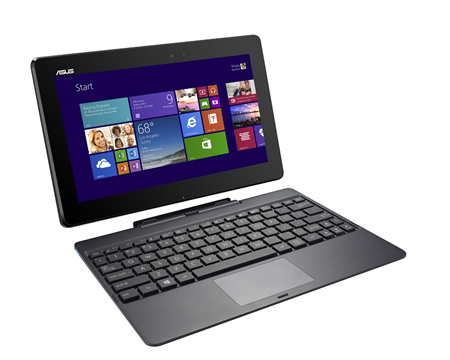
With this release the Asus Transformer Book T100 challenges the Microsoft Surface 2. The new Transformer Book has a 10.1 -inch IPS touch screen display with a resolution of 1,366 x 768 pixels. Supposedly it comes with “excellent daylight visibility” which taken care of display brightness.
Although HD is not full HD as it ascends the Surface 2, this Asus is a full version of Windows 8.1 and not on the mobile version of Windows RT. A full version of Microsoft Office Home 2013 Word, Excel, PowerPoint and OneNote is also on board.
Inside, a new Intel Atom Z3740 potters quad-core processor, the Bay Trail generation with 1.8 GHz clock that can compete with the Tegra fourth 2 GB of RAM provided. Likewise, there is a choice between 32 GB and 64 GB internal. The Transformer Book T100 tablet only weighs as 550 grams and as a convertible with a keyboard 1.07 kg.
Asus promises a battery life of up to 11 hours and 14 days in standby mode. The terminals correspond to those of the Surface 2: Micro- HDMI, microSD, 3.5 mm headphone / microphone jack and a full USB 3.0 port in the dock.
The Technical Details at a glance:
Operating system: Windows 8.1 ( 32-bit)
Processor: Intel Atom Z3740 Quad Core ( 1.33GHz )
Graphics: Intel HD Graphics ( 7th Generation )
Display: 10.1 -inch IPS multi touch with 1366 x 768 pixels
Memory: 2 GB
Internal memory : 32 GB or 64 GB
eMMC Camera: 1.2 MP front
Connectivity: 802.11a/b/g/n ( dual-band ) Wi- Fi, Bluetooth 4.0 , micro USB , micro HDMI , microSD,
3.5 mm headphone / microphone
Tablet Dock: USB 3.0
Sensors: Accelerometer, ambient light , e- compass, gyroscope
Battery: 31 Wh Lithium
Weight: 550 g tablet , dock 520 g
According to on line sources Asus Transformer Book T100 is available for 350 Euros and the release date is stated as 14th November.


