Tuesday, 11 March 2014

Top 10 - Chat Tools For Effective Communication

Google hangout
We live in a fast track world with various options in improving our system of working with the help of advanced technology. In the present scenario where communication takes priority in every system of working, technology plays a very important role in the overall system with the internet giving way to the quickest means of communication anywhere across the globe and for an efficient way of working it is essential to stay in touch, coordinate and implement the necessary output needed for smooth functioning. With the choice of various options now made available for better communication, we have some of the best and popular communications tools which include old as well as new tools that can help to stay in touch from any location of the world and since each communication tool differs from the other one can make the choice in selecting the best way suitable to stay in touch with effective communication.

Google Chat Service
 
Google Chat presently is one of those popular chat services and is directly integrated with Gmail and Google Apps inbox. Users can also add Google Talk to Pidgin or other popular chat application or their desktop app though it works amazingly from the browser. Moreover the user can also engage in voice as well as video call from Gmail in their browser where their chat logs can also be saved in Gmail inbox.

Skype Communication
 
Skype, best known for cost cutting voice calls over the internet to traditional phones is also great for video chats. One can have the option of group video chats up to 10 individuals at a time and this is one of the most favored choices among many users. Another feature of Skype text chats is that the user can send messages even when the other is offline bringing the convenience of email to IM.

HipChat Applications
 
Another fast growing option for team collaboration is HipChat which offers more than a chat interface. One can share files with the help of this application for mobile, web or desktop computers. Moreover the group chat is also beneficial since users can embed photos or various other media intending to be shared.

Yammer Private group communication
 
Users who do not want their communications to be public will find the Yammer tool appropriate for their private group communication which permits only people with company email addresses to sign into their network. Once it is set up, the user can engage in its simple micro blogging services by updating the status, send messages and even form groups for private team communication within the company.

Jaconda – a Classic team Chat Solution 
 
Jaconda is a good choice for a classic team chat solution which is free for thirty days though it does have some costs along with a paid account. Their services feature a number of chat rooms with support for very large teams and medium to large company.

Podio – Full backend Management Suite
 
Podio another solution is a full backend management suite for project which needs to handle various users where the signup is free under a five member team. Users can try out their large number of application using the free account where apps like, to do task, calendars and chatrooms are available.

Twitter Connect 
 
Twitter is increasingly gaining popularity helping many to get connected with most of them joining Twitter to follow popular writers and celebrities besides friends, family and coworkers. It is a great way of keeping in touch and getting to know quickly on what is going on or even to send a private direct message for things which need not be public, to see what is being said about products and services and an opportunity to directly support customers.

Azendoo Free Personal Service
 
Azendoo is a free personal service with a project management service enabling a full company-wide group managing individual projects where the chat system is the same as Facebook wherein users can get private messages as well as notifications. The user also has the options to leave comments based on certain projects within the group.

Hall – Solution for Project Management
 
Hall is an appropriate choice in solving project management and the application is free for personal account which is worth signing up and getting familiar with the interface. Hall offers both group chat as well as private chat together with video conferencing where all the products of the chats are saved. In advanced paid plans, users can also search through chat logs for any specific keywords and the first five users have the facility of free accounts, with 1 GB free storage and one on one video.

Flowdock – Constant means of Communication
 
Flowdock is branded as a `team inbox with chat’ offering desktop and mobile application. It has some good features which helps to work as a constant means of communication and is very slim with features in comparison to full project management tools. Below five users, in the team can use this app for free and once the user limit is crossed, a charge of $3 per head per month is applicable which can work well for medium sized team.

How to backup data with EaseUS backup software

What if the worst happens and you lose all you important data, images, videos, and documents from your computer. The thought is scary, right? Thinking of such a situation is so dangerous, what will happen if it happens to you? For this purpose, there is an option called the backup of the file that automatically make the copies of the documents, files, images, videos and whatever it is and stores them elsewhere on your hard disk or any other device. So that in case on any accident, you do not lose your important data. The reasons of data loss may be virus attack, hardware failure, human error or any potential danger. So it is better if you have already made a backup of your files timely. Backing up your system file is really easy but only if you choose the backup software wisely. There is a number of software in the market that will promise to create a safe backup of your file but, are not trust worthy and reliable. Some of the software is paid while the others are free backup software. So why you need to waste money if it is available for free. We are here with the best backup software that will guarantee the best backup of all your files.


EaseUS free backup software
 
EaseUS free backup software is the best backup software available in the market and is trusted by many users across the world. It is available for free whether you want to create a backup of the PC or the server. Billions of home users have already used it and they seem to be quite happy with the results. For the professional purposes, the paid version of the software is also available as they need a much more accuracy as compared to the home purposes. So whenever any tragedy occurs, you just need one single click to restore all your data back.

Top features
 
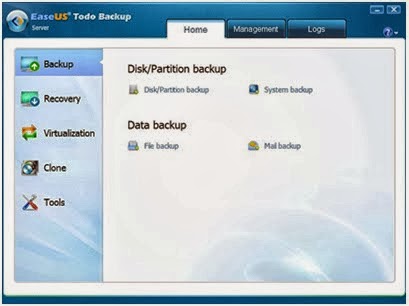
The most important feature of EaseUS backup softwareis that whenever you want the data back from the backup, you do not need to reinstall the windows as in the case of some other backup software. There are many different modules to create a backup such as system, hard disk, partition or individual files backup. So you are the one who can decide what kind of backup you want to create. Now the new features has been added to the software in which you can even backup your contacts, call logs, documents and even images and videos in the android devices. In just few simple steps, you can create a backup and recovery back your files without any skill required. So it is easy to use, can be automatically updated for free, available in multiple languages and even work automatically if the backup job is assigned to it.Even after that if you encounter any sort of problem, the technical team is available day and night to help you out. You can contact the customer care anytime you want.

Razer Launched Their Own Mechanical Switches For Gaming Keyboards

Razer 1
Razer 2
Razer 3
With the new technology the Razer has busy - and develops new switches that are optimized especially for gamers. But it can be also useful for other PC users. Most of the higher-quality keyboards very often come from the German manufacturer Cherry’s switches and Razer also use the same in his keyboards to date on the technology of the Upper Palatinate company.

It turns Razer just before a new design for the interior of the buttons, called switches. Razer has developed two slightly different versions of the switch: the clicky Razer Green Switch requires triggering a force of 50 g, while the rather quiet Razer Orange Switch needs a force of 45 g to trigger. The signal point to be achieved in both models compared to 1.9 mm, while two competing models used for comparison 2.2mm and 2.0mm need - Razer does not mention any manufacturer, but probably they are the products of Cherry.

The reset point is the green switch by Razer 0.4 mm long and the orange Switch 0.05 mm. With these values Razer sees his keyboards especially for use in computer games at an advantage, for example when it comes to fast double clicks. But the lifetime should be longer than the nameless competitors.

The green and orange Razer indicates 60 million each clicks, the competitor creates depending on the model only 20 million or 50 million. Razer can produce its switches from a third party, but they are having their own experts to ensure the quality on site.

The two new keys should be used for the first time in the series keyboard Black Widow 2014. Other manufacturers of keyboards should be able to install keys in their models. A reader has alerted us that the 2014er models of the Black Widow keyboards already in the online store of Razer on pre-order. Deliveries are scheduled to begin in mid- March 2014, the cheapest model costs around 100 Euros.

LG 34UM95, Cinemascope Screen With 34 Inches


LG 34UM95
LG has unveiled a 34 -inch display with an aspect ratio of 21:9, on which, for example, several documents can be displayed side by side. The displays have replaced by two screens in the 4:3 format. The 34UM95 is not LG's first display in 21:9 formats.

Already in 2012, the company launched such a screen on the market. The new 34UM95 achieves a resolution of 3,440 x 1,440 pixels and is equipped with an AH - IPS panel with a contrast ratio of 1,000:1. The brightness is given with 320 candelas per square meter. The display offers a DisplayPort 1.2, two HDMI ports and two Thunderbolt connectors as well as USB 3.0.

With stand, the screen measures an impressive 829.9 x 468.9 x 173 mm and requires about 80 watts in operation. The price is about € 1,000. In April, the LG should 34UM95 will be available in the market. In addition, LG still offers the UM65, which is also held in 21:9 formats and is available in three sizes 25, 29 and 34 inches.

The smallest model has a resolution of 2,560 x 1,080 pixels and a brightness of 300 candelas. The AH - IPS display is selectively connected via DisplayPort 1.2, two HDMI inputs or DVI-D Dual Link to the computer. The LG UM65 with 29 inch and 34 inch with 34UM65 are larger, but the other hardware detail remains the same.

The LG 34UM65 costs about 610 Euros, the 25UM65 to be offered for 280 Euros and 450 Euros for the 29UM65 model.

Fantastic Plugins to enhance the functionality of WordPress

Beta Tester and Regenerate Thumbnails

Plugins could be of immense help for websites on WordPress and handy plugins could prove to be helpful in enhancing its capabilities with great functionality without much strain though one would wonder which of these plugins would be useful for their site. It is essential to understand its need for specific site and add them depending on their requirements with the WordPress installation, most of which tend to become very useful on any WP site. Viewers could check on these plugins and opt for the ones most essential in running their website according to their requirements. At times, some of the functions in WordPress are not recommended for usage and the Log Deprecated Notices plugin provides a list of functions in the plugin or theme with suitable alternatives for usage.

Theme Check

Theme Check is one of the essential and most important plugins for WordPress developers which measures against the prevailing WordPress coding standards as well as its practices. While creating the theme, it helps in verifying the code making sure that it meets the review standard of the WordPress themes directory and creates a fresh menu item under the setting of Appearance. Its capabilities are that one can run over 8000 tests on any installed available themes resulting in a list of recommendations, errors and information messages. If the user has the inclination of submitting the theme to WordPress.org repository, the need to eliminate the errors is essential since Theme Check which is active during submission does not proceed any further, even if a single error is detected.

Besides this, Theme Check’s recommendations can also help in providing ideas for the theme with the maximum advantage on its functionality such as post formats and thumbnails and by eliminating all the recommendation the user can benefit with the latest features to turn off the same. If showcasing themes to clients or for colleague’s feedback and testing, the Theme Demo Bar enables a single WordPress installation, presenting more than one theme where these plugins are common on theme market places and theme shops. These are much easier than setting different environment for various themes though it does not have the flexibility of different content for different theme.

Beta Tester and Regenerate Thumbnails

Updating to WordPress Beta, Nightly version or Release Candidate (RC) with Beta Tester enables to test the compatibility of the theme or plugins, with the latest upcoming versions while Regenerate Thumbnails can be useful in setting a new size of image thumbnail which enable the user to regenerate the thumbnail images in the library according to the size of one’s choice with a single click though the process may take its time depending on the number of images especially from a live site.

Debogger

Debogger helps in dealing with debug messages, warnings and notices in WP, helping in showing the debug notices at the bottom of the page with the query counts, page load time and peak memory usage making it easy for performance tuning. It also checks the markup for W3C validity and for its function, one need to run on the server which is accessible by the W3C validation service. Another alternative is the Debug Bar that adds a Debug menu to the admin bar for easy access to cache, queries as well as other useful information. The two useful plugins which are alongside each other are the Debug Bar and Debug Bar Extender where the former give information about memory, request etc. while the later gives a better insight on what is prevailing under the hood, inclusive of cache hits or misses, clear profiler with back trace of all functions as well as SQL queries.

User Switching

One can switch between registered users without the need of repeating the usernames and passwords with the User Switching which, once activated will give a new menu named Switch off in the admin bar and if a plugin to create new role with a set of new capabilities is needed, this plugin would be of great help.

Disable Core Updates

Users often working with plugins and themes and probably testing them in various versions of WP of different set of plugins as well as setup configurations come across new versions available which can cause interruption in their working system. The Disable Core Updates plugin thus helps in turning them off.

Backup to Dropbox

Back up of the content is very vital and offsite backups are essential when one would not have the time to download a backup and reload the same to a cloud storage service. WordPress Backup to Dropbox helps in saving the same to the dropbox account instead of downloading a backup using the OAuth, keeping the details safe with its simple and sleek UI, customizable backup settings and cross browser compatibility.

Better WordPress Security

This plugin provides various WP security features and techniques which are essential for securing a WP site combining them into an easy to use plugin by working in obscuring sensitive information, increasing security of passwords, blocking unauthorized users and detecting attempts in finding vulnerabilities. Moreover it also makes regular backups of the site enabling the user to be online quickly should they face any kind of an attack Mono-live is a great eye opener on some fantastic latest technology information which provides immense insight to the user.