Follow these simple 6 steps to extend the life of your laptop battery.
1. Know the ropes
Batteries life depends upon the work of processors. Number of tasks performed by the processor reduces the battery life. Current generation processors such as i3, i5, i7 might have the ability to perform multiple tasks simultaneously but the life of batteries becomes halved.
In case of windows customized power options are available in your Control panel. Choose the best plan that suits to extend the battery life.
If you’ve Mac OS laptops then go to “System Preferences-> Hardware Tab” which has the power options. Change the option of sleep to energy saver mode.
2. Clean your battery
Remove the battery and then clean the metal contacts using alcohol and allow it to dry it for 5 to 10 minutes for better performance of the battery. But make sure the batter is thoroughly dry before you place it.
3. Temperature kills life
When any task is running the processor gets heat up. When temperature raises ability of the processor decreases. So a cool place to work with your laptop is preferred. Usage of cooler pads might also do the trick.
Additionally usage of softwares such as Speccy helps you to know about the power consumption of each components of your laptop. Other preferred freeware utilities are SparkleXP.
4. Remove all the accessories
Remove all the unnecessary accessories that consume the power of your lap it might be USB, pen-drive or CD’s etc. Turn off the Bluetooth and Wi-Fi settings and turn them on when needed. Try to avoid using the laptop while charging. This method drains most of the charges from your battery and reduces the lifetime of your battery.
5. Hard drive De-fragmentation
When you delete some data gaps are created in the hard drive. Sometimes new data stored doesn’t fill these gaps. Fragmenting the hard disk slows down the processor speed and manages the space needed. Fragment your hard disk once in 3 to 4 months.
6. What kind of applications can be run to save the life of your battery?
Handle laptops with care. Don’t impose heavy applications on your processors. When you need to type any basic information choosing a basic text editor is preferable than the Microsoft word. Playing games, watching movies are the faster way to drain the life of a battery. Mute your lap. Turn them on only when necessary.
Last but not least Shutting of your laptops are preferable rather than putting it to sleep. It continues to drain the power of your RAM.
Tuesday, 22 October 2013
Microsoft launches new tablets Surface 2 and Surface Pro 2
From Tuesday the new tablet computers from Microsoft will be available for sale. Microsoft will launch two new models: Surface 2 and Surface Pro 2. It is powered by a latest-generation Intel (Haswell micro architecture), which will improve its performance by 20 % according to the Microsoft. The Tablet is loaded with Windows 8.1 Pro. The display is 10.6 inches.
According to the official communication from Microsoft, it will be better than 95 % of current laptops in terms of speed and graphics performance and it assure up to 50% increase in the performance. And it is assured more battery life which is the weak point of the previous models. These kinds of statements mean that these models are better than the previous models.
The user has the option to choose a configuration to 64 GB of storage and 4GB of RAM, 128 GB of storage and 4GB of RAM, 256 GB of storage and 8GB of RAM and 512GB of storage and 8GB of RAM. They are marketed to retail for 879 Euros and 1,779 Euros in 64 and 512 GB.
A new dock will also be taking part, which can power two external monitors mini Display Port, three USB 2.0 and one USB 3.0 ports , plus an Ethernet port and an audio input / output. Finally, Microsoft has changed its accessories and can put the tablet in two positions, with a viewing angle of 22 or 55 degrees.
A new dockable keyboard also makes its appearance. Called Power Cover, it offers a battery to enhance the autonomy of the tablet. The keyboard light - protection Type Cover, is not forgotten. In its new version, it is now called Surface 2 but is well powered by Windows RT 8.1. Still, the Surface 2 is more powerful again, with the same 10.6-inch screen and Pro Surface 2 is capable of displaying 1080p.
According to Microsoft, it runs 3-4 times faster than its predecessor. It also takes the same stand as its big sister, is refined and is available in white, black or silver. The tablet provides access to 100,000 applications (against 10,000 for the previous model) and especially includes Office RT and RT which now includes Outlook. Microsoft therefore corrects the main drawback of the previous model and makes the Surface 2 terminal to work and not just to consume media. Surface 2 will be available at a price of 439 Euros in 32 GB and 64 GB 539 Euros Rates include access to 200 GB of Skydrive storage for two years.
The characteristics of the new area - improved performance, better battery life, etc. - and the range of new accessories - such as dock, keyboard, increasing the battery cover and backlit - are evidence of a hardware ecosystem expansion. Remix the Surface, a music controller that connects to a magnetic system like Touch Cover, is a very creative novelty that expands the capabilities of these mobile devices.
But the real strength of Microsoft lies in the amplitude and the functionality of the online ecosystem where individuals and businesses can access with their Microsoft account like Skydrive, Azure or Office 365. This online platform is the rear base for the expansion of "digital self" that create online users, "says the analyst. “The real question is whether the range area, including the Surface 2 based on ARM chip (unlike the Surface Pro 2 and Intel Core i5 chip), Microsoft will offer a place in the landscape of mobility.
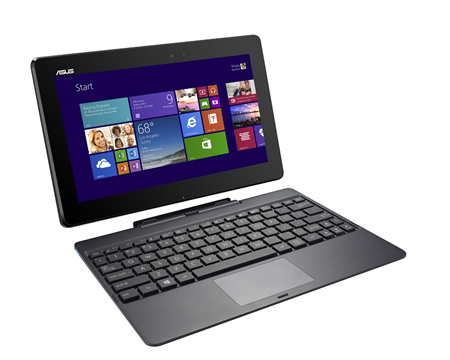
Asus Transformer Book T100 Announced
Asus has now introduced the Windows 8.1 Convertible Transformer Book T100. The 10 -inch tablet with keyboard dock and it uses the new Atom quad core processor and an IPS touch display. It will be available from by mid-November 349 Euros.
With this release the Asus Transformer Book T100 challenges the Microsoft Surface 2. The new Transformer Book has a 10.1 -inch IPS touch screen display with a resolution of 1,366 x 768 pixels. Supposedly it comes with “excellent daylight visibility” which taken care of display brightness.
Although HD is not full HD as it ascends the Surface 2, this Asus is a full version of Windows 8.1 and not on the mobile version of Windows RT. A full version of Microsoft Office Home 2013 Word, Excel, PowerPoint and OneNote is also on board.
Inside, a new Intel Atom Z3740 potters quad-core processor, the Bay Trail generation with 1.8 GHz clock that can compete with the Tegra fourth 2 GB of RAM provided. Likewise, there is a choice between 32 GB and 64 GB internal. The Transformer Book T100 tablet only weighs as 550 grams and as a convertible with a keyboard 1.07 kg.
Asus promises a battery life of up to 11 hours and 14 days in standby mode. The terminals correspond to those of the Surface 2: Micro- HDMI, microSD, 3.5 mm headphone / microphone jack and a full USB 3.0 port in the dock.
The Technical Details at a glance:
Operating system: Windows 8.1 ( 32-bit)
Processor: Intel Atom Z3740 Quad Core ( 1.33GHz )
Graphics: Intel HD Graphics ( 7th Generation )
Display: 10.1 -inch IPS multi touch with 1366 x 768 pixels
Memory: 2 GB
Internal memory : 32 GB or 64 GB
eMMC Camera: 1.2 MP front
Connectivity: 802.11a/b/g/n ( dual-band ) Wi- Fi, Bluetooth 4.0 , micro USB , micro HDMI , microSD,
3.5 mm headphone / microphone
Tablet Dock: USB 3.0
Sensors: Accelerometer, ambient light , e- compass, gyroscope
Battery: 31 Wh Lithium
Weight: 550 g tablet , dock 520 g
According to on line sources Asus Transformer Book T100 is available for 350 Euros and the release date is stated as 14th November.
Monday, 21 October 2013
Best alternatives for Google alerts
Google alerts are the best mechanism which makes you stay updated with all kinds of activities that are occurring in cyber space. Google alerts is the best tool that sends you an alert which is happening over the internet. Google used to crawl continuously in the web; when the Google detects a keyword which has been subscribed by you, it automatically sends you an email regarding those stories. Suppose if you were subscribing for the alert regarding android, then you will automatically gets the emails regarding the android in your inbox. The main disadvantage of the Google alerts is that Google Alerts neglects what is going inside the social media websites. This makes it to not work perfectly as advertised. There are few alternatives to Google alerts which in turn gives you best alerts that gives you what is going on the Internet.
1. Talkwalker
Talkwalkwer is a best alternative which bring you to get alerted frequently with the events which are going inside the Internet. It helps you to monitor various events which are happening inside the cyber space and send you real time alert for your email inbox. It also monitors the activities on the social media websites, blogs, and online websites and so on. In Talkwalker you can subscribe to the RSS feeds as well.
2. Mention.net
The second places goes to the Mentions.net which is a free alert service from which you can track the brand or keyword which is mentioned on Facebook, Twitter, blogs and Forums. The interface of the Mention.net gives you a better wizard-style set up menu for setting up the alerts. This service also offers you to tack the mentions on a particular websites too. Once the process of signing up gets over, you will be asked to download and install the application extension for your device. You can also skip that step since the website has all sorts of features.
3.Newsly
Newsly is another alert service which acts as a best alternative for Google alerts; basically it is not a email alert service similar to Google alerts but you can easily track out what is going on a blog, websites and even in online newsletter too. You can also sign in into your social media website which let you get notified when your friends makes some news over the websites. It will generate alerts when your friends make some alerts in your social media circles. You can even also use the monitoring tool which let you to track mentions of your names in the internet.
4.Infoxicate
Infoxicate lets you to set up the pings for your things which you have been waiting for a longer time. This service is totally a different way which sends you an alert when the things happen in a cyberspace. You can get the information when that information is available over the internet. Suppose you need a update on android operating system, you will be automatically alerted when the newer version of operating system is available over the website.
1. Talkwalker
Talkwalkwer is a best alternative which bring you to get alerted frequently with the events which are going inside the Internet. It helps you to monitor various events which are happening inside the cyber space and send you real time alert for your email inbox. It also monitors the activities on the social media websites, blogs, and online websites and so on. In Talkwalker you can subscribe to the RSS feeds as well.
2. Mention.net
3.Newsly
Newsly is another alert service which acts as a best alternative for Google alerts; basically it is not a email alert service similar to Google alerts but you can easily track out what is going on a blog, websites and even in online newsletter too. You can also sign in into your social media website which let you get notified when your friends makes some news over the websites. It will generate alerts when your friends make some alerts in your social media circles. You can even also use the monitoring tool which let you to track mentions of your names in the internet.
4.Infoxicate
Infoxicate lets you to set up the pings for your things which you have been waiting for a longer time. This service is totally a different way which sends you an alert when the things happen in a cyberspace. You can get the information when that information is available over the internet. Suppose you need a update on android operating system, you will be automatically alerted when the newer version of operating system is available over the website.
Top 5 Social Media Security Blunders
Security has become so advanced these days, there are thousands of different options when it comes to keeping safe and secure. However, even after going to all the trouble to make our property as secure as possible we still manage to put ourselves at risk via social media. Burglars and criminals can use social media as a way of identifying targets, and people are quite happy to openly advertise their homes. If you use social media regularly then there are a few simple rules you need to follow. Here are our top 5 social media security blunders.
1. Going On Holiday
If you are planning on going on holiday any time soon it’s important that you don’t boast about it online. Telling all your friends you are going skiing next week or off to an all-inclusive resort for two weeks might seem like a good idea at the time, but it could attract some unwanted attention. You are telling the world exactly when your house will be empty and burglars could be round your house as soon as you set foot on the plane.
2. Home Alone
Some celebrities have had bad experiences using social media and telling people they are at home alone. Helen Flanagan tweeted on the popular social media site Twitter that she was home alone when her boyfriend at the time Scott Sinclair was away. Shortly after this tweet her house was burgled. If you are going to be at home alone don’t post about it on social media. Consider making your profiles private if you are concerned about this.
3. Planning A Party
There have been countless reports in the papers about people advertising house parties on Facebook and other social media sites. Refrain from creating a Facebook event about a house party as this information could get into the wrong hands, even if you make a private event people still talk. House parties arranged via social media have resulted in hundreds of people swarming to the house party location and trashing the place. This is especially true amongst teenagers and young adults.
4. Disclosing Your Location
Do not under any circumstances post anything about your location online. This doesn’t just mean your address and information about where you live. Don’t post things about where you plan to go and what you will be doing at specific times. Otherwise people will know exactly where you are and it’s not safe. Consider removing locating targeting from your social media profiles as these can be used to track your whereabouts.
5. Talking About Valuables
Just got a brand new HD TV? Try and resist posting updates about it on social media. Don’t advertise your most expensive possessions to criminals. Then they will know what prize possessions you have and may decide your house is worth targeting. This is especially true around the holiday seasons.
Whilst we agree social media is a great of connecting people it has unfortunately also meant an increase in cybercrime.
Neil Maycock is a security advisor for MDS Security. He loves to blog about home and business security issues.
1. Going On Holiday
If you are planning on going on holiday any time soon it’s important that you don’t boast about it online. Telling all your friends you are going skiing next week or off to an all-inclusive resort for two weeks might seem like a good idea at the time, but it could attract some unwanted attention. You are telling the world exactly when your house will be empty and burglars could be round your house as soon as you set foot on the plane.
2. Home Alone
Some celebrities have had bad experiences using social media and telling people they are at home alone. Helen Flanagan tweeted on the popular social media site Twitter that she was home alone when her boyfriend at the time Scott Sinclair was away. Shortly after this tweet her house was burgled. If you are going to be at home alone don’t post about it on social media. Consider making your profiles private if you are concerned about this.
3. Planning A Party
There have been countless reports in the papers about people advertising house parties on Facebook and other social media sites. Refrain from creating a Facebook event about a house party as this information could get into the wrong hands, even if you make a private event people still talk. House parties arranged via social media have resulted in hundreds of people swarming to the house party location and trashing the place. This is especially true amongst teenagers and young adults.
4. Disclosing Your Location
Do not under any circumstances post anything about your location online. This doesn’t just mean your address and information about where you live. Don’t post things about where you plan to go and what you will be doing at specific times. Otherwise people will know exactly where you are and it’s not safe. Consider removing locating targeting from your social media profiles as these can be used to track your whereabouts.
5. Talking About Valuables
Just got a brand new HD TV? Try and resist posting updates about it on social media. Don’t advertise your most expensive possessions to criminals. Then they will know what prize possessions you have and may decide your house is worth targeting. This is especially true around the holiday seasons.
Whilst we agree social media is a great of connecting people it has unfortunately also meant an increase in cybercrime.
Neil Maycock is a security advisor for MDS Security. He loves to blog about home and business security issues.