Friday, 22 November 2013
Google Web Designer Beta, Create HTML5 Content Of Your Own
Google has released its free Google Web designer in a first beta version. Google created this current version mainly banner ads, but also intended for good old sites. Flash advertising is computationally intensive and error prone. Many users switched over such content. In the advertising industry, there is still little effort to use the HTML5 alternative.
Why is that? For one of good tools for creating HTML5 advertising is lacking. With programs like Adobe Edge can indeed be standard advertising create a high quality, but the results are often so extensive that they are not accepted by marketers. In addition, between an advertiser and its agency and the website to play the advertising, are often intermediaries who provide technical solutions that cannot handle HTML code. Some agency that has admitted early to the new technology had to find that they could bring to advertise only on a few websites.
Google wants to fix with his web designer in combination with its DoubleClick ad serving platforms and Admob at least the technical hurdles. So should be capable of create without programming using the Google Web Designer in HTML5 banners that can be played directly through the widespread systems of DoubleClick and Admob then, even on mobile devices. Here, the Google Web Designer offers for Google platforms finished project templates, but it is also easily possible to create online advertising to other advertising platforms, the Web designer but files with HTML, CSS and JavaScript.
And the creation of online advertising should be only the first step in the long term should become familiar with the web designer creating and edit web pages. Currently, it is not yet possible to open HTML files created with other editors to the Web designer. Basically, the Google Web Designer is a WYSIWYG editor that generates HTML5, CSS3 and JavaScript code. Google wants to provide an alternative to Adobe Flash, which now indeed also has an HTML5 export, for the creation of online advertising is currently not really usable.
Adobe has also recognized that the trend away from Flash developed towards HTML5. Therefore, Adobe has developed a number of new tools, grouped under the heading of Adobe Edge. The web designer is most similar to the Adobe Edge Animate, which also generates HTML5, CSS3 and JavaScript code. Edge Animate has a slightly different functionality. In contrast, contains the web designer features such as 3D - ready tools and components that are not found in Adobe Edge that. For programmers Edge Animate offers a JavaScript code editor with function blocks and a good JavaScript API documentation. On the other hand, the user can switch the web designs directly into the HTML code view, the code editor syntax highlighting dominated. Also knows the code editor auto-completion, for example by automatically adds it after creating the start tag, the end tag.
For creation of events and web designer offers a wizard that can be selected in the event sequences. It automatically creates JavaScript code that can be edited in the Code Editor. The most important part of the program for the animation of objects is the timeline. This is the web designer in expanded animation mode. This can be key frames for objects at a specific time set at the end, so that the animation is created. This is directly playable.
Keyframes in the timeline using drag -and- drop operation, the user can also adjust the properties individually. The delay of movements between keyframes can be influenced by characteristics curve. With Adobe Edge Animate the Timeline is similar. Here, the more features. Keyframes must not be set manually, ensures an automatic keyframe mode. This is the creation of the animation easier by hand. Overall, the procedure for creating animations in Adobe Flash Professional two editors is very similar.
The recommended banner sizes in the advertising industry vary depending on the banner size. The Google Web Designer displays the size of output when publishing. Here you can also set options such as compression. The output produces high quality HTML code. In contrast, Edge Animate was initially in the criticism because critics Adobe to ignore accusing the HTML standard. Web Designer with Google can bring about the transition to HTML 5 Google has a stake in the global online advertising by about a third.
Using the web designer provides a free Google tool available that house advertising platforms can operate easily with the agencies. Future so that Google could use its market power to bring about a switch from Adobe Flash format in the HTML5 format. This is early beta stage but still makes in the range of noticeable. If Google is driving forward the development of the web editors area, the web designer would also be an interesting alternative there.
So that Google could use the entire value chain, starting with the creation of banner ads and websites with the web designer on the distribution and marketing services with the help of their own way to display with Chrome. The Google Web Designer can be downloaded for Windows and Mac OS from the Web Designer site. A Linux version is currently not provided Google. Group discussions can be found in the Web Designer Forum, and on the help page provides an introduction and some Google videos. Besides, some example files can be found in the Help section.
Keeping up with web traffic
If you own a website – as many businesses do – you're likely already aware of the benefits that being online can provide. You may also have realised just how important web traffic is, as this dictates the number of people on your website.
The more people that visit, the more potential customers you can make. As such, it always helps to keep up with web traffic. This includes knowing the numbers, benefiting from both real-time and real usage data, and ensuring that your web load speeds don't fail as a result of too much traffic.
Numbers
The first and most obvious call of port should be to simply be aware of the numbers. When it comes to a website, the volume of hits can be seen as the earliest sign of success or not. A rise would indicate growing interest, for instance.
After a number of months you can then apply moving averages and trends to determine potential future growth. If you're expecting an increase in a certain amount, it's much easier to set such targets and plan to adapt ahead of time.
Real-Time Data
Similarly, it's important to get real-time data. Knowing past figures, such as at monthly reports, can be useful but data that comes in as it happens allows for more accurate and dynamic responses.
For example, when is your website's traffic at its highest? If there is a noticeable trend, this might suggest a potential course of action. Again, such real-time information allows for a better response as you can recognise increasing volumes of traffic much sooner – this would help anticipate the growing numbers rather than simply waiting for it to happen which can overload your servers.
Real Usage
Likewise, you should also aim for real usage data. There is a big difference between the number of hits a website gets and the number of individual users.
You should also be interested in this data because it shows returning interest. 10,000 hits is no good if no one comes back – in many ways, it’s actually better to have a lower hit count with a higher percentage of returning customers as this would show a dedicated and interested audience. In other words, if they come back, it's a good sign for the business, which is why you need the right data and monitoring to support and show this.
Services such as web load testing can provide an effective way to keep up with website traffic.
Thursday, 21 November 2013
Best Smartphones With Physical Keyboard
Smartphones are becoming a huge passion for most of the teen around this globe; touchscreen smartphones are manufactured by the most of the manufacturers. Most of the smartphones are coming very sleek with one or two buttons in its outer case. This makes the physical keyboard to gone away from the smartphones and which results in reduction of thickness of the mobile. But somehow there are few smartphones which has best keyboards in it. In this article you can get information about the most innovative smartphones with physical keyboard and they are given as;
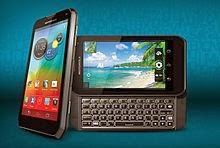
1. Motorola Photon Q 4G: Motorola Photon Q 4G is an awesome mobile which brings out the slide-out keyboard for its users. Motorola Photon Q 4G helps you to type your text faster than other touchscreen smartphones. Motorola Photon Q 4G runs on android operating system and comes with fastest processor. The Motorola Corporation makes a series of smartphones with better keyboard designs. Motorola Photon Q 4G has Bluetooth 4.0 and it has 4G technology in it.
2. BlackBerry Q10: BlackBerry Q10 has 3.5 inch display screen and it comes with 4G technology in it. BlackBerry Q10 runs on BlackBerry operating system and it has LED flash to capture picture in low light itself. BlackBerry Q10 has a brilliant interface and has Great keyboard with compact design.
3. Motorola Droid 4: Motorola Droid 4 is a best mobile which provides you a best experience with physical keyboard. Motorola Droid 4 has amazing keyboard design and has an awesome slide-out keyboard. It enables you to capture 1080p HD video without a lag. It has a screen size of 4.5” display and runs on Android operating system in it.Motorola Droid 4 makes you to utilize its feature unlimitedly with the 4G technology.
4. BlackBerry Torch 9810: BlackBerry Torch 9810 is a wonderful smartphone with blackberry operating system. BlackBerry Torch 9810 is an ultimate mobile with responsive display and it comes with Full QWERTY formatted physical keyboard. Since it runs over BlackBerry OS 7, BlackBerry Torch 9810 lacks lots of applications in the app market for the BlackBerry Torch 9810. BlackBerry Torch 9810 comes with 3.5 inch display and has built-in camera which allows you to take HD video recording from it.
5. Motorola Droid 3: Motorola Droid 3 is a slide-out keyboard mobile, which allows you to type the text very quickly through the physical keyboard. Motorola Droid 3 has 4 inch screen display which gives you a wonderful image experience and Motorola Droid 3 runs on android operating system. This let you to grab tons of mobile application from the Google market store. Motorola Droid 3 is very pretty and has a brilliant camera which allows you to shoot pictures even in dim light too. Motorola Droid 3 has a fantastic keyboard with slide-out model with number row. You can easily extend the storage of Motorola Droid 3 by extending your memory with external memory stick.
Hope you have like the list of smartphones with physical keyboard which gives a better guide to buy the best Smartphones.
Jawbone Up activity tracker
In the those days if you want to increase or decrease your shape or live healthier it takes long time but now all these can be taken care of a device such as a fitness bracelet. Yes the device is named Jawbone Up. It helps you to become faster, easier and more beautiful at the earliest. The Jawbone Up measures how many steps we have taken and how long we are active and how many hours we have slept
. Within its rubber housing more sensors work for you and they are connected with our Smartphones. With the apps provided for our Smartphone we can analyze the data. And we can share these details with our friends and relatives in the social media. It automatically records our entire activities. It don’t need a Bluetooth just your headphone jack of your Smartphone do all the wonder on behalf of you.
Based on these available data, the device calculates the perfect wakeup time and wakes up. In this way we better and more relaxed start of the day. Even you can calculate your office nap with this device. The sensors register our every movement and show it in a nice graphic format every morning. Even we can monitor our eating habits and thereby check taking too much of processed food. Every dish has to be quantitatively recorded and compared with the up data base.
The battery long lost for ten days. If you are using additional gadgets such as vibrator and Alarm then it will eat more of your battery life and can be recharged with your USB charger. This electronic bracelet is a motivational tool that sometimes painfully reminds the wearer of how much actual and target values for physical activity, eating and sleeping habits.
Panono, A Spherical Roll Camera Provides 360 - Degree Images
Now You have the option to throw your camera up in the air and the rest will be taken care of your Camera. Amazing, isn’t it? This novel technology is employed in a new camera concept called Panono. A round ball is studded with 36 small photo chips, the result of your output looks like Google Street View.
Instead of pressing a trigger, it very simple and you have to throw the ball-shaped camera in the air. At the highest point of the trajectory then a motion sensor automatically activates an all photo composed of 36 small cell phone cameras, which are arranged similar to the compound eye of a fly and a complete visibility enable: Forward, backward, up, down, right and left. And directly under the camera of course is always the photographer to see themselves, usually with arms outstretched, to catch the panoramic camera.
Horizontal 360 - degree panoramas can be taken together semiautomatic with many Smartphones. Panono the other hand is called the first 360 x 360 degree panoramic camera. With these snapshots you can only see what is in front of the photographer. This Panono union camera captures the entire scene, however, a bit like Google Street View, but from the air. Arrow had the peculiar idea when he visited the island of Tonga while studying abroad in New Zealand.
Overwhelmed by the beauty of the Island, he wanted to stick with a conventional camera and shot the entire scene as he thought; But it would not be easier to make a fully automatic for all shot! Thus the idea for his thesis at the Technical University was born. He developed a prototype that was originally almost as big as a handball and 750 grams in weight, covered in green foam panels to protect the flying camera. In September 2012, Arrow was awarded for his prototype ICT - founder prize of 30,000 Euros.
Over three million times the demo video of his camera has been clicked in YouTube in short span. Now he has offered the camera on the Internet for sale on the crowdfunding platform Indiegogo. The steep price for early booking is 499 €. Now he has now shrunk to half of its original size, the weight to around 300 grams the entire raw image is gigantic with 72 megapixels composed of 36 two- megapixel cameras. The software then converts the images together; the end result can be explored in mobile phone, tablet or computer by wiping over image or rotates with the phone on its own axis.
The Panono - throw camera combines two trends particularly; one is the slightly oblique hobby to throw conventional cameras for taking pictures in the air to be surprised what comes out of it - and if you succeed the collection . “Camera tossing " is this reckless disposable camera method.