Monday, 17 November 2014

Finding The Right Manual For The Register In The Building

Cash Register


When people inherit a cash register, they need to make sure that they have a manual that will help them manage the machine. These cash register manuals are easy to read, and they help people to keep the register in good working order. The steps below show how someone can make their register work for them with the user manual.

The Sales

When the register is turned on, it must be set to handle purchases. The most simple cash register is always set to do a purchase, and it must be changed to a different setting to do a void or return. The most primitive registers are going to need a key, and the key settings are explained in the user manual.

The Return

The returns that are done on the machine must be handled according to the cash register manuals. These transactions must come through properly when they are done. The record for the machine needs to show a return, and the machine must be on the right setting if it is to work correctly.

The Voids

When people are voiding purchases, they must follow the instructions in the manual. Most manuals are going to show how to do a void so that it is stricken from the record on the machine. If the record on the machine is not handled properly, no one will be able to tell if the purchase actually occurred or not. Also, the key settings for a void are listed in the manual for the oldest of registers.

The Cash

The cash drawer in the register is used to handle all the cash. The machine knows how much money was dispensed during the day, and it can show that amount of money on the daily record. The machine needs to be used properly so that the cash drawer is always at the right level.

When people want to use old cash registers, they need to read the manuals to make sure they understand the machines. Each and every machine can be programmed to perform a certain task using the manual.

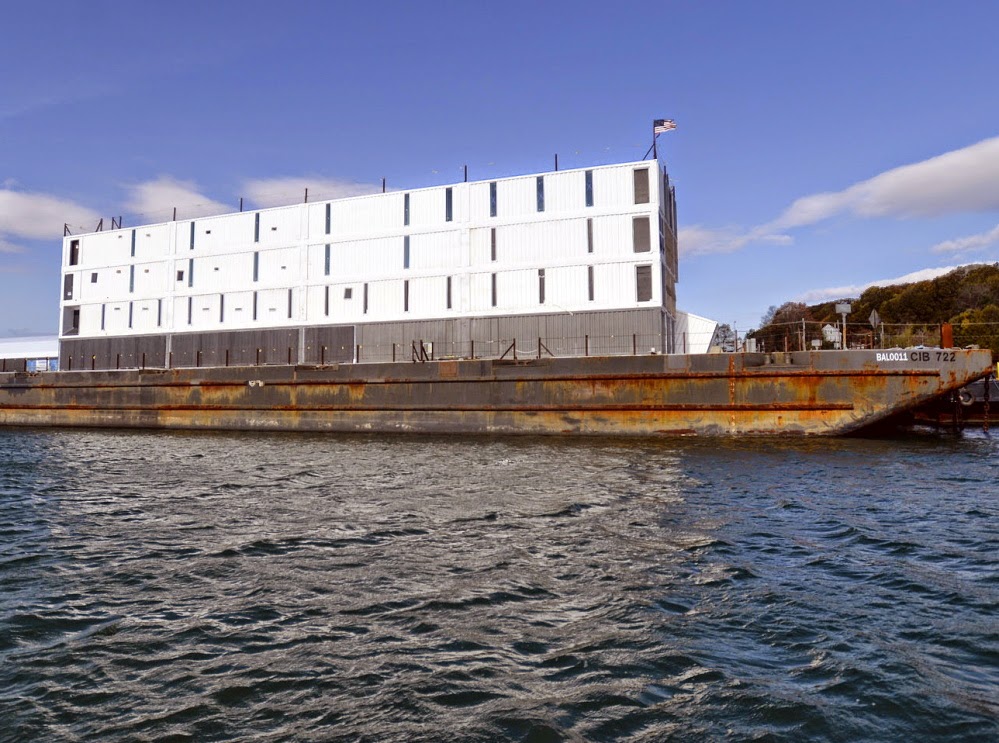
Nothing's Budged on Google Barge Since its Arrival

Google Barge
The Google Barge was build to be a showroom of its products with above standard features. The idea looked like an excellent one and was on the build near the Stockton dock point until the process came to an abrupt stoppage with situation looking extremely dormant in the current time. The Google Barge is nothing more than a piece of conversation in the current scenario and its development stopped due to constant warnings of danger by the coast guard, who came up with the fire safety concerns multiple times. The safety concerns were always there but the guards just did not want to get things to the point of extreme danger that could have led to a major burnout. As far as the current time stands, Google Barge is a dormant vessel.

Points to look at:- 

  •  The containments creating the problem: - According for the construction plans, the vessels are supposed to have around 5000 gallons of fuel in the main deck. This is one of the aspects that kept the process always in doubt with respect to safety concerns. With such a substantial combustible material on the deck capable of causing a wide burnout was always going to be a risky factor and finally, the coast guards decided to go against its permit. The twin of the Google Barge in Maine did receive sufficient attention and that caused a generation of the idea to build another one at Stockton. 
  •  The twin is also on the downside: - The barge at Maine was thought to be the major vessel and bring success of great levels. But, similar security concerns has also prevented the Maine’s dock to go further and that too at the moment is nothing more than just a piece of conversation . 
  •  Continuous safety concerns: - A succession of safety concerns finally did break the project and stopped the development of Google Barge. In the beginning of March 2013, the first case of warning came from the Coast guards side. This was followed by another email in the month of September and this acted as a trigger to either go along or stop the process. A final report a couple of months later stating that the vessel did not match the standard safety concerns and people needed to jump overboard if a case of fire came up ever. 
  •  The current situation: - Well, construction began in 2011 and a lot was expected from this project. A 1200 people a day would visit the San Francisco port until it was moved to Stockton but it failed to maintain the standards of security and the process fell out of the tank. With a lot of speculation, the vessel arrived in Stockton but nothing has happened. No signs of work, just a dormant vessel.
With the twin vessel being dismantled in August, it is sure that this one too will have the similar fate unless security features are enhanced and they come to a meet with the coast guards.

Microsoft fixes '19-year-old' bug with emergency patch


Microsoft
The 19-year-old software bug that was discovered by IBM has not been fixed by Microsoft. IBM came to know about this flaw long back (May) but wanted to get the issue fixed as it was affecting office and windows products before making any statement to the general public.

According to IBM, this software bug was present in every single version of Windows since 1995. Windows users are being requested to download the update for the respective windows version, as hackers and attackers will be easily able to exploit their personal computer, which is already affected with the bug. Microsoft has already addressed this issue in their monthly security update and has added more patches to fix the other security issues of the users. They are currently working on few more updates and patches, which will be rolled out soon.

Robert Freeman, IBM researcher has explained the susceptibility in depth in his blog post. He has written that this bug can be easily used by any attacker for creating drive-by attacks and easily run codes remotely on anyone’s computer and they can practically take over the entire machine or system. A drive-by attack in a computer security means that the system attacker will be able to make the user of the system download vulnerable and malicious software.

According to the reports given by IBM, this bug was practically hiding in the plain sight. On the CVSS (the Common Vulnerability Scoring System), the vulnerability - dubbed WinShock has been rated 9.3 out of a possible 10. This means a severity in terms of computer security.

Potential disaster: 

Another bug that has been identified affects the Windows Server platforms of Microsoft. This potentially puts the security of websites at risk, which mainly handle the encrypted data. This bug has been specifically linked with Schannel, which is the company’s software for applying the secure transfer of data. Schannel is also known as Microsoft’s secure channel. Some of the major problems discovered in secure standards include GNUTLS, Apple SecureTransport, NSS, OpenSSL, and Schannel now.

This security flaws has also been compared with Heartbleed bug by the security experts. However, they have also added that the impact of the bug might be on the similar scale as that of Heartbleed bug but the level of exploitation will be difficult for the attackers. When it came to Heartbleed bug, the technological vulnerability was associated with the exploitation of the secure data transfer also known as Secure Sockets Layer (SSL).

Now, the bug has been identified by IBM and a patch has already been released by Microsoft to tackle the issue, there is been no evidence of any complaints being received about potential attacks. However, security experts believe that there are chances of security attacks in the system, which are out of date.

According to the Market researchers, if the bug had been sold out to hackers and attackers, the worth of the same would have easily been in six figures. According to Gavin from Tenable Network Security, just because there is no evidence of any attacks, we should not leave out the security concerns.

Owing your Personal Data – the Key to Activity Tracking!


Personal Data
In the past few months, the market has been on the brink of saturation as far as fitness trackers and smartwatches are concerned. Every week sees a new announcement from one of the OEMs about a smartwatch, a smartband or a fitness tracker.

All these devices are aimed at doing one thing – gather raw data and churn them into useful information for the user. Yet if you even have to migrate from one of these devices to another, the process of reclaiming your data collected can be a tough journey.

Exporting from Activity Trackers

In case you own a fitness/activity tracker like Fitbit, Jawbone Nike+, Withings, etc. you would want to own all the precious data that these devices have collected over a period of time and when you make the switch, the old data should still be available.

Among them, the best exporting services is provided by Jawbone – just login to your account and export the data in CSV format by year for free. The next in line comes Fitbit – exporting is available in either of CSV or XLS formats but only if you happen to have a premium account for $ 49.99 a year. For others, you may need IFFFT recipes from the IFFFT websites, which let you export your data.

Exporting from Smartwatch

Smartwatch on the other hand collect less data and provide more “phone”-like facility like notifications, playing music, checking emails, etc. The data collected is usually synced with a smartphone. Since this means that there is a dedicated app on your smartwatch running for this, the data in theory can be extracted and archived if wished. Note that smartwatch are more power hungry devices and will not last as long as activity trackers often requiring daily recharge.

Smartphone and Health Services

The biometric data tracking does not end with wearable devices. Modern smartphones are very capable of collecting such data and then churning out the information. The three big competitors – Apple, Google and Microsoft are already in the game with integrated health services where all the data are stored in huge databases and can be exported i.e. Apple Health makes it possible to export all the data.

Microsoft on the other hand seems to be platform agnostic i.e. their recently launched smartband supports IOS, Android and Windows Phone whereas Google and Apple are more keen on supporting their platforms without compatibility across others.

The Recommendation

Going by all the choices, the Jawbone activity tracker seems the most promising – free export of all the data in CSV without any hassle. Next in line would be Fitbit with a premium account that provides the same with XLS and CSV support. As for the others, the long route of IFFFT recipe is the way out. For smartwatches, the scenario is different.

These devices do not provide stellar battery life and data tracking is limited in nature – they are more an all-rounder. However the Microsoft smartband seems a good proposition with cross platform support and data export in some form should be arriving in future.

Sunday, 16 November 2014

Inbox App From Google Makes Email Simpler


Inbox App
Inbox, in its present state, is basically an option to your usual Gmail account. While the entire look of Gmail has just changed a little in recent few months, Inbox includes Google's latest Material Design idea, which presents an admiring user interface with consistent colors all through the app. Such a design pattern expands to all versions of this Inbox, comprising iOS or the devices of Android etc.

Gmail's new features of Categories try to place incoming email messages under the generic tabs. The sending emails are put into a wider variety of more particular headings, named as, Bundles.

Description of Bundles

Bundles are mainly accordion folders for definite categories within the inbox. It sets all emails in one label under a single line within your inbox, and then you may click to enlarge the label by not leaving the inbox. Theoretically, it is very parallel to the action of the Priority Inbox, excluding the notifications that are not seen in the tabs and they are a line item in the inbox.

For most of the parts, the app works very well, and it forms a simple header through a color-coded pattern to indicate emails of a particular type by date, week, as well as by month. This Inbox will also throw a few pictures or in other words, highlights, from those emails found on the header and as a result it becomes very simple for you to get any attachment that you are searching.

Function of the Feature- Reminders

Gmail always included a choice to form a to-do list by means of Tasks; however now Reminders can take it to the next advanced level, they will be shown just within the inbox. Just as the other aspects, you can use Reminders whenever you like in its folder through a left-hand menu. This Reminders feature functions really well, mostly when it gets combined with another function known as- Snooze.
Snooze- Another Next Addition to the App

Not all the reminders or any email that you form within Inbox will require your instant attention and it is the point where Snooze feature comes to help. Just as an alarm clock, you need to fix the reminder to aware you about them afterward. After that fixed particular time, Google offers you some options like:

  • Snooze to an exact time 
  •  Snoozing up to someday- Here, if you think you may wish to open an email afterward, but not certain when, you may prefer to snooze the email. Mostly, the email will stay in the Snooze folder if you do not remove it. 
  •  You can snooze until you reach somewhere. But it can be done in the mobile only and it allows you to track location.
Besides these, there are also some other features added. However, Inbox does not allow you to see more than one email account at the same time. You may swipe among the accounts from the very top menu; however this seems very awkward if it is compared to the Mail app, found in iOS that allows you to see all of the message threads of different accounts in a long inbox.