Monday, 4 November 2019

Smart Speaker Review: Stay Tuned for the Best Smart Speaker

Smart Speaker Review: Best Smart Speaker Sonos
Many of you might remember the ‘Jetsons’ on Cartoon Network, the stuff of children’s imagination, and the future. Well, now we have a slice of that future too with smart speakers. We may not have a robot butler hanging around to fulfill our every wish just yet, but we are getting there. So, for now, we’ll just have to make do with what we have – smart speakers. Google Home, Amazon Echo, and Apple HomePod are some of the few smart speakers doing the rounds in the market. According to US statistics, nearly 26.2% of the US population owns smart speakers. Smart speakers allow you to switch things off/On with your voice, you can ask questions of it and control almost every aspect of your living space. In this smart speaker review, we’ll be seeing all that there is to know of smart speakers as well as some of the best.

Smart Speaker Review 2019


First of All, What Can Smart speakers Actually Do?

So as the name suggests, they’re speakers. They play music and sound but besides that, they also do much more. Besides involves having a smart assistant built-in. These smart assistants are voice-activated. This means that you’ll be able to tell your smart assistant to perhaps, answer a question, play music or control other IoT devices i,n the house.

On to Look at the Best Voice Assistant to have in your speaker:

We aren’t going to say which is the best. That is completely subjective. But we will tell you some of the trends in this smart speaker review. Apple has always been among the favorites, consequently, Siri has become a household favorite too. But it also helps that Siri has been in the market for quite some time now in other Apple Devices. Some people swear by Alexa. So as soon as Amazon’s echo dropped, people were all on that. But overall, many prefer Google Assistant. Many people feel that the assistant with Google is the most accurate. But of course, these are all people's personal choices; yours may vary.

If you’re going for Sound- Pick the Sonos One Smart Speaker Review:

In this smart speaker review, this is the best sounding speaker you can lay your hands on. This speaker gives you the best of both worlds with the smart Alexa on one hand and Sound Quality with Sonos on the other. On the one side, you get the ever-improving Alexa as a voice assistant and on the other, you have Sonos with its multi-room smarts. This feature-rich speaker has even got AirPlay2. This basically allows the Sonos speaker to communicate with Siri sitting inside a HomePod from another room. So Sonos becomes the most versatile speaker on this smart speaker review too. A disadvantage with this speaker is that Google Assistant is still nowhere to be seen. We were hoping it would make an appearance in the November 2018 update, but we’re still waiting now in 2019 as well. If Google does happen to launch in the Sonos smart speaker, then hands down, we can say this smart speaker is the best.

Apple HomePod- a Merging of smarts with Sound Quality:

Smart Speaker Review Apple HomePod
If you happen to be a die-hard Apple fan and have all its gadgets lying around, then getting an Apple HomePod is a no brainer. The problem with this speaker is not its sound or Siri, it’s the premium you have to pay to get a smart speaker that only fits well into the Apple ecosystem. Is it really worth it? When it comes to sound quality, you can’t really complain but with Siri, you can. Siri seems to work with only the Apple ecosystem when it comes to what some might consider fundamental tasks. That is a bit of a let- down.

Amazon Echo Featuring in this smart speaker review:

Amazon Echo has become a household name for many and with good reason too. Its price makes it an excellent starting point for getting into the smart speaker game. What’s more is that its own voice assistant is more than capable of handling news, podcasts, music and other voice assistant stuff. 2019 new and improved Amazon Echo has taken audio to a whole new level too making it a serious consideration for those looking to enter into the smart speaker bandwagon. This one might be a tad expensive from earlier models but is still way below what you would have to pay to get an Apple HomePod. It softer look too makes it more at home than ever. The assistant too has undergone an upgrade too, with it having voice profile features. It also takes in different voice speeds too. It may not be able to replace your HiFi system just yet but still deserves some serious consideration.

Finally to Google Home:

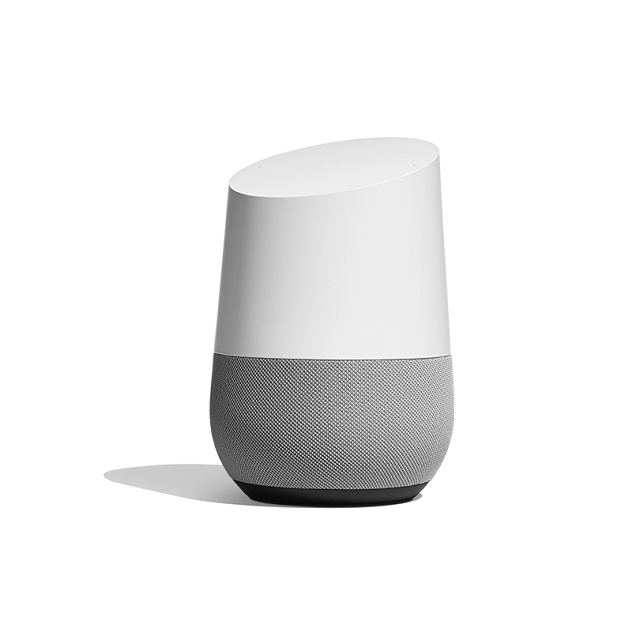
Best Smart Speaker


Google Home is a great smart speaker but while in some areas it excels it also disappoints in other areas. When it comes to its voice assistant, it can be a little too rigid when it comes to comprehending a language. Plus many of Google's own features are sorely missed in its smart speakers. The list of these smart speakers keeps growing but with no much improvement or improvements that do not impress. For now, it still has a ways to go to compete with Amazon’s echo but if you’re only looking for a smart speaker that can have access to YouTube Music, built-in Google Cast and to turn on and off light switches then this is the speaker for you. Over the years Google Home has undergone some notable updates. It can now be used to call landlines in the UK and also the ability to handle multiple languages. The most recent update has seen Google Home being brought into the Nest Security Systems array. There are some smart speakers that are great only for their music while others can be used for both. The best of them being the Sonos smart speaker.

Friday, 1 November 2019

Google Maps vs Google Maps Go- Which is the Best Choice for You?

Google Maps vs Google Maps Go
Are a travel freak who loves to travel around the world with the help of travel apps like Google Maps and Google Maps Go? Then you will love this post.

In this post, I'll let you know about Google Maps and Google Maps Go. Google has specially launched its "Go" apps because they are light in weight and has all the features people love to use.

The Google's go line version of photos, Maps, search, and more are widely accessible. But are these go line apps really useful for you? I'll let you know about it.

The general idea behind Google Maps Go is to give users the core functionality of Google Maps with less storage. Google wants to provide it's low-end users the full Core functionality. So they have introduced Google Maps Go.

Are you frustrated about Google Maps speed? Is your Google Maps app slowing down your device? Do you feel that it's over running extra features?? Then let's check out which one is best for you, Google Maps vs Google Maps Go or whether it's Google Maps or Google Maps Go?

Let's first see about Google Maps Go,

Google Maps Go: 


Google Maps Go is a super speedy, lightweight app. Although it has limited features, it takes a very light space, and it only takes a little part of the processor. So you will have better performance for your device. This App has 4.2 ratings in the Google play store. Google Maps Go App only takes 208 kb, but you have to use Google Chrome on your device to make Google Maps Go work.

As these days, most of the phones come with a pre-installed Google Chrome app; you don't have to download it. If you are a person who loves to use a lightweight and speedy App? Then you ill recommended Google Maps Go. To get a proper idea of Google Maps vs Google Maps Go let's have a look at its features.

Features of Google Maps Go: 


  • This App lets you find the fastest route for all travelers, including, Two-wheelers, cars, metro, buses, taxi, and walking as well.
  •  Check the metro, bus, or train with live city public transport schedules through this App.
  • Navigate your two-wheeler with Navigation for Google Maps Go App.
  • Get all the directions with route preview to help you plan your trips.
  • Reach your destination faster with real-time traffic updates.
  • Search and find local businesses, restaurants, and other famous places nearby.
  • You can find the phone number and other details of the place in Google Maps Go.

Let's check out the pros and cons of Google Maps go.

Pros of Google Maps Go: 


  • Google Maps Go is having faster performance than Google Maps.
  • This App has a more straightforward user interface and best user experience.
  • Pretty easier for children or older people to use.
  • This uses less storage space.
  • Works pretty well on older phones and low-end mobiles.

Cons of Google Maps Go App: 


  • It feels like a mini-app with limited features.
  • This App doesn't allow 3D viewing.
  • In this App, you can change the angle of Maps.
  • This Google Maps go App won't allow you to add places on the Maps.
  • You are not to add photos to the App as well.
  • This App has no download option and no offline view, as well.
  • If you want to navigate to other places, you have to use Navigation for Google Maps "go" App.
  • This App requires Google chrome.
  • If at all, Google Maps are pre-installed, then you are unable to uninstall it.

Who can use Google Maps Go: 


You should use Google Maps Go if you have already installed Google Chrome on your device. If you want to use a lightweight and speedy App, then you definitely have to use Google Maps Go because of its light in weight and faster in processing.

In case you want to use voice navigation, then you shouldn't need Google Maps Go because it will not offer some features which you get in Google Maps. If you feel you're device is slowing up when you are using Google Maps? Then, in that case, you can use Google Maps Go. It's the best Google Maps alternative you will get for all the low-end devices and low data-packed mobiles. Until now we have seen who can use the Google Maps go, now let's get straight into the Google Maps App.

Google Maps: 


As we all know, Google Maps is a widely popular app that has all the best features. Google Maps is literally loaded with a comprehensive set of features to make everything easy for users. But, the only drawback of Google Maps is it will slow down your device.

Google Maps has 4.3 ratings in the Google Play Store with thousands of positive reviews. This App usually uses 128 MB on a fresh App install, and it will also eat up lots of space in the cache section as well. As it takes around 400MB along with caches and everything, it will definitely drain your battery because it's using the processor. Google Maps will eat 100 times more space then the Google Maps go generally consume. That's the reason so many switches to Google Maps go, but if you are striving to use full features, then you have to stick with Google Maps itself. To get a proper idea of Google Maps vs Google Maps Go lets have a look at its features.

Features of Google Maps: 


  • Get real-time traffic updates with ease from Google Maps App.
  • Beat the traffic and reach your destination with ease regardless of traffic conditions.
  • Catch your train, bus, or other public transport rides with real-time information.
  • Save time with rerouting based on live traffic, road closures, and other information.
  • Discover all the places and explore them without a local guide.
  • Find out all the restaurants, activities, events, and more nearby with ease.
  • You can find out what's trending and plan your trip accordingly.
  • Group planning has been comfortable with Google Maps.
  • You can create a list of favourite places and share them with your friends.
  • Download offline Maps to search and navigate to the location with an active internet connection.
  • Get street view and indoor images of shops, museums, restaurants, and more before you visit.
  • Use indoor Maps option to quickly find which way you have to go to international airports, malls, and other famous places.
  • These are some of the features of Google Maps. You can also find lots of features in Google Maps when you explore the App perfectly.

Let's have a look at the pros and cons to decide which is best for you.

Pros of Google Maps: 


  • It's fully loaded with the power-packed feature set.
  • Voice navigation is the best feature users love to use.
  • You can get location-based recommendations.
  • Download Offline Maps and navigate easily without an active internet connection.

Cons of Google Maps: 


  • Google Maps app will run slower on low-end devices.
  • It consumes lots of space in low-end devices.
  • There are lots of features that make the App more complex and harder to control.

Who can use Google Maps: 


Google Maps is one of the best apps which you have to use when you are using a high-end mobile. But, if you are using a low-end device, then you have to switch to the Google Maps Go App. I'm saying it because Google Maps consume more space and use the processor effectively than Google Maps go App.

If you are having enough room on your phone and have enough power to run the Google Maps app, then you can use this App or else it better to switch to the Google Maps Go App for a smoother experience. In general, Google Maps is used by lots of people. Only if you are having any issues with Google Maps, you can switch to the Google Maps Go. Now, you might have a clear view on Google Maps vs Google Maps Go and which is best for you.

Google Maps vs Google Maps Go Conclusion: 


This is all about the Google Maps vs Google Maps Go post. Hope with all these features and pros and cons you can find out the best app you are looking for on your device.

Monday, 28 October 2019

Google Pixelbook Go is Stylish and Sustainably Made

Google Pixelbook Go
As with all Google events, there were gadgets over new gadgets introduced. There were the likes of the Pixel 4, clearly, the spotlight was on this gadget, truly wireless Pixel buds, a nest mini speaker, nest Wi-Fi, and the Pixelbook Go. The Pixelbook Go isn’t something people were looking out for, but you know as they say you take what you get. But even so, the Pixelbook Go does not disappoint. It looks to be a pretty good machine with all the specs you would need for performing daily tasks and more. If you’re just looking at a Chromebook for small and menial tasks then this is your go-to Pixelbook Go.

But Where’sPixelbook 2? 


Pixelbook was launched back in 2017 along when the Pixel 2 was launched. Let me tell you it was a damn good machine. It had an outstanding display, its two in one shift abilities to transform it into a tablet with all the associated Android apps at your disposal and it also came with a Pixelbook pen. Yeah, it was expensive but then again it was the best Chromebook to buy.

Come 2019, the Pixlelbook is looking old. What with its not – bezel-free display which is not up to 2019 standards and the lack of a finger print scanner and face ID all make it look older than its two years. Besides that, you have to shell out nearly $900 for a two-year-old Intel processor.

But Google stills wants both the older Pixelbook and the new Pixelbook Go to co-exist. Which makes no sense as the newer albeit cheaper model is the best buy for now.

But what’s Wrong with the Pixelbook Go? It takes a lot to make a good laptop and yes the Pixelbook go has all that it takes. But the point that I am trying to make is that when you already have a really good laptop- Pixelbook is the said laptop in question, why make an altogether new one.

You could just as easily turned up the bezel-free display and put in some of dem biometric authentication tech and updated some of the internals to get Pixlebook 2. Maybe it’s over-simplistic but it works.

Where did the Pixelbook Go come from? Maybe Google might say to cater to a growing mid-range population. That may be true too but when you have Microsoft releasing laptops such as the Surface Laptop 3 and Surface Pro 7 wait there’s one more Surface pro X too, then you’ve got to bring you’re ‘A’ game too.

If not 2019 then 2020 right?

As for the Pixelbook Go…


Google’s Pixel laptops tend to be outside most people’s budgets. But the Pixelbook Go costs just around $649. Yeah, it’s still more expensive than some of the completion but then again it’s not your ordinary laptop either.

What gets me with laptops is its hinge. You have to open a laptop with both hands, which is kinda irritating. But with this one, you can open it up with just your finger. The hinges on the Pixelbook Go are made so that you can do this. Plus it’s not too slack either that it just falls forwards when you open it. Call it a pet peeve or whatever but this part of it I really like.

Monday, 14 October 2019

Learn to Code with Grasshopper

Ever wanted to learn how to code but found it too difficult or maybe you didn’t know where to begin? Well now you can throw all those excuses away with Google’s new Grasshopper. With Grasshopper, Google allows novices to learn how to code. Recently Google even made Grasshopper available as a desktop app to better reach those novices who preferred a desktop to work on. Grasshopper was initially released back in 2018 as a mobile app. Since then millions have downloaded it on both compatible platforms of Android and iOS. With a larger screen space to work on, learning to code with grasshopper becomes easier and that’s what you can do now with grasshopper for desktop.

Googles whole Grasshopper initiative:


Grasshopper was created by Google back in 2018 to allow people access to coding education and also to give people a head start in career opportunities dealing with coding. Initially Grasshopper was started on mobile phones and millions have accessed it through that. But to reach a more wider audience, aka those who prefer larger screens, Google decided to bring Grasshopper to the desktop as well.

Since its initial release, more than 2 million people have installed grasshopper. These include but are not limited to those who have no coding experience at all. Grasshopper is aimed at those who need to know what the nut and bolts of coding are before they go on to more ambitious projects.

Google already provides a number of tech education tools and grasshopper is the latest to join this group. Besides grasshopper, there are also other tools to help you learn coding, not all by Google of course.

Learn to code with Grasshopper on a desktop PC:


Having a larger screen and a keyboard at your disposal makes learning to code much easier. Google capitalized on that fact and started Grasshopper for desktops now too. Now with the desktop app available Google is able to fit in columns for instructions, results, code- editors all side by side.

Google has also added more classes to its Grasshopper school- in addition to learning the basics you will also be able to learn how to use a code editor and a more advanced- how to make your own webpages. These classes will teach you more about CSS, HTML and Java Script.

Why is using a Code Editor a Separate Class?


In the first few classes which are more about the basics, you just learn how to create a few snippets of code and how to put them in the right order. But to learn how to create something from scratch you now have a new class- using a code editor.

What do you get after you learn to code with Grasshopper?


At the end of your course with Grasshopper you’ll be able to build a simple webpage. Besides that you will have your fundamentals down to learn the more advanced stuff. Once you have the background down you can then take on further courses on other platforms such as codecademy.

Friday, 11 October 2019

Best Live TV streaming Services

Best Live TV streaming Services
This is now the age of Best Live TV streaming Services, the most famous of them being; you guessed it- Netflix. But besides Netflix, there are still a lot of options out there that give you great content. When most of us these days cut the cord or wire, as you please, we’re doing so to get better content at more affordable prices. But the best part is none of these things. With wireless streaming, you can watch what you want when you want, that is the beauty of streaming. Many companies are too now seeing big bucks in streaming and want to get on the streaming bandwagon too. The most notable of the lot is Apple and Disney.

The only downside to cutting the cord is that you don’t have the flexibility of surfing channels anymore. There are, however, apps that let you surf through them to get to what you most want to watch, but yeah! They’re more expensive than Netflix. But they are still cheaper than cable TV. In this article, we’ll be looking at some of the best live TV streaming services you could use as an option to actual cable TV. So without further ado, let’s get started….

Go Live with Hulu + Live TV as one of the best Live TV Streaming Services:

Hulu is one of the best live streaming services to date. It has a leg up over its competition when it comes to this stuff as well as watching shows on demand. This has been something many live streamers don’t offer. Hulu also has one of the best libraries of channels in town. Although, there are other live streamers such as YouTube with its premium offering. It still does not have what is necessary to overthrow Hulu when it comes to the entertainment department. Hulu + Live TV is also one of the cheapest options out there coming in at $45 a month.


If you prefer to go ad-free when it comes to on-demand shows, then you can get those ads removed, all for a fee, of course. If you’re a sports fan, however, you may want to give Hulu a skip as it does not come with NFL Network, NBA TV, or MLB. Hulu is compatible with most OS devices, that is including iOS, Android, Windows, Chromecast, Apple TV, Xbox One, Nintendo Switch, PS4, Roku, and Amazon Fire TV.

The Next Best Live TV Streaming Service- YouTube:

YouTube is the next best on our list as it is easy to use and has three simultaneous streams that you could use without spending a lot. What’s more, is that up to 6 people can have sub-accounts too, it’s a family plan kinda a thing. Yeah, there maybe one or two channels not present on YouTube, but which live streaming TV service has all the channels in the first place, right?

YouTube as a Live streaming service is compatible with most platforms such as Android, iOS, Windows, Chromecast, Apple TV, Xbox One, Nintendo Switch, PS4, Roku, Amazon Fire TV, macOS, PS3, and Vizio Smart TVs. Some of the notable absent channels are- A&E, History, Comedy Central, Lifetime, NFL Networks and Nickelodeon. This live TV streaming service is slightly more than Hulu and will cost you around $50 a month.

Sony PS Vue is another good bet when it comes to Live TV Streaming Services:

PS Vue or PlayStation Vue is a great live TV streaming service for those having one of those gaming consoles lying around. PS Vue is designed to work with only a limited audience- that is to PS3 and PS4 owners. Even so, it still is one of the best live TV streaming services to own. It has some of the best channels available. Plus, if you’re a PS3 or PS4 owner, you can get it easy enough- by simply downloading the App from your PS whatever.

But PS Vue is not limited to only PS3 or 4 but you can also get it on other devices as well. PS Vue also comes with a good collection of sports channels that other streaming services are sorely missing out on. You can also get up to 5 simultaneous streams with PS Vue, which means that up to 5 people can use it on one account, The Family Plan, again.

It is compatible with Android, iOS, Windows, Chromecast, Apple TV, PS4, Roku, Amazon Fire TV, and macOS. A&E, History, Comedy Central, Lifetime, Nickelodeon, and MTV are some of the more notable absents from the list. To get PS Vue, it will cost you around $50 a month.

No Family plan with this one- Sling TV:

One of the longest-running live streaming services out there today and one of the most versatile ones too is Sling TV. Plus, it’s cheap, coming in at $25 a month. The downside, however, is that there is no family account or simultaneous streaming.

Also, its list of channels is a tad confusing. It is compatible with Android, iOS, Windows, Chromecast, Apple TV, Xbox One, Roku, Amazon Fire TV, and macOS. Some of the absents are- ABC, CBS, Fox News, Animal Planet, MLB Network, and Nickelodeon. You already know what it costs.

Some other Options For Your Perusal:

Philio TV- This is the cheapest of all our live TV streaming options. It has 58 channels and is available across most platforms. The negative is that its user interface isn’t as easy to use as YouTube and Hulu Live TV. If Not Streaming, then the alternative- Digital Antenna- If not for streaming, you can also check out the digital antenna idea.

You can get most major networks on air for free, too, like ABC Fox, CBS, and NBC. To give you some options in this arena, there is WinegardFL5500A. This digital antenna has a 50-mile range and is the best quality antenna out there. You can place it at a window, too; there is no need for a rooftop install.