Friday, 10 January 2014

How To Protect Yourself From Online Fraud


Although making purchases online is very convenient, it is only reasonable that some consumers might be reluctant to carry out certain transactions online, particularly when personal or financial information is involved. After all, it was only very recently that Malaysian police took action against a network of online scammers who illegally obtained more than $1 million from their victims in Malaysia and Taiwan.
Still, buying goods online is generally safe, and research carried out by Rakuten showed that 71 per cent of Malaysian online shoppers are satisfied with their purchases. But whether you are buying music, books, cars, or furniture, it pays to keep the following advice in mind in order to protect yourself from online fraud.

Protect your computer

The first thing you can do to reduce the chances of experiencing online fraud is keeping your computer or internet-enabled device up to date with the latest security software. Keep in mind that malicious software can access confidential information you may have stored in your device and make it accessible to hackers. Don't only install an anti-virus, but download any updates and scan your computer regularly. Also, don't rely on anti-virus only, but also install anti-spyware software for enhanced protection.

Protect your accounts with passwords

Don't make things too easy for scammers or hackers and make sure to protect all your accounts (e-mail, social networks, online banking, etc.) with strong passwords. A strong password contains a combination of numbers, uppercase and lowercase letters, and symbols. Moreover, a strong password should have at least 8 characters and not form a complete word or anything that is relatively easy to guess, such as your name or date of birth.

...and protect your passwords too

Password protection software, also known as password managers, can securely store all your passwords (as they should be different for each site) and encrypt them. Should anyone attempt to break into your accounts, this secure software will launch a two-layer authentication process or even fingerprint recognition, so that you and only you have access to your passwords.

How secure is a website?

Before you buy online, check that the website's address starts with 'https' instead of just 'http'. The 's' stands for 'secure' and tells you that the website has implemented trusted security systems. Also, check the website address for a padlock icon, which should be locked. Clicking on that icon will display what is known as a security certificate, so check the certificate to see if the company name that appears matches that of the site.

Managing your payments online

Whenever possible, avoid purchasing goods using a money transfer or any direct banking transaction where your financial details may be exposed. Nowadays, the vast majority of companies use payment gateways which allow the acceptance of PayPal or are linked with a secure payment processor who handles the online transactions. The advantage of using such methods is that the merchant will receive payment without ever having access to your bank details.
Being a victim of online fraud is a valid concern, so don't take chances when it comes to the security of your personal information. Make sure to follow the advice mentioned above and remember that you can never be too careful.
Steve is doing a masters in Visual Merchandising, and is currently studying for a module in online retail. He is trying to develop an app that gives the utmost security and customer experience for shoppers. 

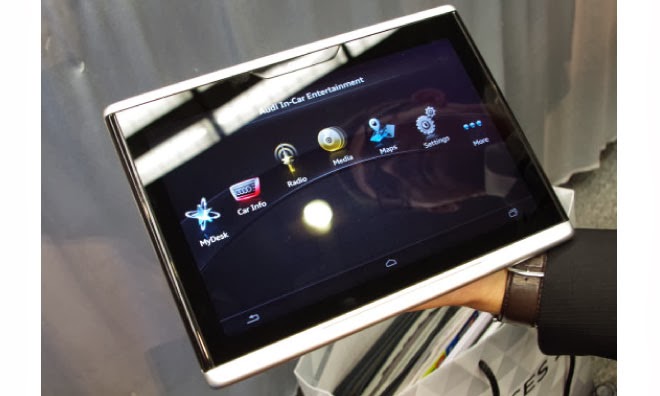
Audi Smart Display, A Tablet PC For Car Operation


Audi Smart Display
Audi is showing; How the automotive future looks like at this year's CES (7 to 10.1 in Las Vegas. ), Among others, with its Smart Display. The Smart Display Audi is based on Android and has a ten-inch touch screen. Current vehicle data rates (such as fuel consumption and distance traveled), plan routes, regulate the air conditioning or the music system of car all can be monitored and modified accordingly.

 These all goes with the Tablet PC Smart Display by the Audi at the CES presented in 2014 - a delight for the passenger or the passengers in the back seat! The Ingolstadt-based carmaker has integrated a number of self-developed apps in the Android device.

This has a ten -inch display, and boasts all the essential features of the things and software available for a tablet, such as the access to the Google Play Store. Even the Internet browsing works well while driving, the Smart Display uses the built- in new Audi models LTE module. Compared to current tablet PCs, the Smart Display Audi looks quite chunky.

This is due to the robust aluminum housing. According to Audi, the device is designed so that it can withstand temperatures from minus 40 to plus 80 degrees Celsius without any damage to the hardware and software- so it can stay in the car even on sweltering summer days and cold winter nights.

The Audi Smart Display is still in development stage. When the device serial production attained and the price can be announced, until then we have to wait. But it is clear that Audi will offer its Smart Display only as an adjunct to a new car; individually it should not come on the market.

First leaked screenshots of forth coming Windows 8.1 Update 1


Windows 8.1 Update 1

Windows 8.1 Update 1

Windows 8.1 Update 1
In 2014 and 2015; Windows users can look forward for the three major updates to their operating system. The smallest is going to happen in April for Windows 8.1 which is free according to the sources, which probably goes by the name "Windows 8.1 Update 1" or " Windows 8.1 2014 Update".

So far it is only known this much and there will be hardly visible innovations it seems. But Microsoft aims to improve system performance and provide more stability. Windows 8.1 Update 1 is therefore likely to closely resemble the previous service packs.

Already screenshots of a preliminary version of the update are leaked on the net. However, they show no changes compared to Windows 8.1. Only the version number of Internet Explorer 11 has increased slightly. According to the rumor, Microsoft will distribute this pre-release version from the third week of January for the first time to the selected partners.

Shortly thereafter, is thus to be expected the first leaks of the pre-release version. According to another insider, the final output of the update is the end of March then on 1 April 2014 it will be freely available for all users to download - just in the time of Microsoft's developer conference this year.

10Gbps USB3.1 demonstrated at CES 2014


10Gbps USB3.1
The current USB 3.1 interface allows you to charge devices as well as a faster data transfer, or the both. At the consumer electronics trade show CES 2014 they have demonstrated the capabilities of the USB 3.1 adopted the USB 3.1 standards by Rave Jeff Craft, president of the USB Implementers Forum.

This provides 10 Gb / s double the USB 3.0 speed and enables the Power Delivery to charge devices with up to 100 watts - under certain conditions. The first demonstration shows a fitted with two SSDs PC (one per PCIe and one USB 3.1), which achieved a reading rate of around 1,000 MB per second, according to the ATTO Disk Benchmark, thanks to the gross data rate of 10 instead of 5 Gigabit per second, and only 3 percent protocol overhead instead of the previous 20 The latter is made possible by the 128b-/132b- instead of the previous 8b/10b encoding, thus a loss of 4 bit per 132 bits.

A special FPGA chip in the hub allows power delivery and also to connect a monitor at the same time. Another function that supported by USB 3.1 is the Power Delivery in the form of six profiles ( 0-5), who can afford each 10, 18, 36, 60 and 100 watts.

Beyond 36 Watt Micro- USB connectors are not provided, only the large connector of type A and B should engage. The devices can negotiate their skills before. This corresponds to what the proprietary devices support already, but just in a standardized form. Jeff Rave Crafts presentation included a printer connected to a hub monitor and a notebook from which a trailer was transferred to the display. USB 3.1 is not fluent in HDCP, which are protected under other Blu-rays. Since the standard has already been adopted, Rave Craft expects the first products at the end of 2014 to be available in the market.

How to share files securely?


How to share files securely?
Wanna share your business files or any sort of personal files in a secure manner? Worried someone might pirate it from you. Here are some tips to share your files in a secure manner.

Tip 1: Encryption

Encryption is a simple technique where there exists a common or any private key for a user and the data will be modulated using this key. This key will be present at the receiver who is ready to receive the information. His/her key alone can demodulate the message and the original information is transferred in a secure manner. When a third party tries to interpret it, it either becomes unreadable or either destroyed. There are several types of encryption techniques are available in the internet which allows you to transmit your files more securely by encrypting files by using those encryption algorithm.

This is not new. This kind of technology already exists but most of them are not aware of this. Encryption products such as Hush Communication’s Hushmail.com, Voltage Secure Mail cloud area helpful tool that guides you for a secure transmission.

Symantec’s PGP Email encryption is the most widely used and is available Windows, Linux and Mac versions too. It provides variety of encrypting tools and plug-ins. These can be used to send your Tax documents too. It’s too secure.

Tip 2: Drop-box: 

Wondering what’s a Dropbox? It’s just a website similar to having an account in Gmail. It’s quite simple to create an account here and transfer your files safely. Drop-box is a leading cloud storage system which is used by most of the professional people all around the world. Most of the bloggers would have account in that website which allows them to access their files from anywhere of this world. Main advantage here is Dropbox encrypts everything you upload or download. Also it is available for mobile versions. Just follow these simple steps:

• Drag your file into Drop-box
• Once it’s uploaded do a right-click and choose “Dropbox”
• Get Link. Automatically this shareable link will be copied to your clipboard.
• Now send this link to which you want to share the file with over an email or message over mobile.

Simple as it is.

Tip 3: LastPass

LastPass is also another website where you can maintain your account to share your secret files. It still one of the most secure ways to maintain secrets. It also gives you the option of saving your passwords.
It is similar to Dropbox where your files are stored in LastPass vault.

Tip 4: Buy an e-mail ID: 

If you don’t know or if you are not yet cleared from the above topics best decision is to buy an e-mail ID that is already in existence with some sort of additional appliance for sharing files securely. Some of them are Sophos Email Appliance, Tumbleweed etc.

But these are quite expensive. If you are so bad in sharing your files securely then you should put in some money to get something worthy.

Hope you are clear with the file sharing techniques now.