Saturday, 5 July 2014

Converting LG G2 To LG G3


 LG G2

The XDA forum has developed a new firmware version of LG3 Optimus UI, which can be used in LG2. By following the steps below, it can be installed in LG2 and a 4K display can be experienced.

Requirements: The following things required in order to install LG3 Optimus in LG2:
  • The LG2 phone has to be rooted.
  • The phone has to have a custom recovery installed.

Disclaimer: The steps, which are required to install the LG 3 Optimus in LG 2 phones, has to be followed word by word. If a person misses a step or does a step incorrectly the phone may turn into nothing more than a toy phone. If such a situation arises, no one shall take the responsibility for turning it into a showpiece other than the person who was installing it.


The procedure will not protect the phone’s internal memory. To protect the memory of the phone installing a back up is essential. If the backup application is installed properly, all the files could be saved. Either it can be backed up manually as well as by using an appropriate application. Manually it could be done through the use of USB port. Different backup application software are also available that can be easily used to save the internal memory of the phone.


The easy steps that follow are a simple guide to convert a LG G2 phone into a LG G3 phone. What is important to remember is, these steps are applicable for the model - LG G2 D802. No other model will respond to these steps.

How to install LG 3 Optimus in LG 2:

The following steps have to be followed to the line to get the 4K effect in LG 2. :

Step 1: The ROM file named Optimus G3 V1.0 has to be downloaded. Care must be taken while downloading and only the recent version should be downloaded.
Step 2: KK Baseband must be downloaded for the model number.
Step 3: Both the ZIP files must be copied to the root of LG G2.
Step 4: The LG G2 has to be rebooted in the recovery mode. It can be easily done by pressing down the volume button and the power button in the phone and letting it go after the appearance of the LG logo, and it will come back after the phone has been booted in the recovery mode.
Step 5: Clear up the phone. Refresh the data, software and the system in the phone. Give it a good wipe.
Step 6: And the final step in converting a simple LG G2 into a LG G3, giving it a 4K experience is to remember that, the ROM has to be installed from the recovery mode, install the ZIP files and then flash it in KK baseband.

By following these 6 simple steps, the LG G2 user will be able to experience the user interface used by the LG G3 users.

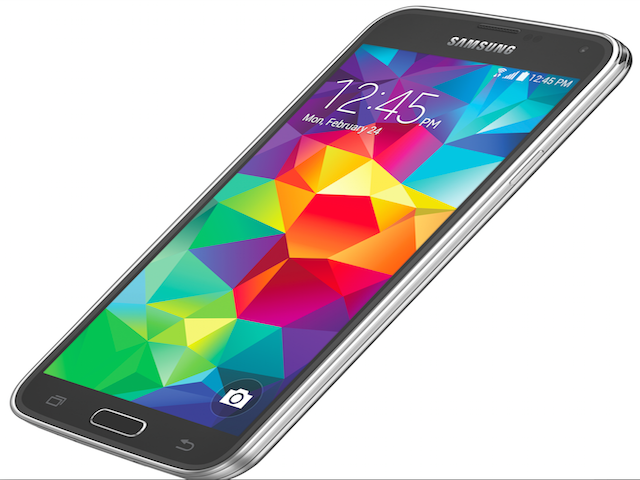
Explore a New World with the Hidden Features of Samsung Galaxy S5!

Samsung Galaxy S5!
The Rise of “Galaxy”
 
The siblings of the Samsung Galaxy S series range have finally seen the release of the much-awaited Samsung Galaxy S5. The phone had been quite high in demand due to the attractive features and options given by its predecessors.

Ten Hidden Features to Know
 
The all-new Samsung Galaxy S5 Smartphones undoubtedly has a multiple range of options, applications and features that make it as one of the most demanded phone in the Galaxy's S Smartphone range. Apart from these basic features the phone also has few more hidden features that all of its users must know about:

  1. Privacy- You can easily enjoy your privacy by just one step, with the activation of the private mode that is present in the Settings section. By doing this some of the personal apps will be displayed only when it is kept in this mode.
  1. Caller Information- Samsung has offered to know more about the callers while letting them stay on the line. All you need to do is to go to the Settings, then call settings, then selecting Show Caller Information. This can be a potential step to avoid stalkers.
  1. Ignore My Magazine- My Magazine is a feature offered by the Samsung to get the delight of reading on various topics. However, many of its users do not quite use this option. Thus it is better to switch it off, by un-ticking the “My magazine” option in the Home Screen Settings section.
  1. Tilt for playlists- Tilting the phone to the landscape mode, the respective users will be suggested for an appropriate follow up of songs with the help of mood, genre as well as source.
  1. Quick Connect- Clicking the Quick Connect option opens a brief list of those wireless devices that can be readily connected.
  1. Entering Text- When the phone's touch sensitivity is increased, you can actually enjoy the multi-touch display either by a pencil or with your own hand while wearing gloves.
  1. Accepting calls along with continuing apps - For most of phones, calling can interrupt the running of the apps. However, with Samsung Galaxy S5, it's not the same. As one selects the Enabling the Call Notification, one can actually accept or decline calls, while the apps may run on the background.
  1. Virtual tour mode- This option lets one to have a series of photos that can later act as a tour guide with the help of Panoramic as well as 360 degree shots. This option can be activated by going to the camera app and by clicking the “Modes” option, where one will find the “Virtual Mode” option.
  1. Priority Senders- Enabling the “Priority Senders” option will be pushing up all the important contacts to the top of the phone's messaging app, from the respective contacts list, making it easier for you to communicate.
  1. Kids' Zone- Today's kids really know and love playing with any phone. Knowing this Samsung has introduced the Kids' Mode, where kids can enjoy using the phone along with learning much other stuff. Once filled with Apps that they can use, kids can really have a good time.
With a whole lot of hidden features, Samsung thus again proves that it can set itself apart from the other leading names. Indeed the name “Galaxy” rightly goes with the phone.

Friday, 4 July 2014

Microsoft Seeks Office Beta Testers for Android

Microsoft Seeks Office Beta Testers
Microsoft invites beta testers to participate in the Office beta test. Yes, Microsoft sent out invitations to test the private beta for Android.

There was a speculation about this for some time back. In early April, Microsoft released the Office app for the iPad. Soon Microsoft wishes for the version of Office could come for Android Tablets for which Microsoft currently looking for beta testers.

This version of Office seems to offer more features than the iPad edition, which is actually quite logical if Microsoft wants to maintain its value on Windows ecosystem. The evidence specifically designed for Android Tablets Office version condenses. The Verge already reported that Microsoft will soon make a non-public beta test of the new Office start version for Android-based tablets and it is currently looking for suitable testers.

Applicants should be in the so-called "Pre-Release Programs" for both businesses and individuals. The new logon page itself does not reveal to which Office products it goes, but speaks only generally of pre-release versions of the entire Office product in range.

It is also not revealed that when the beta test is to be going to start. The individual Office programs are designed to provide the same touch interface, in principle, according to The Verge, as is known from the iPad version, published in April. Applications are going to be selected for testers are for Word, Excel, and PowerPoint one by one in order.

Word is going to be published in the specially designed version for Android tablets, as speculated for some time already, even before the introduction of Office for Windows Touch in early 2015. The Microsoft expert Mary Jo Foley firmly believes that Office for Android is on its way; after the huge success of the iPad app. Microsoft already known that the app has been dubbed over 27 million times on the iPad.

Canon And Microsoft Signed A Cross-Licensing Agreement


Canon And Microsoft
Most of the time the companies are suing each other for patent rights and for a change they now Microsoft and Canon have signed a cross-licensing agreement intended to cover a wide range of products and services, including digital imaging and consumer mobile products public.

Microsoft and Canon formalized yesterday a cross-licensing agreement that involves a number of patents held by the two companies. Microsoft and Canon has announced that they are going to share with each others with broad user rights to help in patents.

But no details have been revealed. But we can guess that this agreement covers a wide range of products and services by both companies in the field of digital imaging and the mobile products.

Nick Psyhogeos the leading Microsoft’s patent Attorney told that Microsoft is hoping that the agreements like this will raise the innovation and where it will reduces the patent litigations. And the both companies have granted access to each other in the past to access to the technology.

Hideki Sanatake head of the Canon patent rights also welcomed this type of agreements and assured that the decision will heads up to the advanced collaboration that represents the evolution of business relationships firmly. In 2009, Canon entered a similar agreement for the exFAT file format.

Everyone can guess that these agreements will help Microsoft to use Canon Photo patents in Nokia Smartphones in near future.

Sony Releases Sony RX1 With Black and White Sensor

 Sony RX1
Already in January 2014 there was a huge rumor that Sony has acquired a novel technology with a small image sensor in 35 mm format to take crystal clear images in black and white photography.

Again new rumors surfaced that Sony is trying to push new camera system equipped with such kind of sensor in to the market.

According to the rumors surfaced the camera will be in your hands in the end of 2014 else in the early months of 2015. The sensor could have more that 24 pixels resolutions hence it can achieve more significantly sharper images hence it will be more sharper then the color images we guess.

Apart from the details the website didn’t furnish any details. The omission of the color filter actually helps the sensor to work with gray scale sensor so that the light fall on it will not me hindered by any filters and hence the overall sharpness will increase.

 And this could increase the overall result with higher light sensitivity and better sharpness. The idea and its realization is not new and Leica has the M Monochrome since mid-2012 a system camera with such a sensor in the program.

The Leica M Monochrome costs 6,800 Euros without a lens and a resolution of 18 megapixels. Before the sensor is located an infrared filter for filtering the non-visible spectrum above 700 nm is used, but it is a no low-pass filter and some features like an auto focus missing there in Leica.

There are so many other models and brands are available for example Red Epic-M Monochrome is loaded with 14 mega pixels resolution which costs around 25,000$