Friday, 10 January 2014

How to share files securely?


How to share files securely?
Wanna share your business files or any sort of personal files in a secure manner? Worried someone might pirate it from you. Here are some tips to share your files in a secure manner.

Tip 1: Encryption

Encryption is a simple technique where there exists a common or any private key for a user and the data will be modulated using this key. This key will be present at the receiver who is ready to receive the information. His/her key alone can demodulate the message and the original information is transferred in a secure manner. When a third party tries to interpret it, it either becomes unreadable or either destroyed. There are several types of encryption techniques are available in the internet which allows you to transmit your files more securely by encrypting files by using those encryption algorithm.

This is not new. This kind of technology already exists but most of them are not aware of this. Encryption products such as Hush Communication’s Hushmail.com, Voltage Secure Mail cloud area helpful tool that guides you for a secure transmission.

Symantec’s PGP Email encryption is the most widely used and is available Windows, Linux and Mac versions too. It provides variety of encrypting tools and plug-ins. These can be used to send your Tax documents too. It’s too secure.

Tip 2: Drop-box: 

Wondering what’s a Dropbox? It’s just a website similar to having an account in Gmail. It’s quite simple to create an account here and transfer your files safely. Drop-box is a leading cloud storage system which is used by most of the professional people all around the world. Most of the bloggers would have account in that website which allows them to access their files from anywhere of this world. Main advantage here is Dropbox encrypts everything you upload or download. Also it is available for mobile versions. Just follow these simple steps:

• Drag your file into Drop-box
• Once it’s uploaded do a right-click and choose “Dropbox”
• Get Link. Automatically this shareable link will be copied to your clipboard.
• Now send this link to which you want to share the file with over an email or message over mobile.

Simple as it is.

Tip 3: LastPass

LastPass is also another website where you can maintain your account to share your secret files. It still one of the most secure ways to maintain secrets. It also gives you the option of saving your passwords.
It is similar to Dropbox where your files are stored in LastPass vault.

Tip 4: Buy an e-mail ID: 

If you don’t know or if you are not yet cleared from the above topics best decision is to buy an e-mail ID that is already in existence with some sort of additional appliance for sharing files securely. Some of them are Sophos Email Appliance, Tumbleweed etc.

But these are quite expensive. If you are so bad in sharing your files securely then you should put in some money to get something worthy.

Hope you are clear with the file sharing techniques now.

How to Make Your Facebook Account Crime-Proof

The Internet is rife with hackers and fraudsters, and to these cybercrooks, no target is juicer or more tempting than Facebook. With over a billion active users, Facebook provides plenty of opportunities for unscrupulous scammers to do their dirty work — whether it's stealing passwords, identities, or money and goods. Fortunately, there are a few easy ways that Facebook users can protect themselves from people who can do serious harm to your financial life.
If you want to crime-proof your Facebook account, just follow these four simple steps.

1) Choose A Strong Password

Some scammers commit cyber identity theft by hacking into your account and impersonating you to your online friends. Online security starts with a secure password. Believe it or not, many hackers are able to get your password and log in into accounts simply by making an educated guess. But if you follow a few simple principles, you can make a password that is virtually hacker proof.
  • Choose a password that is eight characters long
  • Use a mix of numbers and special characters ( like%,&,*and #)
  • Pick a password that is easy for you to remember
  • Change your password twice a year

2) Remove The Criminals From Your Friends List

You can end potential problems before they start by removing troublemakers from your friends list. By blocking criminals, you will deny them access to your posts, and the personal information that is meant for just your friends and family. The easiest way to tell if someone will commit a crime is if they have repeatedly been arrested and convicted in the past. You can run every name on your friends list through a website like CheckMate.com. Simply by searching for someone’s first and last name, you can pull public records and see if any of your Facebook friends have been convicted of a crime in the past.

3) Don’t Post When You’re On Vacation

Burglars regularly comb social media sites looking for potential targets. When someone reveals that they are out of town and their home is empty, that gives thieves a tip of who to rob next. The easiest way to avoid this problem is to simply avoid revealing your vacation plans until you have returned. It’s much safer to wait until you get home to share photos and stories of your trip.
If you absolutely must tell people on Facebook about the fabulous time you’re having, you could always use Facebook’s custom privacy feature.  You can choose to share your messages only with your most trusted friends and family members, and leave your vacation posts hidden from the rest of your friends list.

4) Beware Of Phishing Emails

Another common way crooks will retrieve your Facebook password information is through phishing emails. You might receive a message asking you to provide your email address and password for some reason, and the hacker will then use that info to access your account. Remember, Facebook will never send you your password as an attachment, ask you for your account password via email, or ask for your social security information.

Andy Sedaris is a blogger living in Mission Beach, California.  He writes about online security and social media.

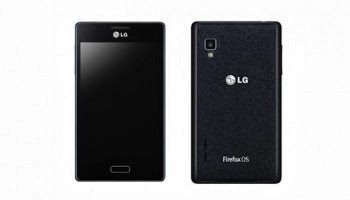
LG Fireweb: First Firefox OS Smartphone launched at CES


LG Fireweb
Now the phone LG Fireweb with Firefox OS was displayed at the CES in Las Vegas and it is a mid-range Smartphone with an interesting new operating system. The LG Fireweb had been released previously in Brazil. This is the first LG Smartphone with Firefox OS.

So far, the phone is available only in Brazil hence there is little known about the device. Since this is not a flagship brand in the Smartphone category, LG is also has not given much importance the Fireweb. The more exciting it is now to get some information about the mysterious device with the unusual operating system.

The inside of the LG Fireweb is a one- gigahertz processor powers the Smartphone. It has two gigabytes of internal memory which can be upgraded with additional 32 GB via microSD card. The four- inch display has a moderate resolution of 480x320 pixels.

The camera on the back takes cell phone photos and videos with five megapixels. As like Nexus 4 the Fireweb back also made of plastic.What is interesting about the LG Fireweb especially is its operating system: The Firefox OS comes from the Mozilla developers and is a completely open system that is based on HTML5 technology.

The OS will access its own App Store: The Firefox Marketplace resembles Apple's App Store or Google Play. In Europe some phones are already equipped with Mozilla's OS. The LG Fireweb is of 11.4 x 6.7 x 0.9 inches and weighs 123 grams. It costs around 152 Euros.

Sony Ultra short-throw projector that displays a 147-inch 4K image on a plain wall


Sony Ultra short-throw projector
At CES 2014 Sony announced its 4K Ultra Short Throw Projector to throws huge, sharp picture on the wall, but is only a few centimeters away front of it. It is an elegant art of the living room, which produces up to 147 inch 4k images. It can be set sizes to the sizes from 1.67 to 3.7 meters diagonal. And the 4K Ultra Short Throw Projector need not be in the middle of the room - it is enough to keep it just a few centimeters distance away from the wall. Instead of a light bulb, as it comes with many other projectors for use, the Sony projector uses laser technology. Because the image produced by laser reaches faster the full luminosity (2000 lumens) and provides better color, according to the manufacturer namely Sony. The 4 K Ultra Short Throw Projectors includes other accessories also. Two speakers are included with it. Sony also offers cabinets in the same design. The close seamlessly to the other modules and provide space for other electronic devices. Still, the device is not commercially available in Europe and it is expected to be available in forth coming days. The price tag is lush around 40,000 U.S. dollars.

EBook reader PocketBook Basic 2 within your budget


PocketBook Basic 2
PocketBook announces a new eBook reader in the low-price segment : The Basic 2 costs around for 69 Euros now. The PocketBook Basic 2 has a six -inch, unlit eInk display with a resolution of 600x800 pixels, the four gigabyte internal data memory serves for storing books .

If there is insufficient space, the capacity can be expanded with a micro-SD memory card to a maximum of 32 GB. The built-in one- gigahertz processor provides a smooth pace. As Compared to its predecessor, among other things the turning of the pages fold is much faster.

As with Pocket Books usual, also the PocketBook Basic 2 also copes with a variety of eBook formats, including ePub DRM, PDF, TXT, HTML, MOBI and DOCX. Only thing the Amazon AZW format is not readable. A compulsory registration with a connected online book shop is not necessary; eBooks invites the user via USB or Wi-Fi.

The installed Read Rate service enables it to interact in social networks on impressions and reviews with other readers.. PocketBook the Basic 2 is clearly beginners, who do not need a high resolution display, touch controls or lighting. The PocketBook Basic 2 is available in early February 2014 for costs 69 Euros.

Thursday, 9 January 2014

NASA unveils the first robot Super Ball Bot for landing on Titan, a moon of Saturn


Super Ball Bot
Super Ball Bot-1

NASA multiplies space exploration and it has unveiled a new kind of robot that will be able to lie on the floor of Titan, Saturn's moon, thanks to its particularly amazing abilities. Super Ball Bot is the new prototype rover designed by NASA. Whose main purpose will be to successfully land on Titan, one of Saturn's moons. Indeed, the agency is not limited only to missions lunar and Martian exploration but also wants to gather data about other stellar objects in our solar system.

In this case, the observation of Titan is interesting since the satellite has many features common to Earth, even if it is more akin to a primitive version of our planet. One of the main similarities is the climate on the surface of Titan; since the winds are present and form dunes, hills and cliffs. Quite surprising it that also has seasonal changes as such of Earth. Super Ball Bot represents the first fruits of this exploration mission. And he also has very special characteristics: it is completely designed with only limps.

As we can see from the picture above, the rover is able to move in a rather strange way since it gives the impression of sagging then recover while going forward. Super Ball Bot actually works on the principle of tensegrity. Tensegrity is an architectural principle in which the ability of a structure to stabilize the forces of tension and compression distributed therein and will be balanced.

Structures established by the tensegrity are stabilized, not by the strength of their individual components, but the distribution and balance of mechanical stresses in the entire structure. Main advantage is its less weight while Curiosity weighs nearly a ton (900kg), this robot will be much lighter and easier landing on Titan. However there are still some challenges to control its management and its movements.

NASA explained that if this prototype was validated, it could then launch an exploratory mission and release large number of these robots explorers on the surface of Titan. In any case, it is exciting to see that the U.S. space agency is exploring many opportunities to learn about our solar system. We have to wait for the mission success and to learn more about Titan.

Wednesday, 8 January 2014

Haier Presented Thin Tablets And Large Smart Phone

Haier has announced prior to CES a Smartphone and two tablets with Android as the operating system which is going to release in this year . The 7.85 -inch tablet is very thin at 6.6 mm where as the Smartphone has 10 -inch have a display with high resolution.

Haierpad Mini 781
With the Haierpad Mini 781 Haier has introduced one of the thinnest tablets. It is equipped with 6.6 mm round 0.3 mm thinner than Sony's 10 -inch model Xperia Tablet Z and so Haier is the thinnest tablet in the world. The IPS display of the Android tablets is 7.85 inches tall, and triggers with 1280 x 720 pixels, which corresponds to a pixel density of 187 ppi. The unnamed quad-core processor clocked at 1.6GHz, the rear camera shoots at 5 megapixels. For video calling, a 2- megapixel front camera is installed. The internal memory is depending on the model 8 or 16 GB in size. The connectivity, the RAM and the battery details are not specified by the manufacturer. The operating system Android 4.2 Jelly Bean will be used. The tablet will be available for the 16- gigabyte version from February 2014 in black , metallic silver and champagne gold at a price of 200 Euros for the 8 - gigabyte version and 230 € according to the manufacturer.

HaierPad H6000
The Haierpad Maxi 1043 has a 10 -inch display with 16:10 aspect ratio with a resolution of 1,920 x 1,200 pixels, while it is 6.9 mm 0.3 mm thicker than the 7.85 - inch version. Again, an unspecified quad-core processor is installed, which is clocked at 1.6 GHz.

The RAM is 2 GB in size, details of the internal flash memory does not specified by the manufacturer. The rear camera has a resolution of 5 megapixels, the front camera of 2 megapixels. The device has Wi-Fi and Bluetooth. The operating system is the same Android 4.2 for this model. As of April 2014, the Android Tablet in Black, Dark Blue and Violet will be available for 330 Euros.

The Haierpad H6000 is a Smartphone with 5.89 -inch large display. This has a resolution of 1,920 x 1,080 pixels, which corresponds to a pixel density of 373 ppi. The RAM is 2 GB in size, the internal memory of 16 GB. Information about the processor was not disclosed by the manufacturer. The 13 - megapixel rear camera is supported in low light from a LED flash. The 5- megapixel front camera enables video calling and is expected to be enough for self-portraits.

According to the manufacturer, the Smartphone supports 2G, 3G and HSDPA +, Bluetooth and GPS module is also installed. The Haierpad H6000 is 8.2 mm thin and 205 grams. The battery with a rated load of 3,200 mAh is permanently installed. The operating system Android 4.2 is installed. This Android Smartphone will be available in black for 350 Euros from April 2014.

Intel announces a “Dual OS" project with Windows and Android


Dual OS
Intel has made an announcement about its Dual OS project with Android and Windows in the CES happened in Las Vegas. According to sources, the founder is trying to unite PC manufacturers around the idea of devices capable of running Windows and Android simultaneously.

It is not similar to that of the dual boot system and it is entirely different from that; that is it is run on the two of the same session. Already virtualisers did this in Windows and OS X. This would called as “Dual OS" internal project, however, this could not be achieved without the help and especially without the consent of Microsoft nor Google.

And everyone says one source, would have reservations about this project. It is better for the one as for the other, that its OS is the only feature on a device. The subject is certainly even more worrying for Microsoft and Google. PC sales, where Windows is still a majority, are in steady decline, without clearing the horizon. And on the front of mobile, Android and iOS leave little room for Windows Phone.

Microsoft certainly has leverage to try to put in the right way PC makers tempted by the idea of Intel. But we also remember the rumors that spoke of wanting to install Microsoft Windows Phone at the same time on Android Smartphones.

Intel, for its part, sees the PC market crumble and the founder has missed the mobile in favor of ARM. Today, it is very soft in the race and processors are capable of running Android. With this project “Dual OS” adequate chips and a mechanism for both OS work together in a practical way, the depth could provide a unique solution for manufacturers.

Security Steps To Be Taken After Installing Windows Operating System


Windows Operating System
Windows operating system is one of the more renowned operating system in all time and it is installed over millions of home computers as well. In the world of technology, it is necessary for us to survive from the hackers around this globe and we need to hide our information without exposing in the internet. The default level of the windows operating system is not that much enough to secure your pc and you need to secure your personal computers by following the simple tips which are given below; so that you can prevent your pc from getting hacked.

Step 1: Install antivirus software to secure your Operating System

Installing antivirus software in your personal computer will secure your files and important information from the viruses and other malicious programs. This is the preliminary step to secure your personal pc from the hackers. Antivirus application provides a basic protection against the program which is used by the hackers. The most advised practice is to scan all the devices before performing any sort of actions in those devices. Having Microsoft essential will provide you the best detection steps for detecting and eliminating the unknown threats. Various levels of detection can be automatically removed from your device using these kinds of antivirus software.

Installing paid software will provide you’re the best detection than the free antivirus software.

Step 2: Automatic Updates

Automatic updates of operating system will provide you various patches and other upgrades for security loopholes that are found in the operating system. So it is necessary to update the operating system of your pc. The first and foremost thing you have to do after installing the operating system is to enable the automatic update options. Once this option has been enabled you operating system will be automatically updated whenever an update is available. Automatic updates for the operating system will provide regular patches and can get you all sort of security features for the operating system. If you were updating your operating system frequently, then you cannot easily get affected by the worms and other security problems.

So it is strongly advised to update very strongly, so that updating your operating system will secure your system.

Step 3: Change the browser

After installing the operating system, change the browser which is defaultly used by other applications. The windows operating system without any update will have so many vulnerabilities and loop holes. It allows the hackers to easily install many vulnerable codes into your personal computer which will affect various important files in your operating system. It is strongly advised to install Google chrome or Mozilla Firefox with latest update, which makes you to reduce your exposure in the internet. If you were using the Internet explorer, make sure your version is more than 8.

Using Internet Explorer with latest update will reduce your chance of getting hacked by the hackers.

Hope you will follow these simple tips after installing operating system in your personal computer.

Great Gadgets To Take On A Ski Holiday


Skiing holidays are a great activity-based break that all of the family enjoy. Whether you have younger children in your party, or complete novices to the slopes, skiing can be a fun thing to do which everyone can take part in. Skiing is a great way for groups to bond together, no matter what their skill level is, and the experience can be much more enjoyable if you have the latest equipment to try out when you reach the pistes. Gadgets don’t make for a great skiing holiday but they can make your getaway all the more enjoyable. So, what are the latest gizmos and devices that established skiers are taking with them this winter?

Heated Ski Gloves – About £40

Wearing super warm gloves is nothing new in the world of skiing. Keeping the wind out when you race down the slopes is nigh on essential so that you don’t get cold. You also want to keep snow out should you fall over. However, the latest trend is for heated ski gloves that not only keep your hands warm but allow you to continue to use touch screen technology without having to remove them. So, if you want to check the latest weather report on your smart phone or book a table with your tablet device whilst on the ski-chair, then heated ski gloves are the gadget for you.

DryGuy Boot And Glove Dryer – About £35

These devices sort out wet ski wear a lot quicker than conventional systems. They are designed to place your boots and gloves right over so that they dry from the inside out. Remember that you can use the gadget to warm your foot and hand wear in the morning, too. So, set it at breakfast time ready for when you first hit the slopes in the morning session.

Mobile Phone Insulator – About £18

These devices are more than just carry bags that help prevent your phone from becoming knocked if you should fall over. They help to keep your device warm which means that the battery life is extended. Many smart phones lose battery life at astonishing rates, particularly in cold conditions. Good insulators will also protect your phone from snow which can be a problem, especially if it melts into water inside your jacket.

Talus Pro Ski Mask – About £75

These are the latest in breathing technology for skiers. The product is designed to augment the air temperature of inhaled breaths. It also affords state of the art ventilation and will assist if you are one of those skiers who suffers from foggy ski goggles. Not only will it and to keep your face warm and dry, but will help you to see where you are going better.

Helmets With Build In Headphones – About £50

Just because you are skiing doesn’t mean that you should not be able to listen to your MP3 player or take a call for that matter. Head gear has always been an important part of skiing, not to mention fashion. However, for the latest trend go for a ski helmet that also doubles as a set of headphones from a cool ski-equipment manufacturer such as Red.
You don't need to spend a fortune to have some high-tech equipment with your the next time you go skiing. Skiers are well known for their love of equipment which, in some cases, can make all the difference, particularly if you ski competitively. However, with a modest budget you can still enjoy some of the devices that are making waves right now. Also remember to pack gadgets which you can use in the evening, back at the warm environment of your ski chalets.
Gary blogs about tech, but is also a keen sportsman in his spare time. He loves going to Courcheval every year.

Intel Edison A Computer Of The Size Of An SD Card


Intel Edison
Intel has missed the turn of mobile computing, but wants to get ahead of those computers technology. They are advancing very rapidly in that direction with his family Quark processors.

The technology now requires new kinds of more efficient and more powerful smaller processors - that perfectly describe the X1000 Quark, presented last September by Intel. Their cores are five times smaller than the Atom processors and consume up to ten times less energy, while being as powerful as Pentium processors.

This kind of processors allows Intel to build a real computer with in an SD card. A computer named Edison, which thus contains a Quark dual-core processor, NAND storage and Wi -Fi and Bluetooth chips. Running GNU / Linux with a specific version of Wolfram, it can for example be used to control devices - think “Raspberry Pi “in much smaller. Edison, which will be offered to developers this summer, is one of the reference designs expected to demonstrate the possibilities of Quark platform.

It was obviously evokes an Intel shows connected and is the one of the star product of this CES 2014. Since the Intel wants completely independent it wish to do more soon. Equipped with its own network and GPS chips, it does not need to connect a Smartphone to notify the user of various events. It is not limited to connect to watches only and Intel has presented a strange headset which is its own independent project which is able to notify you of the delay of a participant in an appointment or to guide your steps in the search a restaurant.

In short, an "intelligent" assistant whispering in your ear, as Jarvis Iron Man which he also uses the name. Intel has also confirmed its “Dual OS " ad eclipsed by Intel's desire to rid all processors' raw materials of shame.” A laudable goal, Apple is also trying to achieve but still in progress.

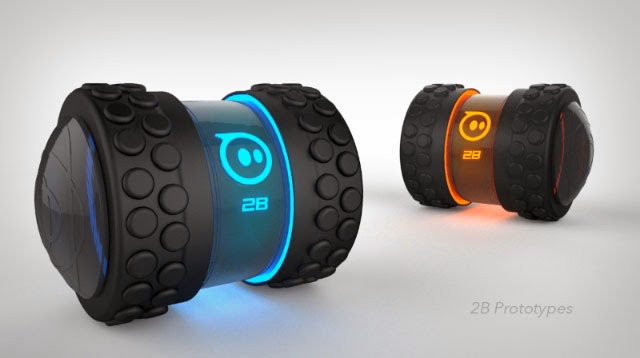
The Orbotix Sphero 2B Robot Can Travel Faster Than Man

 
Sphero 2B
The U.S. Company Orbotix has introduced a successor to the rolling robot Sphero. The U.S. manufacturer Orbotix exhibited their new electronic toy robo at the Consumer Electronics Show (CES) in Las Vegas.

The name of the Robot is Sphero 2B. Sphero 2B is a cylinder with two wheels, which is operated with a mobile device. The Sphero 2B is cylindrical and quite fast.

It is the successor of the ball Sphero robot 2 and it is controlled by the robot via an app. They are already available for Android and for iOS. A version for Windows Phone is in the works, said a spokesman of Orbotix. Data transmission is done via Bluetooth which consumes less energy.

The robot battery is charged via a USB interface. Sphero 2B reaches a speed of over 15 km / h. It is driven by both wheels and at the same time both wheels are driven independently. The manufacturer makes little detail about technical details.

And he elaborated about the details like Wheels, tires and wheel covers which are interchangeable. In addition there are other apps also, such as Augmented Reality games (AR). The Sphero 2B is equipped with infrared sensors, with which two robots can shoot each other. Orbotix provides Software Development Kits, with the help of which users can program the robot by themselves.

Sphero 2B is the successor of Sphero 2, - as the name suggests - is spherical. The user can let the ball robots, also controlled by the tablet or Smartphone to roll. He can use it as a controller for games. The Sphero 2B will be available in black and white. He will come to the market at the earliest. According to Orbotix the price of the Sphero 2B is around $ 100.

Stay Connected with Satellite Phones


Satellite Phones
Some of the best qualities on mobile satellite phones from reliable to affordable satellite airtime options are available at online portals catering to the needs of customers. Being a satellite communication company, with over fifteen years of experience in direct satellite sales, they strive to offer the right solution to customers according to their need and budget. They have been offering satellite communication solutions for broadcast media, government, maritime, emergency response and tracking application, adventure and sports etc.

Some of their high quality products offered are: handheld satellite phones where the quality satellite phones ranges from Iridium, Thuraya, and Inmarsat IsatPhone Pro. Satellite Internet with Marine terminals, land fixed terminals, land portable terminals and in- motion terminals are also offered. For Airtime options, they render their support in identifying the best satellite phone plans along with subscription plans, prepaid vouchers, prepaid plans and SIM cards from Thuraya, Inmarsat and Iridium. For tracking systems, they provide personal tracking systems, marine tracking systems and land tracking systems to their consumers.

Consumers can request an online quote by furnishing the desired information for any satellite equipment and service needed from providers offering their services and support to their clients. The seller is capable of offering attractive prices on Inmarsat, Thuraya and iridium satellite phones, equipments and services since they are partnered with first tier Inmarsat, Thuraya and Iridium service providers enabling them to provide great products to their customers at very low prices, providing reliable and fast deliveries all over United States, Canada and across the globe.

Consumers are provided with all their support and services from start to finish on purchase of products from them. They can also sign up for email newsletter if interested in receiving exclusive offers that may come up from time to time. Consumers could check on their terms and conditions related to the placement of orders and delivery in order to get acquainted with their policies related to their services on products. In case of any queries consumers have the option of contacting them by way of a live chat or through their toll free number available at the site.

Tuesday, 7 January 2014

Best Services to send Large files Online


send Large files Online
Sending files from one person to another person is one of the viral issues in Online. Most of the mailing system itself offers various levels of file transmission schemes. But they provide in a very restricted manner. Gmail offer us to transfer files from one person to another, But you cannot send larger files by using Gmail accounts. Suppose if you wanted to share a bigger file such as Software, HD movies and so many things, you will be definitely fed up by finding best services to send larger files online.

Since most of the services will limit the size of your file sharing and this will definitely makes you to getting worse. In this post, I have shared best services to send larger files online and hereafter no need to worry about the restriction on the file sizes. Most of the website which are offering cloud services are offering file transfer system, allows you to share files without restricting the size of the files. Here you can find the list of website that will provide you the best files transferring;

1. Ge.tt
2. DropSend
3. WeTransfer
4. TransferBigFiles
5. HighTail

Ge.tt: Ge.tt is a web based application website that allows its users to transfer larger files. Ge.tt enables you to send the files which are not more than 2 GB of file space. Ge.tt has an enhanced interface and it is very simpler to use. Ge.tt interface allows you to drag the files and you can share the links very easily. This is one of the best services for sending files with larger size.

DropSend: DropSend is another cloud based data sharing website which allows you to transfer bigger files and also you can share those files very easily. DropSend is similar to Ge.tt in data transfer, but the main difference in DropSend is that DropSend uses software named DropSend Direct to upload files in the website. DropSend Direct is best way to uplad you files directly into that website

WeTransfer: WeTransfer is a simpler and best website which is used to transfer the files. WeTransfer offers a best interface without unwanted ads. Most of the websites are filled with tons of advertisements. But WeTransfer has no unwanted ads and which makes the WeTransfer very unique and simple. WeTransfer free version allows you to send files up to 20 peoples at a single time.

TransferBigFiles: TransferBigFiles is a website which allows us to transfer files which are more than 2 GB or even more. By using TransferBigFiles, you can share files which are even more than 20 GB of files space. TransferBigFiles is the best services to send files which are bigger.

HighTail: HighTail is another website which offers you to send more sensible information in a secured manner. HighTail has more secured options and also it has many security features such as encryption of files and password protections. By using the premium services you can send bigger files and free version offers only 50 MB of files transfer.

Tips for fixing windows slow down issues


windows slow down issues
Running personal computers in high speed is the main things which are wanted by most of the people in this world. Even I want to do the same things. Finally I have found few solutions to speed up the personal computers when it gets stuck by the slower performance. Like every electronic devices, the personal computer will become slow after a period of time. This will affect the performance of your personal computer and even it will affect your time for completing the work. In case of such situation, you will definitely fed up by doing many kinds of relief measures. By using simpler steps, you can easily improve the performance by following these simpler ways;

Troubleshoot your pc

You may face many problems in your personal computers, you have to go through those issues and solve them. So, your personal computer will work efficiently. In order to solve issues, you have to go through the reasons; you can easily get the reason for the problems by trouble shooting the issues. Most of the errors were caused by the Malware attacks, low performance of the hardware, bugs in the video driver and so on. You can easily solve those issues by working over it. If you solve those issues, performance of your device will be automatically boosted up.

Close the services if you don’t need them

If you were using a fresh PC, then you can find various services that are not essential for PC functionality. If you were seeing unwanted services, then you can disable those services to speed up your personal computer.

1. IP Helper:If you not using IPv6 Technology then stop this service.

2. Network Access Protection Agent: Revoke this if you don’t use network based works

3. Smart Cards:Stop these services, if you’re not using smartcard based applications

4. Windows Media Center Receiver Service:Disable the services, if you’re not using Window media center PC.

5. Tablet PC Input Service:This service is used for getting inputs from Tablet Inputs. If you were not having such sort of devices for getting input, then you can disable those services.

6. Fax:Disable the services, if you weren’t using fax services in your personal computer.

By disabling these services, you can easily speed up your personal computers very easily.

Startup applications

If you’re noticing that your personal computer is taking so much time to boot, then you need to concentrate on the startup files as well as the startup applications. Startup applications are the applications which will be started automatically when your personal computer is booted. You can control various applications in the startup applications. Else you can edit them in typing msconfig in the cmd command prompt menu. If you were seeing any unnecessary application which is running over the startup, then you can disable that application from the pop up menu which is appearing over the screen.

If you perform these steps in your personal computer, then you can speed up your computer very easily.

All About Micromax Bolt A61


Micromax Bolt A61
Micromax Bolt A61 is a latest Smartphone which has been released by the Micromax. Micromax has added a new Smartphone to the Micromax Bolt series. You can get this mobile from official Micromax eStore too. Micromax Bolt A61 is a cheapest Smartphone with many featured specifications under your budget. Here I have posted little description about the Micromax Bolt A61 Smartphone and here it goes;

Operating System: 

Micromax Bolt A61 comes with Android operating system with latest version of Jelly Bean Operating system. Micromax Bolt A61 supports various applications and Micromax Bolt A61 allows you to get various applications from the Google play store too. Micromax Bolt A61 has a fantastic interface which brings you a perfect look for the device.

Processor and Performance:

Micromax Bolt A61 comes with 1 GHz processor which belongs to the family of Spreadtrum SC7710 Processor. Micromax Bolt A61 has a built in RAM of 256 MB which allows you to run various kinds of applications in the Micromax Bolt A61. Micromax Bolt A61 has an inbuilt memory of 512 MB in which 135 MB is available for the users. Micromax Bolt A61 allows its users to extend the memory up to 16 GB with the support of microSD. Micromax Bolt A61 support various level of applications and few of the high end graphics application are working in the Micromax Bolt A61 too.

Display and Camera:

Micromax Bolt A61 comes with the screen size of 4 inch display which supports the resolution of 480 x 800 pixels. The 4 inch display allows you to experience better image clarity. Micromax Bolt A61 has primary camera of 2 megapixel and from which you can shoot pictures with fantastic clarity. And Micromax Bolt A61 has 0.3 megapixel secondary camera which shoots in VGA resolution. The primary camera has a built in flash which allows the users to shoot pictures even at low light too.

Connectivity:

Micromax Bolt A61 has a Dual SIM support with smart selection of network. It support Dual standby SIM support and Micromax Bolt A61 comes with 3G connectivity. The 3G connectivity helps you to browse internet in very fast manner. Micromax Bolt A61 has built-in Wi-Fi support that enhances your browsing activity. Even you can connect with internet through the Wi-Fi connection that is available nearby to you. Micromax Bolt A61 also allows you create a Hotspot connection with the Wi-Fi and you can easily connect your devices with Micromax Bolt A61 very easily. Micromax Bolt A61 also has other connectivity such as Bluetooth 2.1 with EDR support and it also comes with micro USB support.

Battery:

Micromax Bolt A61 has a battery capacity of 1500 mAh and which provides 3.55 hours of talk time and 160 hours of standby. Micromax Bolt A61 provides various power saver schemes from which you can save power consumption for the device.

Micromax Bolt A61 is a best mobile under your budget and it has many features that Premium Smartphone has.

Ode To The PC: Rage Against The Dying of Expensive Software and Virus Protection

The PC used to own the scene. People scoffed at cute, brightly colored Macs, and had no issue shelling out $75 a year to Norton AntiVirus and other such computer virus-fighting software. But the personal computer is on life support for many reasons. People love the lower price of the PC, but they hate having to buy a new computer every time their PC takes a dive into a viral coma, which is actually quite common. But that’s just the beginning.

It’s not just the PC operating system that’s to blame; in fact, the Windows operating system on Windows smartphones works very well, and is very much liked by those who use Windows smartphones as well as Windows-based tablets and of course, the newest line from Windows, the Surface. These devices are doing well in their respective markets, yet PCs are lagging.

While buyers of Macs several years ago may have told you the reason they switched from PC to Mac was because they were sick of their computers crashing due to viruses, today they would probably tell you they were switching from PC laptop or desktop to a tablet of some kind, and that’s because they don’t need to take out a loan to purchase one, and offer portability never before possible with such a high degree of device intelligence. From ludicrously sharp, high megapixel cameras to the ability to interact with the cloud and apps that give people access to their social lives, their work documents, and offer them mediums like Skype or Face Time that allow them to interface with everyone from the grandkids to the company CFO.

Tablets and other mobile devices are killing the PC, but it’s not unnatural. In the most organic sense possible, the PC is dying because it is being starved of an interested demographic. Why would any consumer pay twice the price for a Toshiba PC when they could spend half of that on a device that comes locked and loaded with all the doodads, apps, Internet connectivity via Wi-Fi, and don’t require the insane amounts of storage we’ve needed in the past because we’re all storing everything on Google+, Evernote, DropBox, and even the Windows Cloud… just not from a Windows PC.

Accessibility is in fact now the most important thing people look for in a device that offers them what only a PC or Mac desktop could—and so much more. It’s so common it’s a joke: we cannot put our phones down. We can’t release our grasp—literally—on what links us to what we want to know. Our addiction to data access is so severe that we can’t even fathom a scenario in which we’d have to jot down an idea or question on a piece of paper, wait to get home or back to the office, and open up Explorer (let’s not go there, please) and hop on the Internet that was attached to the wall.

PCs were near and dear to us during this time. Dialup was to the PC what the early 1980s were to Mike Tyson—PCs were the best thing ever in the late 1990s and early 2000s. They cost less than Macs, and offered more unpaid options (at that time), longer warranties, and variable user settings. But Apple isn’t all unicorns and fairy dust either—with the exception of the MacBook Pro, when it comes to Apple devices, people are mainly paying for excellent branding, which is fine, as long as their Apple devices deliver on their promises. But such promises can no longer be made by the PC, and that’s exactly why Microsoft is wise to hop into the mobile and tablet world, and their Surface could really be a game changer for the mobile device world—it has the power to bring PC lovers into the current world of technology, and also entices younger demographics who need to take notes and do homework on the go or in tight spaces. The Surface could be to this decade what the PC was in decades past. But one thing is certain: several years from now, you’re going to see two kinds of things on coffee shop tables: MacBooks and various tablets—right now the Samsung Galaxy is owning the world outside of iPad, but there’s no way to know if this is any indication on which direction consumers will go if they are “forced” by economy or other circumstance to go the way of the tablet versus the laptop.

C'est la vie PC, it was awesome writing papers and playing solitaire. It’s not you, it’s me—it’s my need for lightening speed access to information about literally anything with the tap of a screen. If you can’t produce information in front of my eyes in less than a second, it’s just not going to work out.

Please feel free to contact Ella Gray at any time with questions at ella.l.gray@gmail.com.

Sony's A5000 mirrorless camera with NEX technology


Sony A5000
The new Sony A5000 is a new compact system camera with APS- C sensor, which almost reminiscent a compact camera. However, there is no facility for a viewfinder. The Sony A5000 NEX cameras all fitted as an APS-C sensor and can be used with all lenses that are offered for this system.

Who wants to take advantage of the compact case can opt for this. you should connect a flat pancake lens instead of a massive zoom model. The camera body itself weighs about 210 grams and measures 109.6 x 62.8 x 35.7 mm. The camera captures photos with 20.1 megapixels and films in Full HD in AVCHD or MP4 format. The light sensitivity of the sensor ranges up to ISO 16,000. A5000 supports the lens with  an action of zooming by motor drive.

The housing is equipped with Wi-Fi to share the pictures on mobile devices and computer and can be controlled remotely with the appropriate app from Sony. The access can be negotiated NFC what the user picks up the configuration. The pictures can be stored internally on SD cards and memory sticks. For image control, a 7.5 cm display with folding function is built, which can be rotated forward so that controlled self- portraits are possible.

However, a viewfinder in the classical sense is missing, which in strong sunlight can cause problems as well, since the display is barely readable. The camera can be functionally extended with Sony Camera Apps offered partly for a fee or free.

With the updated to version 2.0 app " time-lapse " can for instance create time-lapse pictures or images that are automatically transferred to a mobile device as a backup with " Sync to Smartphone" . The A5000 with the 16- 50mm lens (SEL - P1650 ) will cost around 500 Euros, while the package with the two lenses SEL - P1650 and SEL - 55210 is (55 to 210 mm ) available for 750 Euros. The Sony A5000 will be available in March 2014 for sale.

45 and 50 Helium 4G New Android Smartphones with LTE From Archos


Archos Helium
Archos introduces the 45 helium 4G and the 50 helium 4G LTE -enabled its first two Android Smartphones. Both devices come with quad- core processors from Qualcomm, Android 4.3 and IPS displays. The French manufacturer Archos has presented two new Android Smartphones namely helium 45 and 50 helium 4G 4G.

The devices are the first Archos Smartphones that support LTE. With hardware in the middle class area and Archos offers them for quite low prices from 200 Euros. The 4G Helium 45 has a 4.5 -inch IPS display with a resolution of 854 x 480 pixels. This gives a pixel density of 217 ppi. Inside the quad-core processor Qualcomm Snapdragon 400 (MSM8926) operates at a clock rate of 1.4 GHz. The RAM is 1 GB in size; the built-in flash memory is 4 GB only. A slot for micro - SD card is installed.

The 50 helium 4G has the same processor as the 45 helium 4G, also the amount of memory is the same. The IPS display here is, however, 5 inches tall and has a resolution of 1,280 x 720 pixels, giving a pixel density of 293 ppi. Also, the flash memory falls with 8 GB of something bigger than the other one, a slot for micro - SD card is also included.

Both Smartphones support quad-band GSM and UMTS on the frequencies 900, 1,800 and 2,100 MHz. LTE dominate both devices at the frequencies 800, 1,800, 2,100 and 2,600 MHz. Wi-Fi is supported by an unknown standard, so also Bluetooth is running in version 3.0. A GPS receiver with GLONASS support is built in both of the Smartphones. On the back of the 4G has 50 helium is an 8- megapixel camera with autofocus and LED photo light.

At the front is a 2 megapixel camera for video calling is installed. 4G The 45 helium has a main camera with 5 megapixels; front camera here has only VGA resolution. Both cameras have a BSI sensor for shooting in less illuminated situations. Both Smartphones come with Android 4.3, so the third and final Jelly Bean version. The 45 helium 4G has a battery with a rated load of 1,700 mAh, the 50 helium 4G with a 2,000 mAh battery runtimes are not available.

The case of the 45 measures 134.6 x 66.8 4G helium x 9.7 mm , which is 145 x 71.4 x 8.9 mm in size 50 helium 4G. The 45 helium 4G is 200 Euros and the 50 helium 4G will cost 250 Euros. The Archos Smartphones are going to be displayed at the upcoming Consumer Electronics Show (CES) of 7 up to 10 January 2014 in Las Vegas present to the public.

How to choose the right software for right business

Everything’s going on tough in your business? Need softwares to smoothen your things up? Worried what kind of software you need for your business? This article might help you to clear these clouds from your mind. Here are the steps you should follow.
pic 1


1. Identify the problems 

First step identify the problems. List them. Say it might be difficult to handle the data. Identify the root causes for the occurrence of problems. Analyze the problems. If you can come to a conclusion then it’ll be good else if you think you need software right now to manage the data. Then it’s good.
 pic 2

2. List the requirements 

List your problem in an understandable manner. Convert the problems to your “Needs” and “Wants”. Understand that the “Needs” list should be brief as possible. Your “Wants” list can be detailed. Your “Wants” should explain the basic solutions to solve the problem whereas the “Needs” list should carry the additional features that you’ve included.
pic 3

3. Budget 

Fix your budget prior in creating the “Needs” and “Wants” list. Because software isn’t alone will be your problem. The hardware components necessary to implement them also increases the cost. For e.g. Database consulting alone costs around $200 max per hour. So it’s best to allocate a specific budget for your software
pic 4
.

4. Choosing the right software company 

Go on floor. Get an idea about the companies. Internet is a helpful tool for your searching purpose. Know about the companies. Find what features are provided by the company. There are websites that already offer you accounting software packages with price tags and features mentioned in it. If the features meet your needs then your job will be easy as a piece of cake else you have to place the order in some MNC software creating company.
pic 5

5. About software packages 

If your “Wants” list has been satisfied about a software package that is already present then you can negotiate the price value by contacting the company directly. The companies also provide you a Demo version of the software. This assists you how to install and use the interface and also helps how to use te software. This Demo CD acts as your guide.
pic 6

6. Get a feedback 

It’s not you who is going to handle the software. It’ll be the work of your employees. So allow those who operate with the software and get a feedback from them whether they are satisfied the interface or any feature has to be additionally included in it. The functionality of the software will be tested by them alone.
pic 7


7. If they are not satisfied 

Then make your final decision of giving the list to a software company so they might create a new one based on your needs and wants.

Domain Name Registration at Affordable Cost

Service providers for website hosting and website builder are available in the internet world offering a variety of options in web services, helping users in maintaining and designing their sites. A well reputed and most renowned website hosting provider available now, who provides all the requirements connected to the internet world with remarkable services and support to their clients and is also a one stop shop for all web requirements. Some of their services offered are cheap domain names, domain suggestion tool, website hosting, windows hosting and much more. Being a comprehensive web hosting service provider, they offer complete packages for all personal as well as business web hosting programs and clients have the choice of choosing the most appropriate plan for their business with the option to upgrade, downgrade or even cancel the subscription at any point of time. While others charge for basic services with additional charges on website hosting services, like WordPress blog software installation, this provider provides all that is needed to maintain and develop the site at an affordable and a nominal cost.

They strive to provide the best service with updated internet technologies enabling individuals as well as businesses to enhance their business and reach great heights. Their web hosting services include POP3 accounts, scripts for all requirements, email forwarding, database support and auto responders with daily system backup without the cause to worry over lost information. Clients could check domain names registrations to get started with their uphill journey of their business by employing their services. The domain name suggestion tool available at the site could prove to be helpful in selecting the best name for individual or a business website where the system checks on the availability and provides a list of domain names for the user. Besides their prices being affordable, they also have the most reliable network, regularly upgrading their hardware and software, fulfilling their commitments to their clients by providing excellent customer supports with complete satisfaction. Their 24x7 support with featured hosting and 99.9% uptime average is available at $9.95 CAD per month for those interested in taking up this offer.

Sunday, 5 January 2014

Top 5 Most Expensive Smartphones In The World

iPhone 5 Black Diamond
There is a myth that mid range mobile Smart phones are more popular with consumers. But the mobile companies proved it wrong by their increasing interest in a number of the most expensive mobiles. In the modern world, mobile phones are become very essential for our life. We are using mobile phones for connectivity, calling purposes and also mainly for internet. Most of the people are using mobile phone to connect with their friends and relatives.

Some people are there who are using mobile not only to communicate but they also want to have most expensive and luxurious smart phone with amazing price tags. Here are the top 5 expensive smart phones in the world. If you are curious to know about this you can see below.

iPhone 5 Black Diamond

Price: $15.3 Million

Stuart Huges I known for his luxury brand. In April 2013, he designed and crafted a singular smart phone for Hong Kong Business man “Joe”. Joe requested him to design a such expensive smart phone for about $15.3 M. This breaks its previous record of $8 Million for iPhone 4 Diamond rose. In his official website, he featured all his luxury items that he designed.

This strikingly crafted iPhone 5 features a very rare 26-carat black diamond which was in control of Joe’s family for years. In the back portion there is an apple emblem, which consists of 43 unflawed diamonds. And also the back portion is coated with solid gold. The screen of this smart phone is made from sapphire glass, which is 10 times stronger than Gorilla glass. After diamond, sapphire glass is the hardest natural substance in the world. They used this to conform the strength and stability of screen. The very impressive fact is the Home screen which is also 26 carat black diamond. It is covered on a circa of 600 flawless diamonds.

iPhone 4 Diamond Rose Edition

Price: $8 Million

This expensive Smart phone designed by Stuart Hughes. He designed this Smart Phone before iPhone 5 Black Diamond. There is an ill-famed antenna band which wraps around the side of iPhone 4. Hughes recreated this. He also recreated the backplate with the help of rose gold. The band is decorated with one hundred carats of flawless diamonds. And also the Apple logo is created with fifty three addition diamonds. The additional feature is its home button. It is manufactured from platinum and has a rare 7.4 carat pink diamond.

GoldVish Le million

Price: $1.3 Million

This smart phone is designed by Swedish designer “Emmanuel Gueit”. GoldVish Le million phones is the 5th most costly phone in the world. This phone was purchased by a Russian businessman for $1.3 million. This phone has features of 18 carat white gold and 120 ct VVS-1 graded diamonds.

Diamond Crypto Smart Phone

Price: $1.3 Million

Peter Aloisson is the person who designed and crafted this Diamond Crypto Smart Phone. The cost for preparation for this phone is 1.3 million dollar. This typical Smartphone is decorated with 18 carat white gold and 18 carat yellow gold. In the side of the phone there are nearly 50 diamonds are placed.

Vertu Signature Cobra

Price: $310,000

There is only 8 phones are available in this model. This phone was designed by French jeweler Boucheron. This phone is designed with 2 diamonds, 2 emeralds and 439 rubies. Vertu Signature Cobra is available for $115,000. The pattern on this phone is amazing and it has freaking snakes on them.

Tips to protect your computer from viruses


protect your computer

Computers are very vulnerable to the viruses which are present widely all over the world. We need to secure our personal computer from the viruses that are available in the cruel world of Internet. These viruses damage various kinds of important files that are present in your personal computers which results in formatting of your drive to recover from those effects. Sometimes we might lose important files because of these viruses. But you can still reduce the effects which are done by these viruses. You can monitor that these viruses are rapidly growing rapidly in the internet and use internet as a medium for spreading. It is our duty to secure our pc from various damages and unwanted actions that are done by these viruses. If we protect our personal computer with maximum security, then we can easily rectify the various levels of hazards in our personal computer.

Here I have shared various security tips to protect the personal computer from these unnecessary virus activity and here they goes;

Tip 1: Always install trusted software sources Installing software from the trusted sources will give you software packages without any sort of intruded malicious codes in the program. Suppose if your program has any kind of malicious codes, it will harm our devices and our data may be uploaded to the internet when we connected our personal computer to the internet. So it is always advised to use trusted application and always download applications from the trusted sources.

Tip 2: Avoid usage of pirated downloads Installing pirated source of software from untrusted sources in your personal computer will cause harm to it. Pirated downloads will be infected by the viruses and those viruses can affect your personal computer very easily. Even your antivirus software cannot track those infected viruses that are present over the pirated software. So always download and install application from the trusted sources itself.

 Tip 3: Install good antivirus software Antivirus software helps you to protect your personal computer by protecting it. Antivirus software are most dedicated way of protecting your personal computer from the unwanted actions and executions by the viruses in your personal computer. If you want your personal computer to be secured in most efficient manner, then go for the premium version of antivirus from the market. Spending few bucks will helps you to prevent your personal computer from the various infections by the viruses. If you were using free antivirus software, then you cannot assure that your personal computer has been in full secured manner. So it is always advised to use premium versions of antivirus applications in your personal computer.

 Tip 4: Be careful with the Email attachments Be sure that you have scanned your email attachment and download the files in your personal computer. Sometimes email attachments were fully filled with viruses. If you click on those files, then you will get hit by the virus found in the attachment. This will harm your personal computer very badly.

Application for Capture video on PC


Camstudio
Recording video in our Personal Computer is one of the most searched things in the most of the Search engines. You can record videos by capturing various events that are happening in our life in our Personal Computer screen and we can use it for tutorial purposes as well as for business purposes. Even we can use them for recording games that has been played by us and we can upload them in video sharing websites for fun. Sometimes it can be used to record live streaming content and also video chat sessions for later use.

In order to record video from your screen, you need a better source of software which should have series of features for recording live sessions very effectively. You must need a dedicated program for recording those videos and it must record properly without any problems. There are bunch of applications are available in the market for recording the videos more effectively.

The various features for recording the video in your Personal Computer screen are

1. Highlighting mouse activities in order to shows better actions
2. Panning over the screen
3. Highlighter tool to draw something over the screen
4. Screenshot capabilities
5. Basic video editing
6. Sound capturing from external source of inputs and so on

Here I have shared few applications which are used to capture the screen and they are;

1. Screen Castle: 

Screen Castle is best web based application for recording entire screen along with the computer audio which is available in your personal computer. Screen Castledoesn’t requires any kind of registration purposes or any separate software installation for using this software. You need to simply hit the big red colored button to start the recording purposes in the website. This will be very easier process for recording video that is happening in your screen. Once the recording gets over, it gives you series of links for downloading and editing video.

 2. Camstudio: 

The second place goes to Camstudio. Since it is a freeware and open source application which let you to create and capture video by recording the screen. You can even record simultaneously various events which are happening in your desktop screen. You can record the screen and webcam videos and you can even get screen panning with annotations. Camstudio also provide you a better tool which helps you to highlight your screen activities with mouse highlighting too.

3. CaptureFox: 

CaptureFox is a best add-on for your Mozilla Firefox from which you can capture videos and also it allows you to record audio and screen. You can even capture the video frame by frame by using the CaptureFox. CaptureFox records the video in .avi file and you can save those files on your personal computers very easily.

4. Screen Virtuoso PRO:

Screen Virtuoso PRO is a best application which can be totally free. You can use this application for totally free. But you need a license if you want to use it for commercial purposes.

What ZeroLag VPS Will Do For You

ZeroLag VPS

Virtual private servers are an ideal hosting solution if you need more space, bandwidth, and server resources than what a typical shared hosting account can provide, but don't want to commit to the price or contract involved with a dedicated server. A VPS is ideal for large-traffic blogs and forums, as well as tech sites that may see a lot of traffic during the holiday shopping season. Plus, a VPS often has the power to run more scripts than a shared server, and you'll have more options at your disposal for managing your account.


What ZeroLag VPS Will Do For You includes setting you up on a virtual private server that meets your needs, and making sure that technical support is always available. For the most part, so long as a site isn't suddenly taken down due to a security breach, a malfunctioning script, or a problem with the server itself, a VPS will run smoothly and on a mostly automated basis. But if there are problems, you should know that you can contact your host at any time of the day or night, and you can expect a response within 24 hours, but often much, much sooner than that.

Importance Of Using Spy Cameras


 Spy Camera
Spy cameras can be extremely advantageous for people who use them properly. They can help them monitor people, places and things that they are concerned about. For instance, parents can use spy cameras to monitor their children’s babysitters and ensure that they are properly caring for their children. Business owners, on the other hand, can use spy cams to monitor their employees and ensure that their inventory is kept safe when they are away from their offices. People need to be aware of the proper way to use spy cams, though, ensure that they aren’t violating any privacy laws.

For instance, placing hidden cameras in washrooms is strictly prohibited by law as it is a direct violation of people’s privacy. Even if the camera is placed by the owner within a facility that he or she owns to spy on other people, it is still a violation of privacy laws. The proper way to use hidden spy cams is for investigative or surveillance purposes. For instance, people who suspect their children’s babysitters are abusing them can use hidden cams to glean any evidence that they need to present to a court. In such instances, hidden cams can prove invaluable since it can be difficult to accuse someone of behaving in an improper manner without any solid evidence.

Portable spy cams are also available for people to use when they’re following a subject. However, they should be careful to only get their subjects in the cameras to ensure that they aren’t invading other people’s privacy who are in the general public.

Saturday, 4 January 2014

Samsung NX30 with double swivel viewfinder


Samsung NX30
Samsung has both the viewfinder and the display made pivoted at the NX30 system camera. This allows a simpler image control in unusual positions. The new Samsung NX30 system camera has a movable 80 degrees up electronic viewfinder and a 3-inch (7.62 cm) display on the back, which is also rotatable and also still swivel.

So the photographer can choose the subject yet with the help of the view finder, if the camera cannot be taken before the face. This not only snapshots, but also facilitates shots above the head or at ground level. The viewfinder has a resolution of 2.36 million pixels. The new autofocus feature of the APS-C camera uses face detection and contrast detection in shots. With a minimal electronic shutter speed of 1/ 8000 seconds and fastest movements can be frozen.

In addition, the camera can record up to 9 frames per second. The sensor picks up to 20.3 megapixels and works in the ISO range of 100-25600. The NX30 also accepts videos with full HD 60p apart from taking photos. Who wants the voices can also record it through an external microphone. Using the HDMI output, the recordings will be viewed without going through a computer directly from your TV or a projector.

The NX30 is equipped with NFC to make the exchange of data via WLAN (2.4 and 5 GHz) with mobile devices easier. Instead of having awkward access codes to enter, keep users both devices only briefly together, then they communicate with each other. If you want, then you can also automatically transfer without further action, photos on a Smartphone or tablet.

The Samsung NX30 will come from in February 2014 with the standard zoom lens “18-55 mm F3.5 -5.6 OIS III “for around 1,000 Euros in the market. Camera body only without lens is available for 900 Euros. It included with the software Adobe Photoshop Lightroom. The NX series camera from Samsung has their own proprietary lens mount. So far, 13 lenses are available in the market for this system.

How much do you know about Sailfish OS ?


Sailfish OS
We are in the world of smart phones because we used to spend our great time with our mobiles now days, smart mobile offers many more features and facilities. In the world of smart phone there is a competition is taking place between the mobile os which decide the best mobile by offering best features, among mobile os (android, windows, Symbian) competition a new os is going to take part as a competitor sailfish in the race, from upcoming days we know which is the best mobile os among the mobile world. Let we discuss about sailfish.

Sailfish is a Linux based operating system for mobile devices which provides mobile-optimized with flexibility, ubiquity and stability. The most interesting feature of sailfish is it provides the platform to run an android apps and it supports around 85000 apps in play store. Sailfish run on any hardware platform which support Linux kernel. It was built on MeeGo technology which ensures that core cellular functionality like power management and connectivity so on. The core of an os is come from Mer project. Its UI enriches with fast and easy customization because of it built with QML and Qt Quick.

Architecture: 

• Hardware
• Kernel
• Mer
• UI and Middleware
• Application
• Application store

Hardware

Any hardware which capable to support Linux kernel.

Kernel 

All the hardware should specifies kernel patches and drivers through libhybris.

Mer

Multimedia, graphics, communication, personal information management, system essentials and development.

UI and Middleware 

It provide unique interface in the way of home screen & switcher, multitasking, integrated UX for key web services and UI performance optimization.

Application 

• Jolla Application: Basic app like phone, message, contacts, camera, gallery, settings, etc.
• 3rdparty applications: Maps, web browser and other apps which run on android.

Most attractive features of a sailfish were it can support android apps. Android is well known mobile platform it have more than lakhs application are available in the market is the one of the reason that android become famous in short interval time and also it provide android development features like custom rom and tweaks so on.

Features of Best mobile platform

• Amazing UI
• flexibility
• reliability
• large mobile apps
• mobile platform should provide greater flexibility for developer
• Many tweaks should available for the os which attracts the users.
• Many more

Above all the function merely supported by the sailfish so that sailfish soon overhead android after its launch.

Jolla 

Jolla is the smart phone powered by sailfish. Navigate effortlessly with the gesture-based user interface and loaded with android apps.

Display

Multi-touch display with gorilla glass(gorilla “2)

Ample 4.5” IPS QHD display.

Camera 

Primary - 8 megapixel AF camera with LED Flash

Secondary – 2 megapixels

Memory 

16GB storage, 1GB RAM.

Operating system

Sailfish OS beta.

Frequently update via air (OTA) usage WLAN is recommended.

Connectivity 

2g / 3g / and also 4g-lite

Vender: Nokia 

About: Jola interface is different to android and iOS, it offers something different from other interface like flexible and freeing and the interface is provide quick and fast response but there is an when switch between the apps.

Top 5 Best Google Play Store Alternatives


SlideMe

AppBrain

AppBrain is one of the best alternative apps for the Android market. AppBrain is the software which serves as an enhancement software. AppBrain shows your apps that you purchased, downloaded and it also shows the updates available for already present software in your Android device.

AppBrain has already updated to next level of social media capabilities. By this you can see what are the apps your friends have downloaded and installed on their phones and with the help of this you can also share the app you have with them. There is an option that you can sync your phone with the computer so that you can download apps for your phone directly from the computer and it automatically installed in your phone.

F-Droid: 

F-Droid is the open source software which is offered for free for the wide range of Android users. F-Droid has features of warehouse where all the apps which are available and updates are scheduled. F-Droid has an option to set. This option automatically detects the apps which are already present in your phone. It also shows the updated version of the available app. If there is any multiple version app, F-Droid will show all the version of the app.

SlideMe: 

SlideMe is the app which is the best alternative Android app market. SlideMe provide everything for the users when it comes to the Global Market. SlideMe also provides the developers to deliver their app directly in the market on a world wide scale. SlideMe has a option which is “hire this developer” button. With the help of this button we can also make a deal with the programmers for making specific software. Here most of the software is available for free. With the help of this app we can also provide donations for the developers. This option makes the developers to develop more app.

Amazon Appstore: 

Amazon Appstore is the appstore which is owned and run by Amazon. Amazon is the largest online retailer in the world. This is the main reason why the Amazon Appstore is considered as the alternative app for the Android Appstore. Amazon Appstore has the required resources, experience and authority which help to market their apps. In the Amazon Appstore, there is an app review process which can guarantee the quality content for every consumer. For both the consumer and the market the Amazon Appstore works best.

GetJar: 

GetJar is the app which can give even the Gold rated category app for free. This makes the GetJar different from Android store. In the Android store the Gold rated category apps are acquired for some price. Gold category means they are like the top of the list apps. GetJar provides this in a legal way. So there is no worry about the privacy.

It is not the matter where you are downloading the app, whether it may be main app market or the alternative, what’s important is download the app which is suitable and safe for your gadget.