Saturday, 18 January 2014

Modifying the Technology Behind the AR-15: Ballistics, Barrels, and More

The AR-15 has been an incredibly popular rifle in America for quite some time, and its popularity has only increased in the years that have followed its design and release during the Vietnam War. Part of why it is so very well received is not only because it is a solid weapon, but also because it is heavily customizable. Like the hot rods of yore, the AR-15 has a number of modifications that can be made to it in order to give it a personal flair that other weapons simply don't take to as well.

This sort of versatility has created a whole new breed of collector: the tinkerer. These are people who are not just concerned with what the gun does, how it shoots, or how they might need it. Instead, their focus is on making the gun cool, making it look interesting or having it do things that it wasn't originally intended to do. These are the people who are stretching the limits of what can be done with a weapon, not by dangerous experiments in trick shots, but by trying to refine its appearance and use to suit a single person, the one who is modding it.

And in the process of doing so, they have come up with whole ranges of interesting and original modifications that appeal to wide ranges of users around the world. Communities have risen to discuss and share ideas of this incredible hobby, and most focus entirely on what can be done with the rifles other than actually shooting them.

In fact, here are some of the coolest things that can be done to an AR-15:

1. Smartphone Ballistics Computer - Actual snipers have specialized equipment that tells them things like wind speed and direction, bullet trajectory, and flight time. We can't all have those exact computers, but we can get very similar things with our phones today. Even the most basic smartphone can now be used to track all of these factors, easily attach to your gun, and help you improve your accuracy. These types of apps can even keep track of how many shots you take and your trigger time, helping you get a better handle on your shooting and become a better sportsman.

2. Game Mods - There's a reason why realistic military shooters are so popular: they are realistic. Nothing demonstrates this more clearly than the ways that the AR-15 can be modded in order to more closely resemble a video game gun. By the addition of a number of parts and the changing of the color scheme, this particular gun can look like the one that your first person avatar carried in Battlefield or Call of Duty. It's very easy to replicate guns like that exactly, image for image, with the AR-15.

3. Major Color Mods - Speaking of color, there are tons of color options that you have with the AR-15. It takes very well to paint and there are pre-painted or otherwise hued parts out there to be use for the gun as you need it. Want your rifle to be camouflaged? To what sort of environment? Perhaps you want logos from your favorite movie put on the barrel? There are people who have even gotten pink and purple themed parts for their own Hello Kitty or Barbie themed AR-15, something that is not only fairly common but very easy to do. There is very little that you can't do with the coloration on these weapons.

4. Barrel Additions - Sure, the average person might want to mount a laser sight or a bayonet on the bottom of their rifle, but you're certainly not average. You want something interesting, utilitarian, and above all cool. That's why it's very simple to mount a working chainsaw to the bottom of your AR-15 barrel. Whether you're looking to chop firewood or zombies, this is the mod for that person who wants to make sure that the world knows exactly how bad ass they really are.

These are only some of the amazing mod options out there, like those from ar-magmagnet.com. Unlike a lot of similar firearms, there is very little that can't be done with the AR-15 if you put your imagination into it.

How to Increase Internet Speed and Fix DNS Errors


Google Public DNS
Almost everyone has come across this problem in your personal computer, The Webpage is not available. Yes of course, this phrase will make us to feel bad when we see that thing. In most of the times, you would notice that DNS look-up failed. You can easily speed up your internet speed by changing the perfect DNS. Even you have a better internet connection; sometime you would end up in very slow internet connection. This is the reason of bad DNS setting for your personal computer or for your laptop. Before changing into the ways, you need to know what actual DNS do is.

Actually, DNS stands for Domain Name System, which allows you to connect with the various web servers. It is a actual address assigned to each and every web hosts that are available in the internet. If any one of those gets failed, at the time you were opening that page, then you may experience this DNS look-up failure. Suppose, if you were going to open the Google webpage. The DNS of the Google is not opening and it fails to resolve it, then it will lead to DNS look up failed.

In this case, you can ask your ISP to check up the DNS problem or else you can choose the third party DNS address for surfing. This will provides you more faster internet connection when compared to the other default DNS address. In the following steps, you can learn how to set up a Third party DNS address in your Windows operating system. Before changing into the public or third party DNS, make sure that your ISP supports these kinds of Public DNS. If you change into the public DNS, then you can easily experience faster internet with nice security features.

Steps to Change the DNS setting: 

• Go to the Control Panel in your Personal Computer

• Then, click over the Network and Internet in the Cpanel. Then Click into the Network and Sharing Center.

• Select the Internet connection that you want to change the DNS. Right Click on the Internet Connection and Click on the Properties.

• In the Property Menu, click over the Internet Protocol Version 4 i.e., TCP/IPv4

• Now click on the Property Button, it will gives you a pop up window with few text boxes. Look for any DNS which is already given, that may be used for any future references. Write it down and they can be replaced if your new DNS is not working.

• Click on the DNS and Change it into 8.8.8.8 and 8.8.4.4, after that click ok.

• Now restart your connection and as well as the personal computer. Now Start internet with more speed and performance.

How to Find the Name of Unknown Mobile Number - TrueCaller


True
Have you ever tried to find out the details of a mobile number? Suppose if you were getting unwanted calls from the same number or else you were getting spam calls from a very random number, you can easily get their details using this method. In this method, you can easily sort out the exact location of the person who were calling you and also with their name details. In this case, searching for a global mobile number is very easy, and it is almost free to use. And here we are going to find out the name of the person and their location by using the True Caller Mobile applications.

True Caller: True Caller is a best application which comes for free, that can be easily suitable for all kinds of Smartphones that are available nowadays. True Caller is a directory of global mobile numbers which consists of millions of mobile numbers and their identities. It has the details of all the global mobile users and along with their names.

Working of True Caller: True Caller is a mobile app, once you installed that application on your mobile; it will provide you the caller information in your mobile phone. After installing this application in your mobile, if you get any call from a number, then the True Caller will automatically get the information about the caller. The True Caller application will search the global directory for the mobile number and gets you an identity about the person who was calling you. In other cases, the True Caller application acts as caller id for the mobile number that are not present in the mobile phones and also for the number which are not present in your address book.

For example, if you were getting a call from a number say XXXXXXXXXX, then the True Caller application will find out the identity of the persons who is calling you. But the main thing is that, the True Caller application will need an active internet connection for this application to work.

How to Find out the Mobile Number details through online: True Caller allows you find the details of the person by accessing the True Caller website. The main thing is that, you have to register in the website. Don’t worry; registering in the True Caller website is totally free. Once you have logged in with your account, you can easily search the numbers in the website at any time. Even you can upload all the mobile numbers from your mobile contact in to the True Caller website and make it visible for the True Caller global directory.

Even you can unlist your mobile number from the True Caller global directory, if you want to maintain a privacy, then you can easily remove your number from the True Caller directory by simply clicking the unlist my Number in the True Caller website. This let you to remove your number from the True Caller Global directory.

How to Download Torrents on Windows Symbian and Java Mobile


Torrent on Mobile
Downloading files in the internet is becoming a common thing in this technology era, and you can easily sort out different kinds of files in the torrents sites and easily download from those sites. But the main thing that we need to consider is that, we need a bit torrent client while downloading a torrent files in a website. We can install this client in a click, if we are using a personal computer or else a laptop. But in case of mobile phones, the torrent client’s availability is very less. Nowadays Smartphones has so many applications in order to download a torrent file from internet.

In case of android mobiles, you can download the torrent files by using the applications that are available in the Google Play store. But in case of the Java and Symbian mobiles, the case is some difficult while compared to android mobiles. But in this post, I have sorted out the various applications for the Symbian and java mobiles to download the torrent files, and finally provide you the best source among those apps.

Downloading a torrent files in the Windows Mobile is very easy and here it goes;

How to Download Torrent Files in the Windows mobiles: 

Since Windows mobile has its own style and standard, they provide lots of applications for their mobiles. And they offer various levels of applications for their mobiles, among those applications, the Wp torrents is one of the best torrents file downloader for the Windows mobiles. In this case, you can easily download various torrents files with files and applications from the mobiles. Wp Torrent is a best torrent client which allows you to download torrents files of any sizes from your mobile itself.

Features of Wp Torrent: 

1. Wp Torrent allows you to download various levels of Music, audios and it also comes with integrated Music and Video Playback system.

2. Wp Torrent has both Free and Paid Versions, the Free versions allows you to download the files at the speed of 200KB/s and by using the Premium versions, you can download as much you can with unlimited speed.

How to Download Torrent Files using Java Mobiles: 

MobTorrent is a good Java application which can be used for downloading the torrents files. The MobTorrent provides a better options and features for downloading the torrents files from your java mobiles itself. By installing this application, you can download the torrent files in any of your java mobiles.

How to Download Torrents files in the Symbian Mobiles: 

If you are a Symbian user, then don’t worry. You can easily download the torrent files in the Symbian mobile very easily. SymTorrent is an application, which can be used for downloading the torrent files in your Symbian Mobiles. SymTorrent is available for free of cost in the internet and you can download this application from the internet. SymTorrent lets you to download the torrent files as much as you want.

Visuals Meet Voiceover: Unleashing the Power of Explainer Videos

Owners have passion.  They have explanation, vindicating the production and sale of product and services.  What they don’t have is the masses’ understanding.  Such passionate owners need to impassion consumers, getting the public equally excited.
How can a small to mid-sized business owner do it?  A growing number use explainer videos to communicate effectively.  Better communication – that’s what separates popular from obscure brands.  Today’s go-to brands were once unknown by the public.  Through proper public relations and marketing, small brands make bigger impacts, growing in awareness and revenue.

How-Tos

Use of products and services, along with fixed problems, may not be apparent to the public.  Vendors do well in explaining, in non-technical language, how a product or service functions along with the benefit of exacting such.
How-tos serve as practical demonstrations as well as implicit marketing tools.  Small and large-sized business owners vindicate products by showing rather than telling.

Branding

Video explanation warrants more interaction.  Key, company personnel may display personalities in videos, bridging a gap of awareness between personalities and brands.  From there, consumers search for personalities on social media, creating further ties to a brand.
Branding encapsulates all a brand does and relays to its public, an important and sometimes ‘unseen’ aspect of marketing and business operation.  Video expression did wonders for a number of tech startup brands, including Dropbox.

Communication

Teachers leverage a number of classroom tools to convey lessons.  Providing a mixture of multimedia allows for broader lessons as well as concentrates on individual student preferences.  Visual learners prefer seeing information for internalization; therefore, movies, plays, and photos help visual learners solidify conveyed lessons.  Alternatively, some are tactile learners, needing to ‘do’ the work to fully understand associated information.
Videos offer multi-sensory and visual cues to onlookers, helping others realize the value of provided information and associated products and services.  All one needs is a bit of time, interest, a YouTube account and a video device (smart phones work too!). For working offline, some video downloading software like YTD couldn’t hurt either.

Attention

Search engines like Google index videos and provide them as answers to user queries.  Within a body of elicited results, videos stand out above text-based choices, great for attracting traffic and eventual sales.  Aside from helpful guidance and opportunity to express brand personality, videos help brands gain traffic, propelling broader online marketing campaigns.
More consumers and businesses use the Internet to seek needed goods and services.  Fickle behaviors present little cue to ‘cracking the code’ of online marketing; however, video ‘snippets’ help particular brands gain attention in the results.

Sale Cycle Distinction

For particular goods and services, videos fulfill an integral chain of the sales cycle, sometimes lost on remote and worldwide vendors.  People prefer personalization and great customer service, using the Internet for reduced prices and convenience.  Videos help provide better service while remaining a remote sentiment, available for any person any place in the world to view.
Consider a clothing vendor.  Some seek online vendors, hoping to save money and rid them of the need to leave the house.  However, that convenience and price is offset when poor-fitting clothing arrives at the door.  Exhibiting clothes, showing how shirts, pants, etc fit, help consumers make better decisions.  In such a scenario, a live interaction evades fitting issues, but a video provides equal level of service while the consumer stays at home in pajamas.
Remember to respect IP:   TeachingCopyright.org.
Steven Young has managed his business for many years now. He likes to share what he has learned by posting his informative articles online. 

Thursday, 16 January 2014

The Google Chrome 32 (32.0.1700.77) with new features


Google Chrome 32
This situation, you might have probably experienced so many times out of nowhere is your PC suddenly make any sounds. Reason for this cause is usually recharged videos or commercials to the open web pages. The new version of the Chrome browser will help to resolve this situation. In order to identify the culprit faster, Chrome displayed in the tab index corresponding symbols to identify them, for tabs that make a noise, you will see a small speaker icon.

Accesses one of the tabs on your webcam, the Google browser responds with a recording symbol in the form of a red dot. Stream the content of a tab via chrome cast to your television makes the browser with a television icon’s attention. The developers have also extended to Tiles mode of the browser for Windows 8. In the Modern UI - View (formerly Metro) of Windows 8, the browser remembers now strongly of Google Chrome OS.

In the new app version, the browser behaves as a private system with some app - with typical freedoms. The Browser app starts a black background in full screen mode, in which surface the individual windows and programs (as usual from the desktop view), can be resize, move at the users wish. At the bottom of the screen there is a taskbar with App Launcher in placing Chrome apps from the Web Store.

This requires you use Chrome 32 on Windows 8 or Windows 8.1 as the default browser. In the classic desktop version, the program works as usual. Also there is so many new features like “Supervised users “. You as a supervisor define what another, for example a family member does with the browser. This allows you to, for example, prevent access to adult sites or watch from your PC to which pages can be visited in the supervised mode.

Google expands the protective functions of the browser. So Chrome 32 can be block your download, if there is a potential threat by malicious software; previously the user received only a warning. Chrome 32 introduces support for animated images in the WebP format (for such tasks is so far the GIF format in charge).

WebP is a system developed by Google image format that the Internet giant wants to establish itself as the new standard in the medium term. According to Google, it delivers in comparison with JPEG for smaller file size, a similar quality.

Support for Windows XP is partly extended!

Windows XP

Microsoft announced earlier that April 8th 2014 will be the final closing for all updates for Windows XP but Microsoft announced surprisingly that Antivirus support goes into extra time until mid 2015 and it will be valid for all other updates also.

Microsoft says that the support for XP will be ended on 8 April 2014 and it has not changed and yet it is for Microsoft Security Essentials anti -virus updates to 14 July 2015 passed, the manufacturer has now informed in a press release on Technet . For enterprise customers, it is further definition updates for System Center Endpoint Protection, Forefront Client Security, Forefront Endpoint Protection, and give Windows Intune.

 The move comes not entirely unexpected. Almost all the businesses and people of XP are not switched to a different operating system for a long time. Still most of the people are using outdated operating system and it is around 14 percent of total computers in use in Europe alone, the U.S. Company said in December 2013.


To help businesses and consumers, promote the migration, the supply of anti -malware updates will now be extended considerably. Microsoft stressed, however, that the effectiveness of this measure is limited for which there will be no more updates operating system. Almost all companies running on Windows XP and they cannot be part them. Since most of the old software are not compactable on Windows Vista, Windows 7 or Windows 8.

Also the cost of upgrades of software industry is likely to deter many a company. With Windows 7 Professional license however, there is the free XP Mode. This virtual machine can help to continue working with old software. Nevertheless, there are cases where this does not help. There is no longer the XP Mode in Windows 8.

Basic Computer Maintenance Tips

Computer Maintenance Tips
In our personal computers, various levels of taking simple steps to maintain the quality of the personal computer can enormously and efficiently extend its lifespan. Instead of throwing money for replacing the hardware components, it is also possible to benefit from computer by maintaining it by the following steps will save your money in a larger amount. In this article I have shared little information about the basic computer tips which will improve the performance of your personal computer. And by following these steps, you can also prevent the failure of the computer and prevent the damage of file system too.

Make sure that you have Copies of Everything

It is must to copy the files which are more important in your personal computer and make it a copy in another drive for better support. Back up a file is an important phase in the computer maintenance process and it is a basic element too. Suppose if you lost anything, then it will helps you by providing those important files. While restoring or repairing a computer, it may result in wiping the data present in the device. So it is necessary to take back up of those files which are more important for us. It is strongly advised to use an external hard drive to store all kinds of necessary files in your disk, so you can use them whenever you want.

Clean your computer

Cleaning your computer will provide more speed to your computer. Presence of several unwanted files will reduce your performance of your personal computer. If your personal computer is affected with the viruses, then it will reduce the performance of your computer. So using of several anti-virus applications will remove the unwanted files that are affected by your viruses in your personal computer.

Don’t Clutter your Computer

Dumping files in your personal computer will reduce the speed of your computer and you can easily improve the speed of your personal computer by removing unwanted files in the computer. By keeping the memory 50% free will increases the speed of the computer and you can easily improve the speed by removing the unwanted application files, movies, music, etc… present in your personal computer.

Reorganize your files

Reorganizing of files allows you to experience a speed on your personal computer and you can enjoy the speed of your machine by reorganizing files in it. The computers will always store the files in the chronological order when it is stored and this way of storing the files will reduce the speed of the system. So it is necessary to reorganize the files which are stored in the personal computer to gain the speed of your personal computer. You can easily re arrange the files which are present in the partitions and also it is very easy to store in it an order. This process can be easily done and also with the help of the various tools we can arrange the files which are found in your hard drive. You can even use the defragment option to arrange the file in an ordered manner.

Maintain your Computer Regularly

Performing these easy maintenance steps on a daily basis can improve the performance of your Computer/laptop with none expense or any real issue. If you're facing issues with applications or viruses then it is very wise to seek Computer/laptop support because as a result small problems will become a larger one if it is untreated.

How to create Custom Facebook Page

Facebook Page
You may have noticed that Facbook has made changes in their layout in recent days. Facebook pages are now represented using new timeline view instead the custom platforms. Many users now usually have owned page in Facebook, in which they can add cover photos and they are also allowed to highlight important stories by pinning them to the top of their timeline.

Pages in Facebook by default have included several features such as Events, Photos, Video and Notes. Some people demand for extra features such as Google Map, Youtube videos and may be even Calendar events. In order to perform you need to create an app that supports this thing in your profile. There by custom Facebook pages can be created to fulfill your wish. If you thing this isn’t possible let me show some thing for instance.

Nokia has created an official page that signifies has a Welcome Tab highlighting some their recent launches, Nike featured Location Tab that highlights location of Nike stores across the country. Apple’s App Store page has created a Tab which describes their list of Top selling Apps and games.

How do these Big names have created their own Facebook pages? Ever get into a feeling that they are big brands and hire skilled labors to do so. Even you can create your own Apps in Facebook without writing a single code.

How to Build custom Apps for Facebook Pages

Facebook Apps can be embedded into pages by just using IFRAME tag. It is similar like embedding in HTML web page, if you are able to embed MP3w, Google Maps, YouTube videos, Google calendar, photos and lots more you can also embed into Facebook in similar way.

Just prior to getting into actual process you have to locate a lay to host the HTML, CSS, JavaScript and several files associated with it to your web page. It is Desire to go with Google Sites because it offers free WYSIWYG which provides tool to edit page. Google Sites is integrated with Google Analystics to you can track out who visit your page often. It isn’t exciting that you can view peoples who visit your site, Facebook doesn’t offer you this feature but by custom mode you can avail by this Google Sites.

Some of the other major reason to choose Google Sites is that, it offers secured pages over (https) and (http) connections. This is awfully important since majority Facebook user would have turned on “secure browsing” in their security settings. If your page is going to be http then it will display a warning message. So Google sites must always be preferred.

These steps are not complicated, hence even normal Facebook user can try to do so on knowing the technologies like JavaScript a little bit not up to depth. Try out these steps to create your own custom Facebook page and watch out to be unique from others.

5 Medical Technologies That Will Change Healthcare Forever

No one would ever suggest that health care is something that ever remains static. Most people do agree with the assessment that the world of health care is one commonly associated with innovation and research. The one error many people do commit is they assume that the innovations are only in the world of medicine and pharmaceuticals. This assessment is not accurate one. There are other areas of the health care field that are consistently innovating. One such area would be the one related to medical technology.

Medical technology has grown enormously in recent years. Among the more interesting areas in which it has grown has been that of medical records. Today, many doctors are able to keep track of electronic medical records and do so in an extremely effective manner. The doctors are not even the main beneficiaries of these innovations. Of course, it would be the patients who benefit the most thanks to the better systems created through electronic record databases.

Other unique technological innovations and inventions are emerging on the health care front. For those interested in what these innovations may be, here are the top five.

#1. 3-D Printing. 3-D Printing might seem like a very odd inclusion on a list of revolutionary medical technology devices. Its presence should not be looked at in a dismissive manner since there are quite a number of practical uses for this type of printing. For example, 95% of all modern hearing aids are created through the process of 3-D Printing. Research shows that partial bioorgan tissue printing might be a very real possibility in the future. One of the great benefits of this or any other type of medical technology is great innovations are built on past successes.

#2. Brain-Computer Interfaces. Brain-Computer Interfaces might very well bring forth the long sought after solution to a number of hurdles paraplegics frequently have to face. The original, earlier versions of this technology were designed to use brain signals to help move a cursor across a computer screen. Today, there is work being performed on these systems to connect them to movement in robotic limbs or even parallelized limbs. Certainly, it is going to take a great deal of time for technology such as this to be perfected but the time it takes make be far less than initially anticipated.

#3. Robotics. Robotics are not exactly anything that can be considered completely new. Robotic technology has been around for decades and they continue to increase in sophistication and effectiveness. Robotics are going to be used in the health care field in scores of different ways. Robots are going to be used in service sectors as they taken over many automated tasks. On a higher level, robotic exoskeletons may be employed in the treatment of patients who are not able to walk on their own accord. The truth is robots can likely be used in a host of different ways and their use in the health care world will likely continue to expand.

#4. Point-of-Care Diagnostics. Diagnosing patients is not always easy and there are times when the process, however necessary, can be an invasive one. No physician wants a patient to suffer from any invasive treatments, but this can be unavoidable. With the advent of new Point-of-Care Diagnostics, there might be a new hand-held medical technology in the form of electronic devices capable of performing a simply diagnosis of all manner of problems. The device might not even be needed in a hospital. Those who have such a device their home could engage it to give a basic diagnoses right from their residence.

#5. Artificial Intelligence. The notion of self-aware technology is still many years away in the future, but early prototypes of machines and technology capable of offering reliable diagnostic tools to doctors based on information stored in their mechanical brain are proving to be quite helpful.

The world of medical technology is always going to be an evolving and innovating one. This is certainly a good thing. These unique innovations are what contribute to the overall incredible improvements people will experience in the health care they are offered.

The Japanese Managed To Move Objects Levitated By Sound Waves

Levitated By Sound Waves -1

Levitated By Sound Waves -2

Levitated By Sound Waves -3
Japanese scientists have developed a fascinating device to hold various objects levitating using ultrasound; And make them move in the air!. Scientists from the University of Tokyo have recently developed a device for moving small objects to in the air particles.

The technique is not new since scientists have already succeeded in floating drops of water in the air using sound waves very recently. In this case, the novelty is that these particles and objects are most electronic components move with ultrasound!

In their study, Yoichi Ochiai, Takayuki Hoshi and Jun Rekimoto explained that they are handling system has two original features.

One is the direction of the ultrasound beam, which is arbitrary, as the force acting in the direction of the center is also used. The other is the principle of operation by which a standing wave generated is localized at an arbitrary position and movable in three dimensions by ultrasonic matrices and with opposite phase. They experimentally confirmed that different materials can be handled by their proposed method.

The experience of Japanese researchers is really interesting! It's crazy to see small objects like these float in the air just through sound vibrations. We would like to see whether this method can also float large objects and see them dance in the air.

Create a Free Proxy Server with Google App Engine


Google App Engine
Need to access blocked site from your office, school or other areas and make friend across countries. Usually many sites at office, college or schools are usually blocked from access. “Proxy server” an source provided by Google App Engine, the set up is also quite simple. Let’s have the brief look on how to install Google App Engine.

• Have ever navigated across appengine.google.com. This site offers you the above mentioned one. If you haven’t signed up for an accountsign up to create.

• Now you can create an application by clicking “ProduceAppliance”. From the time when you havesign-up for the initially you will be given a conformation SMS to your mobile. From mobile type the given code for creating apps with Google App Engine.

• Make a choice of an Application Identifier and it prevails as your sub-domain of you proxy. Now proceed to Authentication Option as “Open to everyoneUser” and in conclusion as each application asks Agree upon Terms and conditions to create.

• Your APP ID is created and now you can upload you proxy to Google App Engine. Now need to download and set up phython 2.7. If you are operating in MAC OS then phython is installed default.

• Download the Zip file available and extract it at suitable location. Zip contains HTML, YAML and Phython (.py) files.

• Now visit code.google.com, try to download Google App Engine SDK for phython and follow the instruction to install SDK in your computer. On finishing point of installation clack on “Run Launcher” to open up App Engine.

• Now click on Edit ->Inclination inside the Google App Engine Launcher and insert the correct values in them.

• ClackFile ->Next to that browse the folder and click on index.yaml and without leaving other files too in step 5. Upon adding App engine, Select the project edit and replace YOUR_APP_ID. At final save and close.

• Now as every file are being injected Deploy, also enter Google account credential and few minutes later your online proxy will get deployed and gets ready to work. The open source URL will have your app_id.appspot.com. Now replace this app_id.appspot with App Engine Identifier.

The sub-domain that you provided the name or App ID will uniquely make out your App Engine Application.

Subsequent Steps for Setting up a Free Proxy with Google

Now your online server is ready for the use. You can also have some edit towards proxy website. You can edit it from main.html file to change the appearance of proxy site. Code can also be added up for Google Analystics and Google Adsense to monitor your proxy server.

As proxy server signifies as open source you may have slight confusion regarding your own proxy. It just the simple way from that you can just add up a layer. So they offer you to have authentication whenever you may log in. Hence your proxy site is in a secured way and no one can illegally use your
proxy.

Top 10 best tips on how to repair your computer yourself


how to repair your computer
How many times have you invited the technician for fixing your computer? Have you ever wondered about fixing your computer by yourself? Wanna know some tips to repair your computer by yourself? Well here you are...

1. Let’s start: 

First of all computer is not a device of the intellectuals. If you know to operate the device then you know to handle the problem too. Let’s learn about it first. It’s an ordinary device just like any other device. First analyze what kind of problem your computer has encountered whether it’s related to hardware or whether it’s related to your operating system.

2. Resources for your problem: 

After you’ve found what your problem is, find the resources needed. For e.g. if your computer has a problem on your fan then buy the fan. Buy with care. Give attention to what you buy. Quality is more important when it come to electronic goods. Online shopping is well suited for this. Do not stress on cheap products.

Analyze your problem on net and find what all they’ve provided for the solution. Watch video tutorials related to your problems and come to a conclusion.

3. Basics: 

Other than the problem, first learn the basics such as speeding up your PC. A computer becomes slow after a particular period of time. It’s quite natural. So buy the necessary software’s needed to speed your PC. Scan your PC often such as Ccleaners.

4. Uninstall the unwanted: 

Your computer might have loads of unwanted softwares. Uninstall them using the default uninstaller or RevoUninstaller. It is strongly advised to defragment your Hard Drive once in 3 months. Keep your PC clean externally as well as internally.

5. Virus protection: 

There may be loads of free anti-virus available on the internet. But mostly they’re trial versions. Money isn’t a matter. Try to buy an anti-virus package. Scan your PC once in 3 days.

6. Re-install your OS: 

Is your problem not yet fixed? Format your drive where your OS exits and re-install the OS. And almost it fixes 90% of your problems.

7. Blue Screen problem: 

It’s a rare event to occur. This problem is due to bad memory modules. It isn’t hard and costly. It’s cheap too. Increase your RAM capacity. It’s worth it to boost your performance. Video tutorials are available on how to install memory modules.

8. Bloatware removal: 

Bloatwares are default softwares that are included in your computer that are intended to slow down your computer. When your computer slows don’t you might take it to a store where you pay load to remove these bloatware. Do not fall for it. Try to install PC Decrapifier which handles these kinds of problems.

9. Upgrade your RAM or hard drive: 

Try to upgrade your RAM or Hard drive at least once a year. Well and good upgrades are available at the market for a good rate. Adding and installing new RAM’s are easy.

10. Maintain the status: 

Keep your PC in the same running condition. Maintain the status intact.

Essential Tools Of the Sleuthing Trade For Part-Time PIs

So you want to be a gumshoe, huh? Hunt down leads? Learn the truth that is being kept from you? Well, it’s going to take a heckuva lot more than just your brains and your mitts  to uncover the kind of information you want to get. Being a PI is going to require some good equipment and the kind of resourcefulness that that only comes through working knowledge of what it takes to make it in the field. If you want to be a good amatuer private investagtor, here are four tools you will need to know and use every single day.
As always, use these tools responsibly and make sure you check state laws before you go all Magnum PI on someone.

1) Public Records

As a private investigator, it’s your job to uncover secrets. And there are hundreds of secrets that can be uncovered by reviewing public records. Since no government functions without a healthy bureaucracy, the feds, the state, and even cities keep records about crimes, addresses, and birth dates. The easiest way to get access to these records is through a service like Instant Checkmate LLC. For a monthly membership fee, you do as many searches as you like on as many names as you have in your case file. You can find out if your target has committed crimes in the past, what their current addresses are, and even if they are a registered sex offender.

2) GPS Data Logger

Sometimes, where somebody is actually going is a whole lot different than where they say they’re going. If you want to find out someone’s true location, the most important tool in your arsenal is a GPS Data Logger. All you have to do is stick one of these babies on your target’s car, and it gives you information on where they travel, how fast they drive, and how long they stay at certain locations. It’s like trailing them wherever they go, except you save a whole lot on gas.

3) Video Camera and Audio Recorder

They might not be cutting edge, but that doesn’t mean they’re any less essential. If you have a conversation with someone you’re investigating, you’re going to want to make sure you have it on tape. If you’re on stakeout and your target makes an appearance, you will want to make sure you have proof. All the confessing and incriminating actions in the world won’t matter if you aren’t able to provide evidence to back up your claims.

4) Bionic Ear

Your target is spilling the beans a block away, completely cracking your case and giving you all the information you need. But how do you listen in without tipping them off to your eavesdropping? The easiest way is to use a bionic ear. This is a device that works like binoculars for your ears, allowing you to hear things from a great distance. You just point the bionic ear at what you want to hear, and it’s as if they are right next to you.
Miller Brady is a blogger living in San Clemente, California.  He writes about tech gadgets, online research, and online dating.

Wednesday, 15 January 2014

Google buys Nest for $ 3.2 billion

Nest
Google announced yesterday a major acquisition of the company Nest, aged just three and a half years. It quickly earned a great name in the field of automation with smoke detectors and thermostats smarter, noted for their very worked and sober design. The Mountain View Company has clearly targets the home automation market. She just takes over the specialist Nest for $ 3.2 billion.

Nest is not well known in Europe because its products are mainly sold on American soil. It is produced in special design and worked oriented temperature management or smoke detection. The company has relationships with Apple and hence Google's acquisition thus raises many questions. It was created by two former Cupertino Matt Rogers and Tony Fadell, the latter being also the main designer of the iPod.

Fadell said the acquisition was a great opportunity to Nest and the whole operation would remain the same. The support will be provided, the products continue to be sold and applications for iOS and Android will evolve again. Nothing has yet been said about the Apple Stores, the Nest (thermostat) being officially sold there. Hence we can conclude Nest will therefore continue its activity and organization will be broadly unchanged. In an interview with The Verge, Tony Fadell says that despite a desire to remain independent, the Google offering was simply irresistible in this circumstance. Cofounder further explains that Google has really understood the vision of Nest on its products and that this was a crucial point.

But the question that remains is to actually know what Google intends to do business acquired from reinforcements billion. Rumored that; Google is just working on a project of smart thermostat. It is therefore possible that Mountain View has sought to directly acquire expertise in this area to enrich its own projects, or rather from an existing database and then integrate it with his vision. It is difficult predict that present how products and technologies Nest Google will merge. One can imagine such a scale of Android devices with new possibilities of interaction.

In addition, Google could like his voice recognition to further enhance ease of use. Finally, whether the Nest or the smoke detector, it is very likely a first step towards a broader vision of smart home. However, even if Nest has met with success, the theme of the connected home is not so easy to approach, even if the ESC has yet proven this year that he always so interested. Google’s initiatives in the field, however, have never marked the spirits and all disappeared.

This is particularly true of its Android Home initiative and PowerMeter service, which allowed monitoring the energy consumption of a home. This time, the firm thus enters the field through the front door. Finally , note that the conditions of use of products Nest will not change until further notice. As confirmed to The Verge, those currently in place will remain and there is no plan to change. In addition, the data will be managed by Nest in her lap and will not be mixed with those of other Google services.

Monday, 13 January 2014

Windows 9 coming in April 2015


Windows 9
Scheduled Windows8 update will be a new version of the Operating systems that will be announced in the Microsoft Developers conference according to the insider source.

 Microsoft wanted to bring to the market in April 2015 a new version of its Windows operating system. That will be announced by the U.S. software manufacturers Microsoft in April at the Build developer conference, Windows insider Paul Thurrott reported on his side Super Site For Windows.

The new operating system will be called Windows 9, Thurrot has learned from his sources. It will come on the market in April 2015. In December 2013 had become known that Microsoft is planning a major Windows update codenamed Threshold for spring 2015.

Threshold was actually as an update for Windows 8 Because of the bad reputation of Windows 8, Microsoft have decided to rename it because of its bad reputation. That is at least the current stand Threshold should again get a start menu, among other things.

Its abolition in Windows 8 had not gone well with the users. It will probably be three pre-release versions of Windows 9. However, it is not clear whether this will also be publicly available. Work on the new Windows will begin after the build. The developer conference will take place from 2 up to 4 April 2014 in San Francisco.

Top 5+tips to protect touch screen display


Screen Guard
Touch screens have become the recent developing trends. From Smartphones to tablets, it has reached the way to touch screen computer monitors. Touch screen displays are also used in Malls, Railway centers. Everything comes in handy with a simple touch right?

These touch screens have a great disadvantage since they are put to constant work all the time. These touch screens should be handled with additional care. There’s no software that takes care of your touch screen. Here are some of the tips to protect the touch screen displays.

Rule 1: Know about it 

First and the basic rule is that “IT’S A TOUCHSCREEN DEVICE”. And it should be handle with care. Do not keep pressing the screen like you handle any keypad in a mobile. Touchscreen mobiles should handle in very clean manner else it will be damaged by your rough usage.

Rule 2: Know where not to keep your devices 

You all know that Touch screens are highly sensitive to your touch. So never leave it in the open where dusts settle along the phone or do not leave your screen facing the ground. Do not keep it in your back pocket. In case of girls do not let them rot in your handbag where all the accessories mingle with it and make scratches on your screen. Don’t let it under the sunlight. It hates sunbath.

Rule 3: Accessories for your mobile 

Buy scratch guards and place them over your screen and then use them. Replace your scratch guard at least once in 6 months. Providing these sorts of accessories will make your device to go for a longer run and your device will be prevented from getting damaged. I’m not sure that it will protect your device from all sorts of damages. But, it acts as a preliminary protection for your devices from getting damages.

Rule 4: Clean your screen 

Do not put force while cleaning the screen. You’re not wiping a floor. Clean with standard solutions. Do not use solutions that contain ammonia. Clean it with a small sponge or a clean white cloth is more than enough.
Rule 5: Do not do stunt performances with your phone

Don’t do any sort of stunt performances with your touch screen devices. Do not keep them on the edges of tables. Do not drop it from heights. You might have watched the “Sony Xperia’s Ad” on TV. Yup it’s true that they are water proof. But you don’t need to prove it by doing tricks like those. Proofing is for only protection and it is not for doing such kinds of tricks and all.

Rule 6: Keep it away from the usage of pets and Toddlers 

You all might know about this rule. So there’s nothing I should insist. If you were allowing your pets to roll over your touch screen gadgets, then you would have to deserve for that. Your pets would make scratches over the screen or they might break the screen which in result cause damage of your device.

Secret behind popularity of online games


online games
Wanna know why online games are so popular? Let me list the 5 reasons for the popularity.

1. Comfort zone: 

In the current trends of stress generation everyone needs some kind of stress buster. Online games provide you the ease of relieving your stress. There is no need of any accessories like connecting additional joysticks. All you need is net connection.

Another advantage of online games is that they are easily accessible. You don’t need a desktop pc alone. A small laptop or tablet is more than enough. It provides more comfort than all other gaming zone which is present in your personal computer. If you have a laptop with an internet connection is very enough for these kinds of Gaming zones. You can feel very comfort with online games.

2. Cost: 

First and foremost reason behind the popularity of online games is their cost. There’s no need to pay hundreds to play poker on net. Many sites offer you to play games for cash too. You can put in some cash and bag loads of prize money too.

Some sites need registration and you need to pay only small amount.

3. Appearance: 

Most of the online games come with great graphic technologies. It has a great compatibility with all types of OS’s. There are most popularly played games and it comes with an option of sharing your highest score through your social websites.

Online racing games have been always above the mark of our expectations. They give you a variety of options that are not given by the ordinary games too.

4. Multi-player capability: 

It gives an international arena to play with. It gives a variety of opponent to play with all across the globe. It allows communication across the globe just like any social website. It gives option of chatting with your opponents too.

It gives a world level stage where you can expose your talent. You can easily compete with anyone who is playing this game online. It gives you an ultimate chance to show your performance and even you can gain more tactics as well as experience from these kinds of online games.

5. Updates: 

Main reason for their still existing popularity is that the games are updated from time to time. There are updated versions of each and every game available in net. A variety of games are available ranging for each age category ranging from cooking and for kids too. They also have mind boggling puzzles and loads of brain teasers that help you to improve your intellectual skills. You can even unlock various ranges of characters from your online game if you succeed the levels. This gives you a right choice to play with more fun and enjoyment.

They also implement a wide variety of updates such as implementing most famous cartoon characters in the kids section etc.

These are the most prominent reasons for the existence of popularity of online games.

Still waiting, open an online gaming portal and start playing.

Tips That You Can Use To Make Your Home A Better Place To Live

 WHOLESALE FLOORING IN Dallas-Fort Worth, TexasHome improvement is not necessarily a difficult task. Spend some time properly planning before you start a job, have some flexibility, and you should be able to get the work done on time, within your budget, and have little go wrong. If you want to learn how to make home improvements the right way, make sure you keep reading this article.
One great way to make the inside of your home sparkle is to put new molding in. New molding helps create a fresh sense in your living space. You can purchase special molding with beautiful carvings on them to add a unique touch of elegance and style to your home.
WHOLESALE FLOORING IN Dallas-Fort Worth, Texas
Paint your doors with a fresh coat of white paint to cover up the wear of everyday use. After a while the doors get a grimy bland color, so applying a new coat can make your doors appear new, as well as, add brightness to the inside of your house.
Many people may see dark paneling in their rooms as a curse. However, it can be really simple to spice up your panels to make them suitable and stylish. Lightly sand your panels and paint over it with a primer. Then just apply a coat of paint in the color of your choice. This will give new life to your room as well as your dark paneling.
When it comes to home improvement, think twice about decorating the walls of your house in anything extreme such as a wild color or print. A potential buyer may get a bad impression by seeing a house decorated in a way that is distasteful to them. They may choose to look elsewhere, if they do not want to put in the work to redecorate.
If you have a small bathroom, consider finding ways to save space as your next home improvement project. It is easy to use an adjacent closet or to reformat an old kitchen cabinet into a new storage facility for your bathroom. Always make sure not to remove any structural support that the room has.
If a lock is having problems, you can change out the entire thing or look to change out only the cylinder. The cylinder will keep the lock in place at all times. Just replace the cylinder if your only goal is to make sure your old, lost key won't work in the door anymore. If you are seeking to just improve the look of your door or add additional security by upgrading the lock, then the entire unit should be replaced.Cutting boards are an important asset to your kitchen. A great way to prolong the life of your wooden cutting board is by heating mineral oil in a bowl of hot water and then rubbing it on the scuffed spots with a soft cloth. This should help repair your cutting board for quite a few more uses.
Home improvement projects are needed in every home at one time or another. All homes need to be maintained. Putting that extra effort into looking after your home will lead to a profitable outcome. In order to get such benefits for your own home, add more to your fund of home improvement knowledge!
ProSource Dallas Fort Worth is a wholesale flooring distributor that offers exclusive memberships for trade professionals throughout the Dallas-Fort Worth Area in Texas. ProSource Dallas Fort Worth members can shop the widest range of superior-quality flooring products from leading worldwide manufacturers.

Create a Logo that Stands Out

A logo is a symbol that will represent your company for many years to come. That is why careful thought and effort must be put into the design process. This article outlines some of the most pertinent points for what makes a strong logo so that you can create the best logo possible.
Simplicity
Remembering not to overcomplicate your logo is so important. It should be a summary of your company description and core values. It need not feature lots of intricate patterns or an elaborate image in order to try and make it look interesting. Think of the logo as the ‘elevator pitch’ to your prospective customers and business partners. You only have a short time, and in the logos case a small amount of space, in order to communicate your message effectively. This is why you have to think simplistically when you are sketching out ideas. The tendency to overcomplicate can be very tempting but trying to keep things simple is always the way forward. Some of the best logos have been the simplest ones; think about Nike, Apple, and McDonald’s for example. These have one central image and have all been able to make their mark.
Engaging your Potential Customers
Your design must captivate the target audience. Engaging the consumer when there is so much that can potentially distract them is a tricky task. However, creating a logo which carries meaning and an effective message is one way you can do so. Think about using the elements of your design cleverly to create visual puns or hidden meanings that can be easily discovered with a short look. Obviously, if your logo is too abstract you will find yourself losing your customer’s interest and diluting the message of your brand. Therefore keeping this simple and stimulating will help the logo to stand out and give it more versatility in how it is incorporated into marketing materials. Remember your logo design is part of the communications strategy and must tie in no matter what media it is on.
Making Your Logo Future-proof
The longevity of a logo is crucial in the design process. Thinking of a design that will still look modern and fresh ten of twenty years from now is something a logo designer must think about. This is why it is advisable to stay away from trends within the logo industry. Even though these may look good now, just like most things in fashion, they are in one minute and out the next. For example logos that are purely a typeface are very good for standing the test of time, for example IBM. On the other hand, when you start playing around with certain effects such as gradients and drop shadows, this may begin to look unprofessional.
Always Rely on Vector
You may want to experiment with the different effects and illustrations you have on your logo but the reality is, the end result may not be all that. Crisp shapes and lines that are filled with one or two colours is the perfect way of creating your memorable logo. Think about experimenting with vector based designs as this will give you the best chance of getting the right contrast and balance. It will also enable the quality of the graphic to be maintained when you change the scale. 
Keep it Relevant
An eye- catching logo is fantastic but it needs to be relevant. The design must captivate the essentials of what you are selling or offering to the customer.
Originality is Key
The premise that your company needs to be easy to identify by the logo is one that is constantly mentioned in the logo design industry. That is because many brands seem to copy trends and piggyback off the other original designs. This does absolutely nothing for making your brand and company image distinctive and memorable.

Why You Should Choose Security Solutions From Avigilon CCTV

access
Avigilon is a security and CCTV provider that currently offers innovative high-definition surveillance solutions for any situation, location or property. The company was founded in 2004 and has since been designing and manufacturing top quality surveillance solutions to meet the needs of different customers.
The importance of CCTV surveillance is known to most of us, so being able to better the image quality is vital as the years go on. Avigilon has made it their mission to reinvent surveillance by providing outstanding image quality using open, industry leading HD network video management software and megapixel cameras.
Avigilon allows you to customize your very own surveillance solution to ensure that all areas are covered and protected from harm using open components. All of the products featured on the Avigilon website are both designed and manufactured in Canada so you will always receive the best quality and the most reliable products in the security sector.
Avigilon’s security and surveillance systems are used across the globe, including in major corporations, government institutions, large stadiums, retail and shopping mall environments, casinos, transportation stations and many, many more.
The great thing about shopping for surveillance at Avigilon is that you can get everything you need, from servers to cameras, all in one place. Providing your security team with industry leading technology will allow them to do their job properly and will provide them with a safety net if things are ever to go wrong. The software Avigilon offers is designed specifically for the IT professional, so you never have to worry about technical errors or blips.
Avigilon CCTV delivers unparalleled image detail with technology that is able to preserve complete image integrity via visually lossless compression. The CCTV HD Stream management is able to manage both bandwidth and storage and when you team it with the range of megapixel cameras offered on the site you will access superior image quality as well as maximum coverage.
The access control solutions are all browser-based, meaning that you can manage employees and access surveillance controls from the comfort of your own home, whilst travelling on the train or even in the park. Any workstation or public place with internet connection has the ability to become your center for access control.
If you’re not a computer whiz then don’t worry: Avigilon’s video and access control software is easy to use and features simplistic interfaces. The Avigilon Control Center, also known as ACC, offers you the simplest interface possible for managing video and even puts you in the drivers seat meaning that you can have complete control of video playback. The combination of these two technologies means that you’re never tied down to a particular location or workplace.
Because of the fact that businesses grown and your security needs may grow in years or months to come, all of Avigilon’s security solutions are built to grow right alongside your business, meaning that the ACC is capable of organizing and managing an unlimited amount of both HD and analog cameras. The access control solutions are also programmed so that you can add multiple offices, buildings or locations and manage them from anywhere with an internet connection.
Another handy thing about Avigilon is that all of the security solutions are built on an open platform, which means that they can be easily integrated with your current security system and other technologies.

A Nanorobot Based Bacteria Is Able To Cure Cancer

bacteriabots
Robotics continues to fascinate and impress throughout his innovations. This is again the case with these revolutionary nanorobots designed based bacteria that are put at the service of your health.

This is again the Asian continent comes this robotic innovation should be a scientific and technological advance among the most notable of years. Thus, if the Chinese were able to introduce a nanorobot inside a human body in September 2013, in South Korea these robots bacteria are capable of treating cancer has emerged, in Chonnam National University.

The scientific team behind this scientific discovery announced success in eliminating tumors in animals through the use of robots designed based on bacteria. However, a small precision is needed; these nano robots, also called bacteriabots are composed of genetically modified bacteria and microscopic structures and filled with anti- cancer drug solutions. Thus, studies in laboratory animals have shown that harmless bacteria component of nanorobots have “attacked “the infected cells, targeting priority.

In addition, through immune histo chemistry performed a few days after injection of genetically modified bacteria, the researchers found that the tumors were directly targeted by bacteribots; once it arrived in the vicinity of the tumor cell, these free the anti cancer drug solutions that spread at an impressive rate, neutralizing the tumor quickly.

 Finally, Park Jong- Oh, who participated in these experiments within the team from the University of Chonnam, “This research is important for the development of a new biomedical nanorobot and a vector for administration of active drugs that can overcome the limitations of current methods of diagnosis and treatment of cancers.

Our goal is to develop medical micro-robots or nanorobots capable of diagnosing and treating a large number of difficult to cure diseases, building on the convergence of medicine and technology. This is a really encouraging scientific breakthrough for the health! At the office, the team is appreciative of the progress offered nanorobotics and we look forward to these microscopic robots come to the end of cancer.

Friday, 10 January 2014

Android and Windows convertible Asus Transformer Book Duet TD300


Asus Transformer Book Duet TD300
The Asus Transformer Book Duet TD300 is with a new concept. That is with only one processor Android and Windows 8.1 are performed and it can be interchanged just by pressing a button. A data exchange between the operating systems is provided. As the first “quad- mode device “means the Asus Transformer Book Duet TD300.

It comes with a 13.3- inch display with full HD resolution works on both Windows 8.1 and Android 4.4 Tablet in each case as well as a notebook. Not two separate computer solutions for use, but both operating systems are running on an Intel CPU with Haswell - engineering - but come unlike past - offered by Asus. Unlike the media suspects in advance, Windows, and run Android not parallel through virtualization.

Rather, the state of the operating system freezes when switching and stored on the SSD, then just run the other OS. For a change there is a function key, it takes just four seconds, according to Asus. Both operating systems can access a shared folder so that data between Windows and Android can be exchanged. The entire procedures have Asus and Intel jointly developed and according to Asus patented.

In principle, the solution is hardly surprising, since Android for years been running on x86 CPUs, Intel had first adapted it for Atom Smartphones. The fact that the Google OS will run on the large core processors, is technically possible for some time. Whether, as suggested in unconfirmed reports, dispute with Microsoft that has so far prevented, is an outstanding issue.

Anyway, Intel kept its Android version only very slow in comparison Atom SoCs ago. As with the Atom Convertible Tablet T100 is in the part of the TD300 only a very meager when compared to notebooks equipped with a 128 GB SSD and a Micro SD slot. The keyboard dock has an additional 1 TB hard drive, ports for USB 2.0, 3.0 and HDMI as well as a jack for Gigabit Ethernet.

The graphic is provided by the HD Graphics core in the processor, main memory consists of 4 GB DDR3L. It can spark the device after 802.11ac wireless, Bluetooth 4.0 EDR and LTE - but probably not in all trim levels. As with the new Asus Zenfones are so far only to the minimum price of $ 599 plus tax, which likewise possible Core i7 processor along with LTE module is unlikely to be installed.

Acer Liquid Z5 Dual Sim Smartphone in CES 2014


Acer Liquid Z5
Acer has unveiled the Liquid Z5 in CES 2014 at Las Vegas. Liquid Z5 is an Android device which can accommodate two sim cards with button for selectable operating mode. The Liquid Z5 is one of the entry-level Smartphone. A mere 4 GB of internal memory is there.

There is a slot for micro - SD cards up to 32 GB. Also there is a RAM of about 512 MB comparatively lesser memory. The 5- inch screen also has a resolution of 854 x 480 pixels and is not stable perspective. The color display seemed sufficient for this.

Dimensions and weight are according to Acer at 145.5 x 73.5 x 8.8 mm and 147 grams. The processor is of unknown type and has two cores, each with 1.3 GHz. In addition, Acer plans to ship the device to Europe with two SIM card slots. The camera has only 5 megapixels, but is more precise but it offer comparatively light-sensitive pixels.

In addition, the optics allows plenty of light through (f/2.4). Acer supplies the Z5 with Android 4.2 Jelly Bean. For this model there won’t be any security updates or new features. The manufacturer thus saving costs, the buyer then has left behind.

For relatively low-cost Android Smartphones, manufacturers won’t give much importance for any updates. Acer had offers several modes that can facilitate the operation, or restrict with the help of Android. For children use there is a special child mode with the limited access to a few apps.

But there is also a mode for seniors, which provides about extra large buttons. Switching between the modes can also be secured with a password. Acer will release this at the end of January 2014 for a price of around 170 Euros.

6 Highly Useful Mozilla Firefox Tips and tricks to improve your Browsing Experience


Firefox
Do you prefer Firefox than other browser? Then this Browser is really cool and effective one to deal with!

Tips and tricks In Order improve your Browsing Experience:

1. Yank your Firefox Screen for Optimal Use

• To reduce Size of your Icons to Get More Screen Space Right-Click the empty space and Select Customize. You will immediately find “Use Small icons”. The preview change may happen by checking and un checking to find out the best one.

• You can easily increase the Text Size of your Web Page By using Ctrl & + and Ctrl & - you may increase or decrease text size. Ctrl & 9 Reset them to default size.

• Use F11 to fill the entire webpage and Press once again to previous mode.

1. Create Keywords for Important BookMarked Sites You can fast get to bookmarked pages at a faster mode by creating shortcut keys. For instance got to bookmark items, right-click specified bookmark and select “Properties”. Enter the shortcut key to browse faster.

2. Key Board Shortcut keys for Firefox 

• Keyboard Space bar to Scroll Faster

• Use Ctrl + Shift + B and Ctrl + Shift + H to open Bookmark and History page.

Ctrl + F to open Find box to locate words and phrases easily.

• Use Ctrl + Shift + Delete for clearing the Browsing History.

3. Move At a much Faster Rate with Firefox 

Ctrl + Tab to skip from one tab to another

Ctrl + (1 to 9) to move to specific Tabs in your browser.

Ctrl + T for New Tab • Ctrl + N for New Windows.

Shift + Ctrl + T to unknot Close tab. (Revive Closed Tab)

Ctrl W to close an Open Tab. (Close the Current Tab)

4. Utilize Firefox Address and Search Bars to Browse Faster

• Bring into play Ctrl + D to open Up Bookmark Window.

• Bring into play Ctrl + K for highlighting Search Bar.

• Bring into play Ctrl + L for highlighting Location Bar.

a. Complete a web address using Ctrl + Enter for (www and .com).

b. Complete a Web address using Shift + Enter for (www and .net).

c. Complete a Web address using Ctrl + Shift + Enter for (www and .org).

5. How to swiftly locate precise Tab on Firefox 

Ctrl + Shift + E for creating “Tab Groups”. This would display the tab as Thumbnails. It is your wish to select anyone of them.

 • Utilize % in URL to know what Tabs are open. It Provide the list of Tabs.

A brief Explanation of Trips and Tricks

This would have let you some knowledge on Firefox. People usually think Firefox as little tougher to use, but rather it is more when you know the shortcut keys available in them. If you keep on using this you might turn out to be expert in using Firefox. So these are the Tricks and tips to deal up with Firefox.

How To Protect Yourself From Online Fraud


Although making purchases online is very convenient, it is only reasonable that some consumers might be reluctant to carry out certain transactions online, particularly when personal or financial information is involved. After all, it was only very recently that Malaysian police took action against a network of online scammers who illegally obtained more than $1 million from their victims in Malaysia and Taiwan.
Still, buying goods online is generally safe, and research carried out by Rakuten showed that 71 per cent of Malaysian online shoppers are satisfied with their purchases. But whether you are buying music, books, cars, or furniture, it pays to keep the following advice in mind in order to protect yourself from online fraud.

Protect your computer

The first thing you can do to reduce the chances of experiencing online fraud is keeping your computer or internet-enabled device up to date with the latest security software. Keep in mind that malicious software can access confidential information you may have stored in your device and make it accessible to hackers. Don't only install an anti-virus, but download any updates and scan your computer regularly. Also, don't rely on anti-virus only, but also install anti-spyware software for enhanced protection.

Protect your accounts with passwords

Don't make things too easy for scammers or hackers and make sure to protect all your accounts (e-mail, social networks, online banking, etc.) with strong passwords. A strong password contains a combination of numbers, uppercase and lowercase letters, and symbols. Moreover, a strong password should have at least 8 characters and not form a complete word or anything that is relatively easy to guess, such as your name or date of birth.

...and protect your passwords too

Password protection software, also known as password managers, can securely store all your passwords (as they should be different for each site) and encrypt them. Should anyone attempt to break into your accounts, this secure software will launch a two-layer authentication process or even fingerprint recognition, so that you and only you have access to your passwords.

How secure is a website?

Before you buy online, check that the website's address starts with 'https' instead of just 'http'. The 's' stands for 'secure' and tells you that the website has implemented trusted security systems. Also, check the website address for a padlock icon, which should be locked. Clicking on that icon will display what is known as a security certificate, so check the certificate to see if the company name that appears matches that of the site.

Managing your payments online

Whenever possible, avoid purchasing goods using a money transfer or any direct banking transaction where your financial details may be exposed. Nowadays, the vast majority of companies use payment gateways which allow the acceptance of PayPal or are linked with a secure payment processor who handles the online transactions. The advantage of using such methods is that the merchant will receive payment without ever having access to your bank details.
Being a victim of online fraud is a valid concern, so don't take chances when it comes to the security of your personal information. Make sure to follow the advice mentioned above and remember that you can never be too careful.
Steve is doing a masters in Visual Merchandising, and is currently studying for a module in online retail. He is trying to develop an app that gives the utmost security and customer experience for shoppers. 

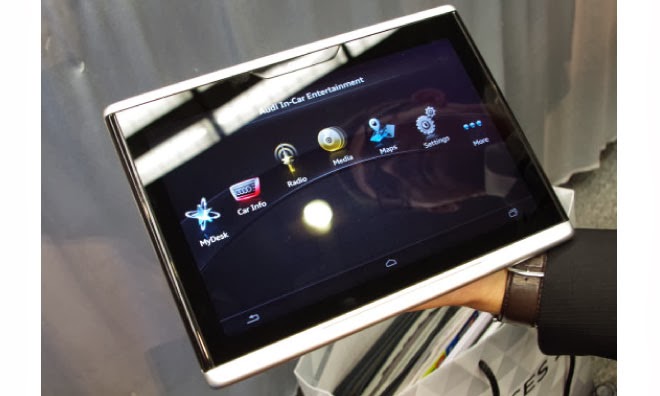
Audi Smart Display, A Tablet PC For Car Operation


Audi Smart Display
Audi is showing; How the automotive future looks like at this year's CES (7 to 10.1 in Las Vegas. ), Among others, with its Smart Display. The Smart Display Audi is based on Android and has a ten-inch touch screen. Current vehicle data rates (such as fuel consumption and distance traveled), plan routes, regulate the air conditioning or the music system of car all can be monitored and modified accordingly.

 These all goes with the Tablet PC Smart Display by the Audi at the CES presented in 2014 - a delight for the passenger or the passengers in the back seat! The Ingolstadt-based carmaker has integrated a number of self-developed apps in the Android device.

This has a ten -inch display, and boasts all the essential features of the things and software available for a tablet, such as the access to the Google Play Store. Even the Internet browsing works well while driving, the Smart Display uses the built- in new Audi models LTE module. Compared to current tablet PCs, the Smart Display Audi looks quite chunky.

This is due to the robust aluminum housing. According to Audi, the device is designed so that it can withstand temperatures from minus 40 to plus 80 degrees Celsius without any damage to the hardware and software- so it can stay in the car even on sweltering summer days and cold winter nights.

The Audi Smart Display is still in development stage. When the device serial production attained and the price can be announced, until then we have to wait. But it is clear that Audi will offer its Smart Display only as an adjunct to a new car; individually it should not come on the market.

First leaked screenshots of forth coming Windows 8.1 Update 1


Windows 8.1 Update 1

Windows 8.1 Update 1

Windows 8.1 Update 1
In 2014 and 2015; Windows users can look forward for the three major updates to their operating system. The smallest is going to happen in April for Windows 8.1 which is free according to the sources, which probably goes by the name "Windows 8.1 Update 1" or " Windows 8.1 2014 Update".

So far it is only known this much and there will be hardly visible innovations it seems. But Microsoft aims to improve system performance and provide more stability. Windows 8.1 Update 1 is therefore likely to closely resemble the previous service packs.

Already screenshots of a preliminary version of the update are leaked on the net. However, they show no changes compared to Windows 8.1. Only the version number of Internet Explorer 11 has increased slightly. According to the rumor, Microsoft will distribute this pre-release version from the third week of January for the first time to the selected partners.

Shortly thereafter, is thus to be expected the first leaks of the pre-release version. According to another insider, the final output of the update is the end of March then on 1 April 2014 it will be freely available for all users to download - just in the time of Microsoft's developer conference this year.

10Gbps USB3.1 demonstrated at CES 2014


10Gbps USB3.1
The current USB 3.1 interface allows you to charge devices as well as a faster data transfer, or the both. At the consumer electronics trade show CES 2014 they have demonstrated the capabilities of the USB 3.1 adopted the USB 3.1 standards by Rave Jeff Craft, president of the USB Implementers Forum.

This provides 10 Gb / s double the USB 3.0 speed and enables the Power Delivery to charge devices with up to 100 watts - under certain conditions. The first demonstration shows a fitted with two SSDs PC (one per PCIe and one USB 3.1), which achieved a reading rate of around 1,000 MB per second, according to the ATTO Disk Benchmark, thanks to the gross data rate of 10 instead of 5 Gigabit per second, and only 3 percent protocol overhead instead of the previous 20 The latter is made possible by the 128b-/132b- instead of the previous 8b/10b encoding, thus a loss of 4 bit per 132 bits.

A special FPGA chip in the hub allows power delivery and also to connect a monitor at the same time. Another function that supported by USB 3.1 is the Power Delivery in the form of six profiles ( 0-5), who can afford each 10, 18, 36, 60 and 100 watts.

Beyond 36 Watt Micro- USB connectors are not provided, only the large connector of type A and B should engage. The devices can negotiate their skills before. This corresponds to what the proprietary devices support already, but just in a standardized form. Jeff Rave Crafts presentation included a printer connected to a hub monitor and a notebook from which a trailer was transferred to the display. USB 3.1 is not fluent in HDCP, which are protected under other Blu-rays. Since the standard has already been adopted, Rave Craft expects the first products at the end of 2014 to be available in the market.