Tuesday, 26 November 2013
Great Android Fitness Appcessories
Appcessory will be a new physical item added to interact with your Android phone, Mac or tablet. Many range of item are available at stores, such as from children’s toys to blood pressure monitors are available. This is going to take care of your health in a better way and appcessories will help you to make out most of your workouts.
Considering with Android phones purchased at larger amount and price to leave at little bit lower nothing went great till this instance. But this new appcessories will inspire you take up physical exercise like jogging at a more comfortable zone.
FitBit Ultra:
Fitbit has come special feature of some of other devices like, pedometer, accelerometer, and sleep tracker that will clip onto your pant pocket especially for men. This one will suits for women of if they clip it in front of their bra, it will be much more comfortable.
This device not only performs functions of device mentioned above but adding walking distance, the number of stairs you have climbed, time taken for your sleep, and it also determines how long you’re active during the day. This performs by wireless communication when you are connected to computer. It is also possible to track the information in Web through Fitbit’s Android or iOS app.
2. MOTOACTIV GPS Fitness Tracker and Music Player:
MOTOACTIV is just a device above the jogging accessory along with the Android device by their design. It is available at regular version and gold edition. MOTOACTIV can either be used as Android phone or just a detached device.
MOTOACTIV just fits in your wrist like an watch, stores music, monitors the distance you ran, also your heart rate and makes it schedule for you to walk and run. Since it performs like an Android device it’s pricy at the cost of $200-$300 relying on the model you choose.
3. Jabra Sport Bluetooth Stereo Headset:
Sometimes tunes help you to boost up your workouts. This Jabra Sport Bluesport headset provides full stereo without the cords getting in your way via a standard Bluetooth. You can place your device anywhere either at your back pocket or front pocket. This is very compatible with the android version of Endomondo.
4. Withings Wi-Fi Body Scale:
Do you regularly note at what time you would wake up, It’s hardly not possible to record in morning. Withings offers a bathroom scale that weighs your weight and body fat, estimates BMI and sends those information wirelessly to many websites, also this is supportable with many other Apps and devices. So this could hang out your diet plan and your morning records.
FitBit also introduced a similar device of wireless functionality by 2012. This app is also supportable by Fitbit.
5. ScoscheMyTrek Wireless Pulse Monitor:
MyTrek is a device that attaches to your forearm and will monitor your pulse to gauge workout intensity. This device is similar to that of Motorola’s watch idea. TomTom is build-in GPS to provided to measure intensity of your workouts. It comes out with Android as a free version or iOS. So there is no need to buy more appcessory than to use actually.
Top Android Sport Apps
Keep you In Game Whenever You Are
For fervent sports fans a time away from gaming is too long. Providentially for those who carry an Android phone with access to Android market can download as man gaming app as possible and try to engage with that. Developers of Gaming will also entertain with the same spirit.
1. NFL Apps for Android
NFL go on with to be the most popular gaming developer in USA. Owing to it’s popularity the Internet is packed with blogs, websites loaded with stats. If you need to have a scoring updates, any latest news or to meddle up with football fix, there are quite a few Apps devoted to the NFL so that app are available on your Android devices. Their categories in the Android market, surplus either for free or for fee, get it and install on your Android device. What stuff this app really provide you? They often provide you NFL news, Scoring updates, Player and team statistics, Standing and lots more.
They set free their content better than others.
2. NCAA Men’s Basketball
For those who have a busy schedule all the throughout the day and hardcore fan of basket and is not so easy to watch out every tournament game, but with this app you can always have an update through the end.
Match viewing is not possible but updates on NCAA Men’s tournament, and provide in-details about favorite team, player. So NNCA app is available at stores.
3. NHL
Basket being the most important by developers doesn’t mean Hockey has been neglected. Avid hockey fan can find out the app in Android market published NHL app that tops the app among hockey. Everyone cannot afford it because it is published at paid subscription. Most of the app being fee free, they may charge a little bit. This is no more being a great deal because news stream on Hockey is no longer a tough task, thanks to Android market and few hockey developers to publish at affordable rate or fee free.
4. MLB
Interested in following your favorite team rite from the pre-season through October ball, when you are not finding time to stay at television, this dissatisfaction can be tolerated with your Android app that helps you to keep you updated.
Pre-Season don’t have much to deal with too many matches, but regular season consist of 162 games. So there prevails many changes and many of MLB apps have Rss feed option used to surf internet deliver the latest news and buzz about your favorite player and team. On installation of this app you are assured that you won’t miss any action in America.
5. NBA and WNBA
Among the major sports, NBA has always given a kick spirit to their fans. This app keeps you update with all scores, news and buzz available at Android market. Common features shared by this app are scoring updates, detailed standing, team and league news, player information.
Hardcore NBA fans having access to Android market is thrilling and will provide all news and updates from around the league.
For fervent sports fans a time away from gaming is too long. Providentially for those who carry an Android phone with access to Android market can download as man gaming app as possible and try to engage with that. Developers of Gaming will also entertain with the same spirit.
1. NFL Apps for Android
NFL go on with to be the most popular gaming developer in USA. Owing to it’s popularity the Internet is packed with blogs, websites loaded with stats. If you need to have a scoring updates, any latest news or to meddle up with football fix, there are quite a few Apps devoted to the NFL so that app are available on your Android devices. Their categories in the Android market, surplus either for free or for fee, get it and install on your Android device. What stuff this app really provide you? They often provide you NFL news, Scoring updates, Player and team statistics, Standing and lots more.
They set free their content better than others.
2. NCAA Men’s Basketball
For those who have a busy schedule all the throughout the day and hardcore fan of basket and is not so easy to watch out every tournament game, but with this app you can always have an update through the end.
Match viewing is not possible but updates on NCAA Men’s tournament, and provide in-details about favorite team, player. So NNCA app is available at stores.
3. NHL
Basket being the most important by developers doesn’t mean Hockey has been neglected. Avid hockey fan can find out the app in Android market published NHL app that tops the app among hockey. Everyone cannot afford it because it is published at paid subscription. Most of the app being fee free, they may charge a little bit. This is no more being a great deal because news stream on Hockey is no longer a tough task, thanks to Android market and few hockey developers to publish at affordable rate or fee free.
4. MLB
Interested in following your favorite team rite from the pre-season through October ball, when you are not finding time to stay at television, this dissatisfaction can be tolerated with your Android app that helps you to keep you updated.
Pre-Season don’t have much to deal with too many matches, but regular season consist of 162 games. So there prevails many changes and many of MLB apps have Rss feed option used to surf internet deliver the latest news and buzz about your favorite player and team. On installation of this app you are assured that you won’t miss any action in America.
5. NBA and WNBA
Among the major sports, NBA has always given a kick spirit to their fans. This app keeps you update with all scores, news and buzz available at Android market. Common features shared by this app are scoring updates, detailed standing, team and league news, player information.
Hardcore NBA fans having access to Android market is thrilling and will provide all news and updates from around the league.
Learn More Telephone Systems
Communication is the cornerstone of maintaining a solid relationship with your clients and vendors in your business. If you need a solid telephone system, Learn more from companies like QCC. Making sure your customers can reach you to make purchases or talk to your customer service staff about any product or service issues they are having is critical.
Whether you strictly need the essentials of a telephone system and service, or you also need data and security services, a comprehensive company will keep you secure and fully accessible to your clients. Avoid the risk of alienating your customers with a less than stellar communications system. Find the best company to fill your communications needs.
Make sure you find the most current and up-to-date telephone system available to make sure you and your team never miss a phone call. Having the best communications system gives your clients the confidence that you are always available to tend to their concerns and answer any questions they have about your business.
Your communications company should feel a commitment to improving your communications, trying to understand the intricacies of your business and precisely what your communications needs are now and what they might be in the future. Additionally, your communications system company should be as available to you to answer questions as you plan to make staff for your clients.
No business is too large or too small for a professional telecommunications company. Find the company that will help you determine what system will work best to satisfy your customers and let them know they are the most important aspect of your business.
A few of the basic voice-based communications concerns your telecommunications expert should address for you include IP telephony, telephone systems, unified communications, mobility, call center services, automatic call distribution, voice mail systems, presence management, conference bridges, predictive dialing, Interactive Voice Response (IVR) and carrier services.
In case you need data services, find a telecommunications company that can help with infrastructure, routing, cabling, switching, WAN integration, Internet access, help desk matters, server maintenance and upgrades, network management, a Digital Subscriber Line (DSL), Multi-Protocol Label Switching (MPLS), Integrated Services Digital Network (ISDN), a T-1 Carrier Line and more.
Since so much of your communications will rely on Internet access that might entice intruders, make sure you find a company that offers you security measures to keep your company's communications safe and secure from outside parties.
Top Must Have Applications for Your Windows Mobile
Windows is the series of smart phone operation system that is developed by Microsoft. Apart from the android operating system and iOs, Windows Operating system has been a popular operating system in the gadgets world. Windows mobile may have N number of apps which lets you to offer variety of features in the Smartphones. In this post, you can get the top must have applications for the windows operating system enabled smartphones. Here are the top must have applications for your windows mobile.
1. Twitter
Realtime search, top tweets, trending topics, and more are offered for official twitter clients for windows phone. This app will bring you the full Twitter experience as it does with Windows Live and Facebook. The only drawback here is that the Twitter app does not run in the background. This is one of my favourite application for my windows mobile which allows the users to hang out what is happening around the twitter world.
2. AP mobile
AP news comes to your Windows Phone handset. The app consists of exclusive photos,breaking stories and video from the trusted news sources. It also uses GPS to get local news stories. Sharing of news stories on social networks like Twitter and Facebook is also possible.
3. Weatherbug
Weatherbug includes forecast,local weather conditions, Doppler radar, live weather cameras etc. The app can be initiated to the start menu and is an active live tile that shows the current weather conditions on your home screen. This application can be useful for forecasting the weather report and you can easily plan according to it.
4. GoVoice
GoVoice is one of the first Google Voice applications which are not a official version to hit the Windows Phone marketplace. It displays your call history Google Voice inbox and transcribed voicemails.
5. Loopt
The social mapping program is now in Windows Phone that allows you to connect with your friends by sharing your status and location among friends. With this app, you can find your friends on a map and status updates and view their photo in real-time.
6. Poynt
Poynt is a location-based app that will help you find local businesses, movies, restaurants, and weather. The app gets your GPS co-ordinates and grabs websites, phone numbers and map directions for these local points of interest. Dining reservations and buying movie tickets can also be made by this application. The app is available only for customers in the US and Canada.
7. Yelp
This is the popular location-based application that will help you voice and find your opinion on local restaurants, bars, shops and more from your Windows Phone. But you cannot pull down personalized content like bookmarks and favourites.
8. Photobucket
The Photobucket application helps you to upload videos and photos from your Windows Phone the application also links to Photobucket’s Find Stuff categories and Search feature so you can download content from Photobucket to use as wallpaper on your phone.
By using these applications, you can easily stay tunes with what is happening around you in this world.
The Best Tech Gifts To Give Out This Year
Let’s face it: we wouldn’t know what to do if it weren’t for our electronic devices. Our smartphones help us take pictures, record videos, jot down notes, and oh yeah, make phone calls, too. Our media centers help us watch the latest movie releases and TV shows easily. Our computers are essential to our jobs. Every year, there’s always something better than the year before. This year, why don’t you get the very best for your loved ones?
- Get the iPhone 5s in gold, space gray or silver. The new iPhone comes with iOS 7 and a bunch of slick new features, including Touch ID, which uses your fingerprint as a lock key, the A7 chip, which delivers fast performance, and a new 8 mega pixel iSight camera. You can get the new iPhone 5s from any number of carriers from stores like Target and Walmart.
- Want to watch movies the way they were meant to be seen? Check out the 3M mobile projector, which is portable, and can connect to all Apple devices. You can hold your own movie festivals or marathon TV screenings anywhere you want, whether it’s in the living room, or in your own backyard. You can find the projector at stores like Walgreens.
- Know a bookworm who can’t stand reading on tablets? Give them the gift of a Kindle Paperwhite, which is designed with readers in mind. The Kindle Paperwhite has an eInk screen that allows for easy reading without glare, and also includes a built-in light so that you can read the screen in low light. Kindle owners can also look forward to GoodReads integration, which will allow them to be social with their friends about their reading habits, and Kindle Freetime, which will help your kids track their reading progress and reward them with achievements when they meet their goals.
- If you have $2200 to spare, you could drop it on the Makerbot Replicator 2, which is a real 3-D printer, and is the perfect gift for someone who has everything. They are guaranteed not to have this. This 3-D printer will fabricate objects out of polymers, based on your own designs, or plans that can be downloaded online.
- Have a super-adventurous friend who lives to bungee-jump, snowboard, and skydive? The GoPro 3D HERO Housing and Sync Cable is the perfect gift. Strap this camera to your friend’s head on her next adventure, and hit record. You can simultaneously download the footage with the sync cable, and have a permanent record of all the falls, jumps, and crazy antics.
- The Wii U Deluxe is the next step in the evolution of gaming consoles. This system comes with the Wii U GamePad controller, which has its own screen, and can be used either alone or in conjunction with the main console and other Wii remotes. The GamePad has its own camera, stylus, microphone, and support for Near Field Communication (NFC). Play in your own sandbox with the Wii’s built-in software such as Wii U Chat, Nintendo TVii, or immerse yourself in the Miiverse online community.
- Get the iPhone 5s in gold, space gray or silver. The new iPhone comes with iOS 7 and a bunch of slick new features, including Touch ID, which uses your fingerprint as a lock key, the A7 chip, which delivers fast performance, and a new 8 mega pixel iSight camera. You can get the new iPhone 5s from any number of carriers from stores like Target and Walmart.
- Want to watch movies the way they were meant to be seen? Check out the 3M mobile projector, which is portable, and can connect to all Apple devices. You can hold your own movie festivals or marathon TV screenings anywhere you want, whether it’s in the living room, or in your own backyard. You can find the projector at stores like Walgreens.
- Know a bookworm who can’t stand reading on tablets? Give them the gift of a Kindle Paperwhite, which is designed with readers in mind. The Kindle Paperwhite has an eInk screen that allows for easy reading without glare, and also includes a built-in light so that you can read the screen in low light. Kindle owners can also look forward to GoodReads integration, which will allow them to be social with their friends about their reading habits, and Kindle Freetime, which will help your kids track their reading progress and reward them with achievements when they meet their goals.
- If you have $2200 to spare, you could drop it on the Makerbot Replicator 2, which is a real 3-D printer, and is the perfect gift for someone who has everything. They are guaranteed not to have this. This 3-D printer will fabricate objects out of polymers, based on your own designs, or plans that can be downloaded online.
- Have a super-adventurous friend who lives to bungee-jump, snowboard, and skydive? The GoPro 3D HERO Housing and Sync Cable is the perfect gift. Strap this camera to your friend’s head on her next adventure, and hit record. You can simultaneously download the footage with the sync cable, and have a permanent record of all the falls, jumps, and crazy antics.
- The Wii U Deluxe is the next step in the evolution of gaming consoles. This system comes with the Wii U GamePad controller, which has its own screen, and can be used either alone or in conjunction with the main console and other Wii remotes. The GamePad has its own camera, stylus, microphone, and support for Near Field Communication (NFC). Play in your own sandbox with the Wii’s built-in software such as Wii U Chat, Nintendo TVii, or immerse yourself in the Miiverse online community.
By Allison Preston. Allison is an avid shopper and an experienced writer with a passion for deals and coupons and for saving her readers money. She currently writes for leading coupon and online promo code site bluepromocode.com based in Santa Monica, California.
Monday, 25 November 2013
Samsung makes quiet push for new mobile OS Tizen
So far, Samsung sold devices with Android. But with Tizen the Koreans have an operating system in hand, which is equally suitable for their products like cameras, televisions and refrigerators.
Tizen 2.0 Magnolia; The Linux-based operating system is not only suitable for Smartphones and tablets, but also for cameras, televisions and refrigerators.
Samsung's success is currently to a large extent on Smartphones and tablets with Android. However, the operating system is open despite code under the control of Google. With Tizen the Korean company is now having a better alternate operating system, whose development is already well advanced and is even suitable for cameras, televisions and refrigerators.
In addition to the devices are still lacking, especially apps. Samsung is playing a leading role in the development of Tizen and the manufacturer who has already announced products with the software - but still working in the Tizen Association with other well-known companies. This includes manufacturers such as LG, Fujitsu, Huawei, Sharp and Panasonic, mobile companies like Vodafone, Orange, and SK Telecom. But also companies from other areas such as McAfee, Trend Micro or eBay are also take part. Overall, the association has a proud 46 members in 2013 end.
Beginning of November 2013 took advantage of the Samsung developer conference of Tizen to introduce the NX300M, the first system camera with Tizen OS. Apart from the operating system few differences to Samsung NX300 can be seen. For now, the Tizen camera appears but for around 600 Euros in South Korea. A Smartphone from Samsung was expected in early 2013.
Currently iOS and Android shares the major Smartphone and tablet pie among themselves. Microsoft manages resistant with Windows Phone. BlackBerry does not matter more and more systems such as Firefox OS, Ubuntu or Jolla have not yet found widespread use. Samsung is now well known enough and has enough power to establish and have financial resources to make it's own operating system on the market.
The development of Tizen OS is already at an advanced stage without equipment for sale - for the beginning of 2014, the version 3.0 is already announced - and if the prospect is that Samsung sells millions of devices, then no developer will want his app withheld from the public, so that the Tizen App Store fills quickly.
Samsung's success is currently to a large extent on Smartphones and tablets with Android. However, the operating system is open despite code under the control of Google. With Tizen the Korean company is now having a better alternate operating system, whose development is already well advanced and is even suitable for cameras, televisions and refrigerators.
In addition to the devices are still lacking, especially apps. Samsung is playing a leading role in the development of Tizen and the manufacturer who has already announced products with the software - but still working in the Tizen Association with other well-known companies. This includes manufacturers such as LG, Fujitsu, Huawei, Sharp and Panasonic, mobile companies like Vodafone, Orange, and SK Telecom. But also companies from other areas such as McAfee, Trend Micro or eBay are also take part. Overall, the association has a proud 46 members in 2013 end.
Beginning of November 2013 took advantage of the Samsung developer conference of Tizen to introduce the NX300M, the first system camera with Tizen OS. Apart from the operating system few differences to Samsung NX300 can be seen. For now, the Tizen camera appears but for around 600 Euros in South Korea. A Smartphone from Samsung was expected in early 2013.
Currently iOS and Android shares the major Smartphone and tablet pie among themselves. Microsoft manages resistant with Windows Phone. BlackBerry does not matter more and more systems such as Firefox OS, Ubuntu or Jolla have not yet found widespread use. Samsung is now well known enough and has enough power to establish and have financial resources to make it's own operating system on the market.
The development of Tizen OS is already at an advanced stage without equipment for sale - for the beginning of 2014, the version 3.0 is already announced - and if the prospect is that Samsung sells millions of devices, then no developer will want his app withheld from the public, so that the Tizen App Store fills quickly.
SkyDrive gets major update for iOS!
After a long wait of two year Microsoft SkyDrive app is entitled to a major update on iOS. SkyDrive and Microsoft signed application provides access to a storage space in the cloud of society. The war between the services for these digital lockers in the cloud is fierce between Dropbox Box, Google Drive etc.
It is therefore logical that Microsoft provides an updated saving and necessary for its application for iOS 7 in these days. First, it becomes now possible to upload your photos and videos automatically to the cloud SkyDrive with their iPhone or iPad.
This feature already exists on the application of competing services but also now available for SkyDirve App for Windows Phone. The user can decide if he wants the transfer takes place only via Wifi or wish to transfer via the cellular network. But it also has the option to define whether the photos will uploaded to their original resolution or a lower resolution to save space up on SkyDrive.
But main disadvantage is that the downloading pictures and videos to servers cannot be done in the background. Microsoft has also announced a new feature for editing and viewing documents using Office Mobile and OneNote integration. It is now actually possible to directly edit documents stored on SkyDrive from both mobile applications. SkyDrive for iOS also has made some changes in the appearance with clean design.
Android VPN Connection
Android phones have merged and produced a phenomenal changed in mobile technology. This popularity to Android phone was due to its calling, texting, media, browsing and lots more. If your owing an Android Smartphone then browsing tends be a major part. User usually use browsing through mobile data, Hotspots, Wi-Fi and many of those, but these are not the most secured way to surf the internet and due to increasing cybercrime security user have to opt for a secured browsing.
It’s a need to be secured in internet to avoid unnecessary site warning and dilemma. To overcome this scenario user can secured online via VPN connection. VPN become a must in Android phones to escape from cybercrimes as their snatch towards unsecured user have become a lot. If user need to be safe online then a secured and protected path to their desired information is a necessity and these are provided by VPN. To find the best solution to this is provided.
“http://www.bestvpn.co.uk/android-vpn-service/android “VPN connection. This VPN site usually provides unrivaled security and unsurpassed protection.
With many new features added to android phones VPN has become a prominent in android operating system. VPN provides you safer technology along with android now user can play with much stuff on internet like business, entertainment and many others. Along with android VPN can be connected by the user to internet via cellular data or Wi-Fi or any other means. It supports many protocols such as PPTP, P2TP, L2TP over IPSec and SSL VPN, along with this Android provide the best security and safety measures. Not only security methods are provided in VPN but it allows gives additional features which may allow access blocked sites and their content with a VPN connection in the Android device. They will also help to support your business along with your needs, you can also have a link up to your company main office and can compress any stuff that you need to do while sitting in your office.
By providing these many features to user Android VPN has really given a stylish and reliable alternative to connect towards the internet. Virtual Private Network is the recent technology that produced a safe and reliable way to surf the net. So user need not worry about the loop holes in security and privacy of the network. Network might be attacked by intruders and an authorized personal people but this VPN will always provide you the best security measure.
VPN provides a speed and satisfactory to user. With more and new apps in Android phone but VPN had taken over lead about every about app and made the user to afford any app with ease. So in order to find the best security that will your support your device can be discovered @ http://www.bestvpn.co.uk/android-vpn-service/ VPN for your android mobile. This let the user to connect to a Wi-Fi for internet with ease and its impressive features and capable of remembering the previous connected networks. This lets you to connect to network in a smarter way. So now try out the VPN with Android and surf the internet in a secured way.
Transcend the Limits of a PDF Catalog by Creating through Online Catalog Software
Your clients get the first peek into your products in your catalog. So, it is imperative that this piece of document showcases your offerings in all their glory so that the beholder feels compelled to pick up the phone or click on the “Buy” button. There was once a time not too long ago when businesses used to put up catalogs in PDF format on their websites.
Some still do, but not the prudent ones. Those business owners and digital marketers who had realized the limitations of the PDF form of catalog have already made the switch to creating their catalogs using powerful online catalog software programs.
The following are the relative advantages of using a piece of online catalog software over PDF documents:
This was written by Anthony Lee Turner, a digital marketer and software enthusiast.
Some still do, but not the prudent ones. Those business owners and digital marketers who had realized the limitations of the PDF form of catalog have already made the switch to creating their catalogs using powerful online catalog software programs.
The following are the relative advantages of using a piece of online catalog software over PDF documents:
- Doing away with downloading woes. A PDF catalog has to be downloaded before it can be viewed. On the other hand, a product catalog created using online catalog software does not require the audience to do anything except view it. Because they don’t need to download any document and wait while the process is underway, your audience is encouraged to take a look at the catalog.
- Creating mobile-ready content. By doing away with the need to download any file, a product catalog created using online catalog software is more mobile friendly than its PDF counterpart. This lets businesses reach out to an ever-increasing segment of the target audience who use their hand-held mobile devices to access the Internet.
- Creating multimedia-rich content. You want the best features of your products to be highlighted in the catalog. Transcend the limits imposed by the PDF document that can only support 2D images and instead use online catalog software to create interactive and compelling animations—3D views of a product or a walk-through of a furniture store.
- Grabbing the social advantage. Unlike in PDF documents, social sharing buttons can be embedded within catalogs created using online catalog software. The presence of these buttons within the catalog encourages viewers to share the content and influence the opinions of their friends and followers on the social media.
- Creating a rich shopping experience. A product catalog created using online catalog software lets you offer a superlative and simplified shopping experience to your customers. Items added to the shopping cart on any of your product sites will automatically be added to the basket on your e-commerce site. Your customers can thus make a single payment for all their buys on a single site.
- Being able to track viewer analytics. A catalog created using online catalog software scores over a PDF format by dint of its superior analytics tracking abilities. A PDF catalog lets you measure only the number of downloads whereas the former gets into more specific details and keeps track of the exact products that the viewer may have clicked on to find out more about it.
This was written by Anthony Lee Turner, a digital marketer and software enthusiast.
Motorola patented a tattoo that reveal your lies
In science fiction, we often see the future humans with electronic devices embedded in their bodies. Well, know that the future is near! In fact, Motorola has filed a patent for an electromagnetic "tattoo" connected to be placed on your throat.
It lets you communicate with your loved ones and will even act as a lie detector! DGS explains this futuristic patent. Motorola Company, now owned by Google, has recently filed a patent for a strange object; Yes a "tattoo" with electrical circuits that will capture your voice in the clearest way possible because the transmitter will be placed direct contact with your sounding board!
It applies as a sticker holding long on your skin and will be equipped with an antenna, a microphone, a power supply and even a small screen. In short, this device is a real communication device placed directly on your skin that can connect to a Smartphone, or even a Smart Wash Google Glasses. However, this tattoo hides another feature.
Indeed, it could serve as a lie detector as reported in the patent; "The tattoo may include a sensor skin reaction. It has been shown that a user might be nervous or tells lies show different when telling the truth skin reactions. " We love the idea of this new communication device!
However, the issue of polygraph remains unclear. Some journalists sees it already spying on the part of businesses and sounding the alarm bell about the privacy of the user. To take advantage of this technology, is that you would be willing to sacrifice your privacy?
Sunday, 24 November 2013
Things that you failed to know about Gmail
Tricks to surf Gmail:
Gmail most used Mail site across the world. Don’t you feel it’s cheap than its available, doesn’t add ads to signature of your Gmail messages letting you use the best available space to your satisfaction.
Still not convinced with the Gmail features? Let you know more about Gmail to make the best use about it.
Tricks to use Gmail:
1.Offers Gmail offline with Google Gears:
On installing Google Gears you can use them in Web like you use it in desktop client. It provides interface at three modes, Online, Offline, and Flaky connection. Flaky connection one don’t have good signal strength. If you have sent message offline, your message will sent when you are connected to internet and you will receive messages that is already sent on availing the connection.
2.Get driving Directions from Gmail:
Have you ever tried sent an invitation with an address? Google by design detects address in the message and creates a link to right of the message and requesting you if liking to map it. It also offers to track the put together that they receive messages that contain them.
3.Turn on Experimental features with Gmail Labs:
Gmail Lab is a feature that is provided by Gmail to experiment with features that aren’t necessarily ready for worldwide release. This isn’t so popular, it so this will be incorporated to main Gmail interface.
Illustrates that inclusion of Mail Goggles attempts you to give headlines test prior to your post on the weekend, it may also include game and useful task.
4.Add Gmail Themes:
It would be boring to use the default theme provided by Gmail. So now it offers you to create your own theme and publish to your Chrome browser. Sometimes the interface created might make you little tough in reading other than that it’s a pure to workout with.
5.Task List:
This feature prolonged not available in Google but it has worth the wait. You are allowed to create your own to-do-items and give access to view it whenever you need to. It provides the notification on due dates and add details as you need. Task list can be hidden, stay above the page or can be viewed in iGoolgle or Google calendar.
6.Use Google App to send Gmail From Own Domain:
Nowadays people provide Gmail address as their professional contact, but still not satisfied with professional look. Then here is an idea to own your own domain, you can make free use of Google App to make it as personal Gmail account.
7.Video Chat From Google:
Gmail offers Google chat and allows you to send message in your contacts and also engage in voice and video chat, supported in both Windows and Mac OS. But at present is not supported in the version of Google Talk.
8.Check The Gmail Server Status:
Have you ever wondered that Gmail is down and have checked the status; you can check the status form Google Apps Status Dashboard.
9.Remember The Milk:
People who aren’t satisfied with Task List of Gmail more service are provided with Milk. Manufacturer is not Google but integrated with Gmail.
Things You Didn’t know you could Do with Google Maps
Get Walking Directions:
User deal with only driving direction to and from a location. You could also possible get walking direction and if permitted get public transportation directions in selected areas. This is not possibly at every instance but try to, select car, walking or transportation and direction in a customized way.
Get Alternative Driving direction by Dragging:
Sometimes the way direction provided by Maps may coincide with the construction area or toll area and needed to take a longer route by just dragging the path around. It isn’t hard, just with free hand go around find a better path.
Embed Maps on Your Website or Blog:
On clicking the Link provided Upper right hand side of Google Map will provide URL to use them as your map and it gives you a code. This will help you to embed a map in any web page that supports these kind of embed tags. Many of you have embed an YouTube link, if that is possible then this is also possible to embed a map.
ViewMashups:
This allows programmers to catch o Google map and combine it with other data sources, so unexpected effects may appear. This states that some effects like what would happen if this place is at nuclear blast.
Create your Own Maps:
Need not be a programmer to create your map. Just you can add Flags, objects and shapes. Publish and share it with your friends to establish.
Edit location in Google Maps:
Have you ever noticed that entrance of a company at other side? Don’t save and try to edit it. You can edit every location you could and make things to their original location.
Get a Map of Traffic Condition
Viewing the traffic condition of your city at Google maps, combine this with the alternate route to get out from traffic location and it will navigate to best available route. And also keep a note of not doing these while driving.
Street View
Street view helps to show the image of certain street captured from a special camera, but unfortunately have caused troubles to Google, but indeed this is a way to find address and identifies how your destination will look like. Privacy was the problem with Street View and Google responded to it by Blur faces and license plate numbers from captured images.
Share Location with your Friends
Latitude a feature introduces by Google to share your location with friends. Update to this is provided and you can do it manually or automatically. This Latitude can be used in Phones or standard device that supports Google Map.It might be little hard to enable location sharing but it’s your wish to turn on or off them.
Top 5 Features That Makes Google+ Unique
Social media is becoming a part of our life and it makes us to spend our time with it. Social media website allows us to stay tuned with the event which is happening around us. We people use social media for many purposes and it acts a medium between you and your friends. Google Plus is a wonderful social media which is maintained by the Google Inc. Since it is from Google, you can get lots of stuff from the Google Plus. In this post you will get few things about the Google Plus;
1.Better Notification system: Google Plus has a better notification system which allows you to get notified when a message is received on your profile. Unlike other social media website, Google has a ultimate notification system which automatically sync the notification into your device. Not only with the device, you will receive the notifications automatically if you’re using any of the Google services such as YouTube, Gmail and so on. If you’re using the above things, you will get automatically get notified with these system. Suppose if you’re using the Gmail for the instance, you will be automatically get notified with the Google Plus notifications.
2.Google Hangouts: Google Plus allows its users to chat with their friends and relatives in their circle by using the Hangouts. Google hangouts are the best platform which brings you a cross interface which let you to perform instant messaging as well as the video chatting.Google Plus Hangout replaces the old Google Talk in your smartphones and you can easily chat with your friends via this application.
3.Integrated Photo Editing system:Google Plus has a built in photo editing system which allows you to edit the photos automatically. You can experience a better image processing in the Google Plus; Google Plus mechanism selects the best image and it rejects other list of images which are blurry and having bad exposures. No need to use Photoshop before uploading images in the Google Plus, Google Plus allows you an inbuilt photo editing system for uploaded image.
4.Hashtags: Google Plus allows you to use hashtags from which you can easily find out the related stuffs over the Google Plus.Hashtags made an easier waywhich allows us to discover new stuff and even you can go through all the post which is related to your hashtag. The implementation of hashtags in Google Plus has made Google Plus to step forward in the social media industries. By simply clicking the hashtag, you can access lots of information about it in a second.
5.Multi-Columns Designed Stream:Google Pluslatest design offers you a fantastic look which made the Google Plus a better choice for the young people.Google Plus makes your post to been seen in a prettier way and you can even post the content which will took more space. Multi-column stream design gives a better life to the Google Plus.
Friday, 22 November 2013
Service Pack 1 for Office 2013 will be released
The first service pack for Office 2013 will be released at the beginning of next year. Microsoft says it will be provided for better, enhanced performance and new features.
According to the blog post by Chris Schneider, Marketing manager in the Office team at Microsoft, that the Service Pack 1 for Office 2013 will be published in the early 2014, But there is no further more details about the SP1 or the new products.
Hence we could infer that with the Service Pack1 the Office 2013 will be more powerful and will have more features and tools with improved compatibility with Windows 8.1. In addition to the Office suite, will have the updated for the SharePoint 2013 and Exchange 2013. It is software that is mainly used in businesses to use. Users of Office 365 do not need to update their product. Since this runs in the cloud, it always works with the new version.
How to Create a realistic snapshots of your websites
Branding is becoming an important factor in improving various kinds of business activities and you can make several changes in your branding by promoting your brand online. Suppose if you have a website or an online business, it is very necessary to brand your website and for that you need to work very hard. There are so many tools are available in the online which lets you to promote your band and you can easily create trends among the people using these tools. Some of these tools may be a free one and also some of them may be a premium one. The premium one ismore effective than the ordinary paid ones. But there are some tools are available online which works like a paid one even they are totally free.
In this post, you can get a detailed info of creating realistic images over a realistic environment Screenshot. By using this online tool, you can create very realistic images of your product. For example, a child holding a mobile in which the screen display the website of your product. This will create a huge mass in the mind of the teenagers in this globe. This tool lets you to choose lots of devices in which your product will be displayed over the screen.
Placeit.net is a awesome website which enables you to create a snapshots as shown in the following figure.
By using this online tool you can create as many as screenshots you need to promote your website; you can easily improve your website popularity among the people heart by using such sort of promotions. This online tool easily captures your website image and you can grab the image to insert it over the various devices present in that website. The various steps for creating the screenshots are given as;
Step 1: Open the website ( http://placeit.net) and you will find some stages and backgrounds for the images. Now you can create awesome screenshots by two ways: 1. by directly uploading the images on the website and 2. Grab the Screenshot of your website by simply entering the URL in the Placeit.net.
Step 2: Once selection of particular option has been over, you can download your image from the website very easily.
Suppose if you have selected the second option, then you can easily grab your website screenshot and you can insert then in your image.
This website allows you to create a personalized image of your website and this let you to create a screenshot of your online business. Hence you can easily create a mass promotion of your online business using this online tool.
Creating a brand is not very easier job but it requires a lot of hard work to improve the level of your brand and you need to perform lot of hard work to promote your website or your online business. Hope you liked this article and you can send your feedback through the comment box given below: D
Phone Cameras For the Win!
When the first phone camera was sold in the year 2000, few could have predicted the widespread impact of such an invention. According to Bloomberg Businessweek, traditional camera sales throughout the world fell 29% January through May of 2013. This same year Flickr reported the top three highest percentages of images posted were produced by various iPhone models.
Though lenses can't be changed out to cover as broad an array of situations as SLRs, there are a number of reasons camera phones have surpassed digital SLR rigs in terms of sales.
Small and Powerful
The most inexpensive phones normally come equipped with cameras featuring 5 megapixels or higher. Now 8, 13, and on up to 42 megapixels can be found on the market. Many include first-rate editing programmes and offer the ability to share images with most social networking sites immediately. Compare the bulk and weight of an old Nikon (5-6 megapixels) to a sleek 13MP mobile carried in one's pocket and it's easy to see why the big camera manufacturers are hurting.
Always on Hand
When attending an event, photo hobbyists must make the decision whether they'll be working or playing. Many love nothing more than to be on hand to capture the moment, but in the past that meant schlepping gear and worrying about equipment getting damaged or stolen. Now with the ability to get images worthy of print from a small phone? Everyone's a photographer. Plus if trying to be more discreet during special occasions a mobile's the way to go.
Easy Sharing
Consider first the film age, which involved sending images off to be processed or developed yourself if you had the proper darkroom setup. Then one hour processing became the rage. Digital cameras came along and blew everyone's minds with the new-found ability to shoot as much as one wanted and then simply transfer to a computer. But still, that required connecting the camera to a computer or reading the memory card. Still an amazing breakthrough but now mobile sharing on smartphones is as easy as the click of a few buttons.
Changing Society
Such ease of use and the rise in popularity of social media platforms may be a chicken or the egg scenario but the very multifunctionality of a phone camera makes it quite obvious why traditional camera sales are suffering. Not only has the professional camera industry been greatly affected, but the ways in which societies act and interact have been greatly impacted as well.
Concerts reveal a sea of lighted phones held high, weddings are documented and posted long before the bride and groom go on honeymoon, and with programmes like Instagram everyone's an artist. Every day little things now seem worthy of documenting and sharing. Plus go to any event of note and see how most people will spend loads of money to physically attend but then watch the entire proceedings on the screen of their phones.
The Cons
The less-than-savory societal changes of being in attendance yet experiencing through a camera lens has also caused changes in the way people do business. Originally, cinemas only asked that phones be silenced, whereas now the glow of the screen times however many people is also cause for complaint. Too, when mobile photographers get really engrossed in grabbing the perfect image it's not uncommon to see them losing sight of personal boundaries and common courtesy. The bloke behind you didn't shell out £100 to watch a concert through your camera. And it's become such a rampant problem that some promoters and artists are starting to ban camera phones altogether.
Add in the constant barrage of images posted publicly (with or without one's consent) and it seems it's been forgotten that with the privilege of such brilliant technology comes responsibility. Phone cameras are wonderfully convenient things. However no 'gadget' should cause a rift between friends. Though camera phones are used the world over, when in doubt—ask.
Ask if it's alright to take photos and ask if you're allowed to post them. It also wouldn't hurt to occasionally put the phone down and just be in the moment. It's your life, not television so share it and enjoy it.
Though lenses can't be changed out to cover as broad an array of situations as SLRs, there are a number of reasons camera phones have surpassed digital SLR rigs in terms of sales.
Small and Powerful
The most inexpensive phones normally come equipped with cameras featuring 5 megapixels or higher. Now 8, 13, and on up to 42 megapixels can be found on the market. Many include first-rate editing programmes and offer the ability to share images with most social networking sites immediately. Compare the bulk and weight of an old Nikon (5-6 megapixels) to a sleek 13MP mobile carried in one's pocket and it's easy to see why the big camera manufacturers are hurting.
Always on Hand
When attending an event, photo hobbyists must make the decision whether they'll be working or playing. Many love nothing more than to be on hand to capture the moment, but in the past that meant schlepping gear and worrying about equipment getting damaged or stolen. Now with the ability to get images worthy of print from a small phone? Everyone's a photographer. Plus if trying to be more discreet during special occasions a mobile's the way to go.
Easy Sharing
Consider first the film age, which involved sending images off to be processed or developed yourself if you had the proper darkroom setup. Then one hour processing became the rage. Digital cameras came along and blew everyone's minds with the new-found ability to shoot as much as one wanted and then simply transfer to a computer. But still, that required connecting the camera to a computer or reading the memory card. Still an amazing breakthrough but now mobile sharing on smartphones is as easy as the click of a few buttons.
Changing Society
Such ease of use and the rise in popularity of social media platforms may be a chicken or the egg scenario but the very multifunctionality of a phone camera makes it quite obvious why traditional camera sales are suffering. Not only has the professional camera industry been greatly affected, but the ways in which societies act and interact have been greatly impacted as well.
Concerts reveal a sea of lighted phones held high, weddings are documented and posted long before the bride and groom go on honeymoon, and with programmes like Instagram everyone's an artist. Every day little things now seem worthy of documenting and sharing. Plus go to any event of note and see how most people will spend loads of money to physically attend but then watch the entire proceedings on the screen of their phones.
The Cons
The less-than-savory societal changes of being in attendance yet experiencing through a camera lens has also caused changes in the way people do business. Originally, cinemas only asked that phones be silenced, whereas now the glow of the screen times however many people is also cause for complaint. Too, when mobile photographers get really engrossed in grabbing the perfect image it's not uncommon to see them losing sight of personal boundaries and common courtesy. The bloke behind you didn't shell out £100 to watch a concert through your camera. And it's become such a rampant problem that some promoters and artists are starting to ban camera phones altogether.
Add in the constant barrage of images posted publicly (with or without one's consent) and it seems it's been forgotten that with the privilege of such brilliant technology comes responsibility. Phone cameras are wonderfully convenient things. However no 'gadget' should cause a rift between friends. Though camera phones are used the world over, when in doubt—ask.
Ask if it's alright to take photos and ask if you're allowed to post them. It also wouldn't hurt to occasionally put the phone down and just be in the moment. It's your life, not television so share it and enjoy it.
Google Web Designer Beta, Create HTML5 Content Of Your Own
Google has released its free Google Web designer in a first beta version. Google created this current version mainly banner ads, but also intended for good old sites. Flash advertising is computationally intensive and error prone. Many users switched over such content. In the advertising industry, there is still little effort to use the HTML5 alternative.
Why is that? For one of good tools for creating HTML5 advertising is lacking. With programs like Adobe Edge can indeed be standard advertising create a high quality, but the results are often so extensive that they are not accepted by marketers. In addition, between an advertiser and its agency and the website to play the advertising, are often intermediaries who provide technical solutions that cannot handle HTML code. Some agency that has admitted early to the new technology had to find that they could bring to advertise only on a few websites.
Google wants to fix with his web designer in combination with its DoubleClick ad serving platforms and Admob at least the technical hurdles. So should be capable of create without programming using the Google Web Designer in HTML5 banners that can be played directly through the widespread systems of DoubleClick and Admob then, even on mobile devices. Here, the Google Web Designer offers for Google platforms finished project templates, but it is also easily possible to create online advertising to other advertising platforms, the Web designer but files with HTML, CSS and JavaScript.
And the creation of online advertising should be only the first step in the long term should become familiar with the web designer creating and edit web pages. Currently, it is not yet possible to open HTML files created with other editors to the Web designer. Basically, the Google Web Designer is a WYSIWYG editor that generates HTML5, CSS3 and JavaScript code. Google wants to provide an alternative to Adobe Flash, which now indeed also has an HTML5 export, for the creation of online advertising is currently not really usable.
Adobe has also recognized that the trend away from Flash developed towards HTML5. Therefore, Adobe has developed a number of new tools, grouped under the heading of Adobe Edge. The web designer is most similar to the Adobe Edge Animate, which also generates HTML5, CSS3 and JavaScript code. Edge Animate has a slightly different functionality. In contrast, contains the web designer features such as 3D - ready tools and components that are not found in Adobe Edge that. For programmers Edge Animate offers a JavaScript code editor with function blocks and a good JavaScript API documentation. On the other hand, the user can switch the web designs directly into the HTML code view, the code editor syntax highlighting dominated. Also knows the code editor auto-completion, for example by automatically adds it after creating the start tag, the end tag.
For creation of events and web designer offers a wizard that can be selected in the event sequences. It automatically creates JavaScript code that can be edited in the Code Editor. The most important part of the program for the animation of objects is the timeline. This is the web designer in expanded animation mode. This can be key frames for objects at a specific time set at the end, so that the animation is created. This is directly playable.
Keyframes in the timeline using drag -and- drop operation, the user can also adjust the properties individually. The delay of movements between keyframes can be influenced by characteristics curve. With Adobe Edge Animate the Timeline is similar. Here, the more features. Keyframes must not be set manually, ensures an automatic keyframe mode. This is the creation of the animation easier by hand. Overall, the procedure for creating animations in Adobe Flash Professional two editors is very similar.
The recommended banner sizes in the advertising industry vary depending on the banner size. The Google Web Designer displays the size of output when publishing. Here you can also set options such as compression. The output produces high quality HTML code. In contrast, Edge Animate was initially in the criticism because critics Adobe to ignore accusing the HTML standard. Web Designer with Google can bring about the transition to HTML 5 Google has a stake in the global online advertising by about a third.
Using the web designer provides a free Google tool available that house advertising platforms can operate easily with the agencies. Future so that Google could use its market power to bring about a switch from Adobe Flash format in the HTML5 format. This is early beta stage but still makes in the range of noticeable. If Google is driving forward the development of the web editors area, the web designer would also be an interesting alternative there.
So that Google could use the entire value chain, starting with the creation of banner ads and websites with the web designer on the distribution and marketing services with the help of their own way to display with Chrome. The Google Web Designer can be downloaded for Windows and Mac OS from the Web Designer site. A Linux version is currently not provided Google. Group discussions can be found in the Web Designer Forum, and on the help page provides an introduction and some Google videos. Besides, some example files can be found in the Help section.
Keeping up with web traffic
If you own a website – as many businesses do – you're likely already aware of the benefits that being online can provide. You may also have realised just how important web traffic is, as this dictates the number of people on your website.
The more people that visit, the more potential customers you can make. As such, it always helps to keep up with web traffic. This includes knowing the numbers, benefiting from both real-time and real usage data, and ensuring that your web load speeds don't fail as a result of too much traffic.
Numbers
The first and most obvious call of port should be to simply be aware of the numbers. When it comes to a website, the volume of hits can be seen as the earliest sign of success or not. A rise would indicate growing interest, for instance.
After a number of months you can then apply moving averages and trends to determine potential future growth. If you're expecting an increase in a certain amount, it's much easier to set such targets and plan to adapt ahead of time.
Real-Time Data
Similarly, it's important to get real-time data. Knowing past figures, such as at monthly reports, can be useful but data that comes in as it happens allows for more accurate and dynamic responses.
For example, when is your website's traffic at its highest? If there is a noticeable trend, this might suggest a potential course of action. Again, such real-time information allows for a better response as you can recognise increasing volumes of traffic much sooner – this would help anticipate the growing numbers rather than simply waiting for it to happen which can overload your servers.
Real Usage
Likewise, you should also aim for real usage data. There is a big difference between the number of hits a website gets and the number of individual users.
You should also be interested in this data because it shows returning interest. 10,000 hits is no good if no one comes back – in many ways, it’s actually better to have a lower hit count with a higher percentage of returning customers as this would show a dedicated and interested audience. In other words, if they come back, it's a good sign for the business, which is why you need the right data and monitoring to support and show this.
Services such as web load testing can provide an effective way to keep up with website traffic.
Thursday, 21 November 2013
Best Smartphones With Physical Keyboard
Smartphones are becoming a huge passion for most of the teen around this globe; touchscreen smartphones are manufactured by the most of the manufacturers. Most of the smartphones are coming very sleek with one or two buttons in its outer case. This makes the physical keyboard to gone away from the smartphones and which results in reduction of thickness of the mobile. But somehow there are few smartphones which has best keyboards in it. In this article you can get information about the most innovative smartphones with physical keyboard and they are given as;
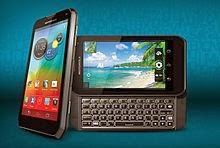
1. Motorola Photon Q 4G: Motorola Photon Q 4G is an awesome mobile which brings out the slide-out keyboard for its users. Motorola Photon Q 4G helps you to type your text faster than other touchscreen smartphones. Motorola Photon Q 4G runs on android operating system and comes with fastest processor. The Motorola Corporation makes a series of smartphones with better keyboard designs. Motorola Photon Q 4G has Bluetooth 4.0 and it has 4G technology in it.
2. BlackBerry Q10: BlackBerry Q10 has 3.5 inch display screen and it comes with 4G technology in it. BlackBerry Q10 runs on BlackBerry operating system and it has LED flash to capture picture in low light itself. BlackBerry Q10 has a brilliant interface and has Great keyboard with compact design.
3. Motorola Droid 4: Motorola Droid 4 is a best mobile which provides you a best experience with physical keyboard. Motorola Droid 4 has amazing keyboard design and has an awesome slide-out keyboard. It enables you to capture 1080p HD video without a lag. It has a screen size of 4.5” display and runs on Android operating system in it.Motorola Droid 4 makes you to utilize its feature unlimitedly with the 4G technology.
4. BlackBerry Torch 9810: BlackBerry Torch 9810 is a wonderful smartphone with blackberry operating system. BlackBerry Torch 9810 is an ultimate mobile with responsive display and it comes with Full QWERTY formatted physical keyboard. Since it runs over BlackBerry OS 7, BlackBerry Torch 9810 lacks lots of applications in the app market for the BlackBerry Torch 9810. BlackBerry Torch 9810 comes with 3.5 inch display and has built-in camera which allows you to take HD video recording from it.
5. Motorola Droid 3: Motorola Droid 3 is a slide-out keyboard mobile, which allows you to type the text very quickly through the physical keyboard. Motorola Droid 3 has 4 inch screen display which gives you a wonderful image experience and Motorola Droid 3 runs on android operating system. This let you to grab tons of mobile application from the Google market store. Motorola Droid 3 is very pretty and has a brilliant camera which allows you to shoot pictures even in dim light too. Motorola Droid 3 has a fantastic keyboard with slide-out model with number row. You can easily extend the storage of Motorola Droid 3 by extending your memory with external memory stick.
Hope you have like the list of smartphones with physical keyboard which gives a better guide to buy the best Smartphones.
Jawbone Up activity tracker
In the those days if you want to increase or decrease your shape or live healthier it takes long time but now all these can be taken care of a device such as a fitness bracelet. Yes the device is named Jawbone Up. It helps you to become faster, easier and more beautiful at the earliest. The Jawbone Up measures how many steps we have taken and how long we are active and how many hours we have slept
. Within its rubber housing more sensors work for you and they are connected with our Smartphones. With the apps provided for our Smartphone we can analyze the data. And we can share these details with our friends and relatives in the social media. It automatically records our entire activities. It don’t need a Bluetooth just your headphone jack of your Smartphone do all the wonder on behalf of you.
Based on these available data, the device calculates the perfect wakeup time and wakes up. In this way we better and more relaxed start of the day. Even you can calculate your office nap with this device. The sensors register our every movement and show it in a nice graphic format every morning. Even we can monitor our eating habits and thereby check taking too much of processed food. Every dish has to be quantitatively recorded and compared with the up data base.
The battery long lost for ten days. If you are using additional gadgets such as vibrator and Alarm then it will eat more of your battery life and can be recharged with your USB charger. This electronic bracelet is a motivational tool that sometimes painfully reminds the wearer of how much actual and target values for physical activity, eating and sleeping habits.
Panono, A Spherical Roll Camera Provides 360 - Degree Images
Now You have the option to throw your camera up in the air and the rest will be taken care of your Camera. Amazing, isn’t it? This novel technology is employed in a new camera concept called Panono. A round ball is studded with 36 small photo chips, the result of your output looks like Google Street View.
Instead of pressing a trigger, it very simple and you have to throw the ball-shaped camera in the air. At the highest point of the trajectory then a motion sensor automatically activates an all photo composed of 36 small cell phone cameras, which are arranged similar to the compound eye of a fly and a complete visibility enable: Forward, backward, up, down, right and left. And directly under the camera of course is always the photographer to see themselves, usually with arms outstretched, to catch the panoramic camera.
Horizontal 360 - degree panoramas can be taken together semiautomatic with many Smartphones. Panono the other hand is called the first 360 x 360 degree panoramic camera. With these snapshots you can only see what is in front of the photographer. This Panono union camera captures the entire scene, however, a bit like Google Street View, but from the air. Arrow had the peculiar idea when he visited the island of Tonga while studying abroad in New Zealand.
Overwhelmed by the beauty of the Island, he wanted to stick with a conventional camera and shot the entire scene as he thought; But it would not be easier to make a fully automatic for all shot! Thus the idea for his thesis at the Technical University was born. He developed a prototype that was originally almost as big as a handball and 750 grams in weight, covered in green foam panels to protect the flying camera. In September 2012, Arrow was awarded for his prototype ICT - founder prize of 30,000 Euros.
Over three million times the demo video of his camera has been clicked in YouTube in short span. Now he has offered the camera on the Internet for sale on the crowdfunding platform Indiegogo. The steep price for early booking is 499 €. Now he has now shrunk to half of its original size, the weight to around 300 grams the entire raw image is gigantic with 72 megapixels composed of 36 two- megapixel cameras. The software then converts the images together; the end result can be explored in mobile phone, tablet or computer by wiping over image or rotates with the phone on its own axis.
The Panono - throw camera combines two trends particularly; one is the slightly oblique hobby to throw conventional cameras for taking pictures in the air to be surprised what comes out of it - and if you succeed the collection . “Camera tossing " is this reckless disposable camera method.
“Moga Ace Power” an iOS 7 gamepad from Logitech
Logitech also has introduced a first gamepad for iOS 7 on Wednesday. The Power Shell with Controller device and Battery is called as Mogas Ace Power is of Lightning speed, equipped with a connector and accommodates iPhone 5s, iPhone 5 or iPod touch fifth generation.
The 120 gram gamepad includes a 1500 mAh battery. In contrast the Moga Logitech waived the analog sticks and directional pad limited to, action buttons and shoulder buttons. An adapter allows you to connect a headphone, the volume buttons and the ringer mute switch on the iPhone lets the gamepad free.
Bluetooth support also still missing. In the U.S., the PowerShell controller seems now available at a price of $ 100, in other European countries it cost 100 Euros for a pre-order and is possible - probably follows the launch in December or January. Developers need to incorporate support for the new controller into their apps – iOS7.
Wednesday, 20 November 2013
Samsung AMOLED An Ultra High Definition Screen For Its Next Tablet
Samsung, the electronics giant continues to fuel its research to be always on top especially in the area of the screen. The South Korean firm is preparing a high -resolution ultra AMOLED screen for its next Smartphone.
Samsung finally put on the screen to stay on top of the Smartphone sales. The South Korean firm said he intended to propose in 2014 the Smartphone screen with very high density. This news is not surprising and it is given already and we already knew the value of technology for Samsung monitors.
This manufacturer has been one of the first to release a Smartphone with curved screen namely the Galaxy Round. There is also a rumor that Samsung is also preparing a wraparound screen for the next Samsung Galaxy Smartphone.
2014 should be the year of innovations for the South Korean firm. Samsung grabbed huge share of the Smartphone market from Apple for this quarter year sales. To maintain this significant advantage, it relies on new display technologies, such as high quality.
That is why websites reported that Samsung is preparing Smartphone screens AMOLED 2560 x 1440 or 560 pixels per inch. For comparison, the iPhone 5S has a 1136 x 640 screen that is 326 pixels per inch. This high density could be applied to a touch tablet rather than a Smartphone, as suggested by the rumor that Samsung would have a giant tablet for 2014. More frankly; the South Korean firm tries to conquer the tablet market which is dominated by Apple's iPad.
Nexus 10 Complete specifications leaked
The evidence of an imminent launch of the new Nexus 10 condense. Now the tablet is even first appeared in an online shop. The British supermarket chain Tesco had the device listed briefly before it was hastily taken offline again.
In the meantime, however, a Reddit user could make screenshots of the product page. These list the exact specification of the next Google tablet. Accordingly, a resolution of 2,560 x 1,600 pixels is represented on the 10 -inch IPS display. The processor of Qualcomm Snapdragon 800 comes with a clock speed of 2.3 GHz is used; the memory is sized properly sized with 3 GB of RAM. Wi-Fi is sparked by the new 802.11 ac and Bluetooth is also on board as a matter of course camera on front and back.
The internal memory is 16 GB and is probably, like Nexus devices usually cannot be increased. The battery life is specified at 18 hours and the weight of 420 grams According to the data sheet of the new Tesco Nexus 10 will actually be selling from the 22/11/2013 to the price of 299 British Pounds (about 360 Euros). LG recently handed in after good work on the Nexus Smartphone, the South Koreans and the latest rumored next Nexus tablet may seem finished.
First it was a few weeks ago were saying that Asus come to train, but now supposedly leaked images suggest to LG. Independently emerged in recent days on two images that allegedly show the new Nexus 10th Both graphs show clearly the same tablet and should once come directly from LG and one of Telefonica/O2 from the UK.
Accordingly, the tablet bears the model name LG- V510 and should cost 299 pounds (about 360 Euros). The official launch is supposedly on Friday the 22th November 2013 instead.
Microsoft files patent for automatically quieting Smartphone
Ringing phones at the movies, in restaurants or at theater annoy other guests and also the forgetful owners. Microsoft wants to let it automatically silences there.
Microsoft has filed in the United States a patent application that describes a mechanism that will automatically mute the Smartphones and other mobile devices when the user is at places opportune where that appears - for example, in the cinema, the theater or in the hospital.
Microsoft describes in his patent application, which was filed in August, 2013, but published only now, could be a mechanism by which this “peace service" work. The user can define it, where and especially how long the phone in certain places or at certain occasions is quiet.
It would be interesting, for example, the link to the schedule. Thus, the Smartphone would not spend more ringing and other notifications as long as the owner is in a meeting. A similar mode has been built into iOS and Mac OS X as Apple.
Why Your BYOD Platform Will Fail in Tablet Kiosk Marketing Deployments
The industry as a whole has gotten more sophisticated in understanding the unique requirements that come with using tablets and smart phones. And businesses are moving beyond internal BYOD deployments to embracing the huge advantages of tablet kiosk marketing, mobile point of sale (mPOS), digital signage and countless other opportunities increasingly sophisticated tablets are offering.
The bad news? Deploying thousands of devices as a mobile POS is very different than deploying thousands of personal devices in a BYOD scenario. And if you're trying to use your in-place BYOD platform to deploy purposed mobile solutions, your deployment is going to fail.
At a very basic level: the requirements for a platform that manages personal devices are far different than the requirements necessary to manage purposed devices, both from a technical standpoint as well as a business process and workflow standpoint.
In BYOD deployments, your business user manages her device, and uses it in all arenas for both personal and enterprise data. Your focus--and the purpose of your BYOD software platform--is very simply maintaining the separation of that data and keeping enterprise information secure.
But on the purposed side, you are facing legions of users who need to be left out of managing the device. Your BYOD software solutions, while designed to manage a large fleet of mobile devices, do not have the capability—or focus--to deal with the complexity of multi-user mobile devices. And deploying and managing thousands of tablets in commercial shared-use environments creates significant technical and operational challenges that BYOD scenarios will never present.
Key issues include:
User experience, security, and monitoring challenges. You need to maintain both the physical and data security of your tablet kiosk solution, lock users out of personalization and management while maintaining your own control, and stay up-to-date on every aspect of the device, from battery to location to installed content to connectivity to app updates and more. And you need to manage, control, and secure every aspect of your mobile solution in real-time, from a central location.
All this plus the need to maintain the essential tablet experience, including access to the Internet and apps, but you need to lock down that access, ensure the experience is curated, and stay on top of security. You need to eliminate the possibility of customization or vandalism, and ensure users can't change or remove content, or worse, add content that's inappropriate. Users must also be prevented from interrupting network connectivity and ruining the experience of other guests who come after them.
Things like App Store purchases, iTunes downloads, deleting apps, rearranging icons, and changing the home screen wallpaper need to be disabled without affecting the user interaction experience and reducing the need to restore or re-image the tablet.
And finally, you need to safeguard your users as well, ensuring their personal information and their session information is cleared when the application quits, and that any information collected is encrypted and inaccessible to any other user.
Technical and device management challenges. Unlike your BYOD deployment, with personal devices safely in the hands of your employees, your fleet of purposed devices require constant maintenance, upkeep, and update after being battered by the public. From restores to refreshes to data caching, from pushing fresh dynamic content to uploading customer information and feedback, the day-to-day administration of mobile kiosks requires sophisticated management tools.
Purposed devices also require rapid development and accelerated deployment of content, end-to-end wireless network and mobile device visibility, and advanced system reliability, availability and scalability (RAS). The complexity of these environments makes routine BYOD tasks such as device and network component roll-outs, updates and maintenance and support/problem resolution difficult without a specifically designed mobile device management platform for commercial deployment.
BYOD platforms are not up to the challenge of delivering a fully secure, constantly updated, always-reliable mobile kiosk, mPOS, and digital signage experience. To ensure that your deployment is completely successful, rely on a mobile management platform specifically built to manage and monitor your innovative tablet solutions.
Check out our infographic, Purposed Devices vs. Personal Devices, to learn more about how managing mobile devices used as mobile point-of-sale, kiosks, digital signage or any other purposed use case is very different than managing personal devices.
Merrick Kennworth is a blogger that writes about many things including tech related issues for Moki Mobility. He has a passion for life and living it to its fullest. Follow them on Facebook to learn more.
The bad news? Deploying thousands of devices as a mobile POS is very different than deploying thousands of personal devices in a BYOD scenario. And if you're trying to use your in-place BYOD platform to deploy purposed mobile solutions, your deployment is going to fail.
At a very basic level: the requirements for a platform that manages personal devices are far different than the requirements necessary to manage purposed devices, both from a technical standpoint as well as a business process and workflow standpoint.
In BYOD deployments, your business user manages her device, and uses it in all arenas for both personal and enterprise data. Your focus--and the purpose of your BYOD software platform--is very simply maintaining the separation of that data and keeping enterprise information secure.
But on the purposed side, you are facing legions of users who need to be left out of managing the device. Your BYOD software solutions, while designed to manage a large fleet of mobile devices, do not have the capability—or focus--to deal with the complexity of multi-user mobile devices. And deploying and managing thousands of tablets in commercial shared-use environments creates significant technical and operational challenges that BYOD scenarios will never present.
Key issues include:
User experience, security, and monitoring challenges. You need to maintain both the physical and data security of your tablet kiosk solution, lock users out of personalization and management while maintaining your own control, and stay up-to-date on every aspect of the device, from battery to location to installed content to connectivity to app updates and more. And you need to manage, control, and secure every aspect of your mobile solution in real-time, from a central location.
All this plus the need to maintain the essential tablet experience, including access to the Internet and apps, but you need to lock down that access, ensure the experience is curated, and stay on top of security. You need to eliminate the possibility of customization or vandalism, and ensure users can't change or remove content, or worse, add content that's inappropriate. Users must also be prevented from interrupting network connectivity and ruining the experience of other guests who come after them.
Things like App Store purchases, iTunes downloads, deleting apps, rearranging icons, and changing the home screen wallpaper need to be disabled without affecting the user interaction experience and reducing the need to restore or re-image the tablet.
And finally, you need to safeguard your users as well, ensuring their personal information and their session information is cleared when the application quits, and that any information collected is encrypted and inaccessible to any other user.
Technical and device management challenges. Unlike your BYOD deployment, with personal devices safely in the hands of your employees, your fleet of purposed devices require constant maintenance, upkeep, and update after being battered by the public. From restores to refreshes to data caching, from pushing fresh dynamic content to uploading customer information and feedback, the day-to-day administration of mobile kiosks requires sophisticated management tools.
Purposed devices also require rapid development and accelerated deployment of content, end-to-end wireless network and mobile device visibility, and advanced system reliability, availability and scalability (RAS). The complexity of these environments makes routine BYOD tasks such as device and network component roll-outs, updates and maintenance and support/problem resolution difficult without a specifically designed mobile device management platform for commercial deployment.
BYOD platforms are not up to the challenge of delivering a fully secure, constantly updated, always-reliable mobile kiosk, mPOS, and digital signage experience. To ensure that your deployment is completely successful, rely on a mobile management platform specifically built to manage and monitor your innovative tablet solutions.
Check out our infographic, Purposed Devices vs. Personal Devices, to learn more about how managing mobile devices used as mobile point-of-sale, kiosks, digital signage or any other purposed use case is very different than managing personal devices.
Updated Android 4.4 for Nexus 4, 7 and 10
Google has published a revised version of the update to Android 4.4 alias Kitkat. Only the build number has changed but the version number remained the same. The update is now also go wireless distributed for the Nexus 4 and the Nexus 7 with modem.
The update to Android 4.4 alias Kitkat is now available for the Nexus 4 and the Nexus 7 distributed with UMTS modem. A week ago, the distribution of Kitkat update for the Nexus 7 launched without a modem and the Nexus 10 These models also receive the revised update. A week ago, the build number KRT16O was distributed, then there is the build number KRT16S.
According to Google, few of the unspecified bugs were fixed but no further details. The update will be distributed wirelessly. Because the update is not everywhere at the same time on the devices, it may take a few days until all devices receive the update.
Google has also provided the updated Factory Images for Nexus models already available for download. Google's Smartphone Nexus One, Nexus S and Galaxy Nexus will not update to Android 4.4 alias Kitkat. Technical reasons were not disclosed.
Many buyers have deliberately opted for Nexus devices because they assumed that they receive in the future early upgrades to new versions of Android. For the Galaxy Nexus there are already alternative Android distributions, bringing the Android 4.4 on the Smartphone. Android 4.4 brings a number of improvements with which the Smartphone or tablet to make use more comfortable than before the user.
The phone app also scans the numbers of nearby shops or the directories of Google Apps accounts. In addition, the app's contact list, sorted by frequency of contact - important people are easier and faster to find. On Android 4.4; now disappear when watching movies or books, the navigation buttons at the bottom completely.
Previously they were just hidden, but still have taken place and were visible as black bars with three points. In addition, the voice search was expanded, with the voice command “Ok Google" it is now ready for system-wide.
The design of the e -mail client of Android, Google has adapted to the Gmail app, so that they look very similar now. In the E -mail client messages can now be deleted with a wiping gesture, which is also possible directly from the notification bar.
How to protect your email address from the hackers
In the today world of technology, internet has playing a crucial role in everything. Suppose if you want to visit the Disney world, you can go through the all the stuffs regarding the Disney world from your place itself. Simply by hitting the search button, you can get lot of information in the Internet. In the meanwhile, internet is very vulnerable. The hackers around the world start to learn more technology which brought them to hack into your personal system and gather your personal details as well as your important stuffs. It might possible that hackers were hired by your competitors to hack into your system and make your clients to run away from your business. So this creates a big loss in your field; you can easily make your stuff more protected as well as secured by simply following these little steps:
The main thing that you need to concentrate is that yours EMAIL; since all of the internet activities need your email details to perform something. You might use your personal email id for most of the things and also you might have used them for online payment stuffs. So the main motto of this article is to protect your email from the hackers which in turn gives you an ultimate security and privacy for your personal things. Here are the tips which help you to protect your email from the hackers;
1.Strong password:
Password is the main criteria which are always used to access you email account. If anyone has your email id, then they can easily access your personal details from your email account by very easy way. By providing a stronger password, you can prevent your email account from the hackers primarily. A strong password in the sense, password which is made up of combination of letters, numbers, uppercase letters as well as special characters. It will take longer time to crack your password and difficult to guess.
2.Password with space in between the characters will be very harder to crack the password.
3.Do not include your name, nick name, family name as well as birthday with your password. It will be very easy and provides a key to hack your password by the hackers. It is strongly advised to create a password which is strongly immune to the hacking tools.
4.Always keep different password for unauthorized websites and keep in mind that phishing sites are there in the internet which will grab your all information and stores it in their database.
5.If anyone of your website is get hacked by the hackers, he will use the same data for other websites too. This will create a thread to your all personal information and important data; you can use different passwords so that you can protect your personal from the hackers. In order to use different passwords, you need a password manager to remember all passwords which you’re using.
Log out the email account if you’re using it in the Public Internet cafe and prevent use of those kind internet centers. They might use keylogger to store your all details. These also give you a thread for your privacy.
Sony Playstation 4 Technical problems “Blue Light of Death”
In the U.S., many gamers report total failures of the new Sony console. Comes after the “Yellow Light of Death “is now the "Blue Light of Death”; many gamers report of defective Playstation 4 consoles give the strips a blue flash of light itself.
The gaming world is waiting for the launch of the Playstation 4 we have already received a developer console! It should be the gamer’s highlight of the year, but for many players, the release of the Playstation 4 has degenerated to the annoyance. The official Playstation forum is littered with indignant and disappointed contributions of PS4 owners whose console has given up the ghost later out of the box or in a very short time.
The symptom is the same everywhere: the light bar in the center of the case flashes blue after power, output picture and sound do not take place, a short time later, the device switches off - a start in Safe mode is also not possible. Sony took up position on the subject already, and advises to check hard drive, power cable and TV firmware.
However, according to many user contributions creates none of the points help. Some gamers had their Playstation 4 already be picked up by Sony, as the blue light can also refer to various other hardware defects by the manufacturer.
The repair will take about three weeks, according to the gamblers. Let's hope that Sony will solve these problems before the European launch on 29 November gets to grips with.