Saturday, 15 February 2014

Update Your Facebook Status In Your Language

Update Your Facebook Status In Your Language
It’s the time for you to update the status of your Facebook, twitter and even sending the mails in your own languages. This article provides you necessary information on how to updates your social networking status in your language.


By using these technique, not only you can update your Facebook status you can also avail other usage in the internet such as writing content for the websites, writing articles for the blogs, status for other social networking sites. In these days it is becoming a trend in making the social media status updatesand which also bring impression over your status because all of us having much interest in seeing our own language in the web. Yup, now we will start this tutorial on how to make Facebook status in your own language i.e. other than English.

The first thing is you should have the Google chrome web browser because the chrome is the only web browser which allows you to update status or writing content in the web in your own language. For updating the Facebook status of writing content in other language by using Google chrome browser you need to download the “Google input language tool” from the Google chrome store

Once you finished downloading the “Google input language tool” from the chrome web store you need to install it in your computer. After finishing the installation you can be able to find the “Google input language tool” icon in the right side top corner of your Google chrome web browser, i.e. it will appear besides the URL address bar of your web browser. Now just make a click on that and choose “theextenuation option” once you made a click over it, it will redirect you to another settings page which will allow you to add your own language to the “the Google input tool chrome application”. And then h ere you can add any number of languages as you wishes. After you finish adding the languages to your extensions you are strictly advised to restart your web browser to utilize the power of extension.


In order to update the status in Facebook by using your own language of your wish, just follow these simple steps given below

For an example we will see for Tamil language.

Ø First login your Facebook account by using Google chrome web browser.

Ø Click the extension button from the top of the browser.

Ø Then select your own language

Ø It will open a pop up as writing pad in the bottom of the web browser.

Ø Then type your status with the pencil provided.

Ø Here the status will be updated which was written in your selected language automatically.

Ø Finally press enter once you finished your work.

Note: this facility of updating the Facebook status in your own language is not available in the Mozilla Firefox web browser.

How to Open or Access Blocked Websites at Schools, Colleges and Office

Access Blocked
In this world, almost every place has the internet access. But in some places we use internet with some restrictions like schools, colleges and offices etc. i.e. they will block some websites like orkut, facebook, twitter in order to maintain the discipline among the students. In order to access the blocked websites, here we provide the tips.

Instead of using website URL, use IP address 
 
In schools, colleges and offices, they use software to block which mostly blocks the websites only rather than IP address. For example www.twitter.com etc. so we can use IP address to unblock the blocked website. Each and every websites has its own IP address. If you want to know the IP address of the particular website, you have to do the following process.

Run->command Prompt-> type “ping domain.com”

Instead of typing Domain, type the Website that you want to know the IP address. For example ping facebook.com. Then the IP address will be displayed. Just type and run the IP address.

Use Proxy manually in Browser
 
Most of the browsers support the proxy IP addresses manually. You can access the Blocked websites and browse whatever you want. There are so many proxies are available in internet itself. So you can get it through internet.

By setting manual Proxy using Mozilla Firefox
 
Ø Firefox browser-> option->advance network tab->connection settings

Ø Manual proxy settings window will open-> enter proxy address-> save

Ø If your computer won’t support the Proxy, you can use the alternative one.


Redirect the Blocked website with URL Shorten Service
 
URL shortner site is used to convert Long URL to Short one. But this site tends to go through the security settings. Tiny URL, MooURL URL are the shortner sites.

Use VPN software 
 
VPN software is available on both free and paid versions. It allows you to surf enormously, by just downloading the software and installing it on computer. Some of the VPN software’s are listed below.

Ø ProxyXPN

Ø Hotspot

Ø Tunnel

Browse using TOR browser
 
Except the social websites (facebook, twitter.) you can access the remaining blocked websites. In social websites you have to save the cookies. So can’t access it. TOR browser is used to hide the online identity.

Use Decimal Code
 
We know the method to unblock the website by using IP address. Suppose the software is not accessed by using the IP address, we can use the decimal code. It is a simple method as same as the first method. When the IP address is displayed you have to convert it to decimal value.

Use Hola extension
 
Hola extension is a browser which is available in all browsers. It is used to surf internet more. You can download hola in the hola’s official website itself.

Use Wayback Machine
 
Wayback machine provides the copy of the websites once the websites have been started. You have to type the website URL and select the latest copy of wayback machine.

SpringPublisher Makes it Easy to Desktop Publish

If you're looking to create your own business cards, flyers, and other products with letterhead, but without a lot of hassle or cost, SpringPublisher just may be the the software package for you. First, the price is right. It's free if you just want to try it out and just purchase a few templates to get some basic projects done. If you opt for the pro package at $23.95, you'll get a bunch of goodies including high resolution printing (350 DPI), commercial use, and perforated paper support. Oh, and did we mention you get 100 template downloads in the package so your money is well spent? Getting the pro package is worth it just for the high resolution and the templates alone. Right now there are 30 templates that you can use. There is sure to be more as time goes on.
What's really useful is that they have QR coding that you can add to your letterhead, postcards, and business cards. That's a great selling point as is the fact that SpringPublisher will work with Avery and Printworks Micro products for seamless printing. And SpringPublisher also works with Google Maps. You can include a map to your retail establishment right in your flyer or on your business card, if you choose.
Once you bring up SpringPublisher, it's up to you whether you want to start with a template or create your own project from scratch. Either way, it's relatively easy to build your project. The templates can be modified and customized for your use too, thus one can easily be made into another project as required.
The user interface is intuitive. You click on the buttons on the left to modify the image. The upper menu has all the file functions such as save, save image, print, open file and so on. The editing features are right above the project you're creating.
Since this is such a simple tool, you'll wonder how you ever got along without it. You no longer have to work with complex desktop publishing software to get the simple stuff done. SpringPublisher is available for PCs with Windows 2000/XP/Vista/7/8/8.1.
About SpringPublisher:
SpringPublisher is a professional and easy to use desktop publishing software. With its included various templates and online template store, powerful multi-layer editor, detailed help-files, SpringPublisher enables users to design and print business cards, flyers, postcards, letterheads, labels and other artworks within a few minutes.
Main Features Of SpringPublisher:
1. Enables you to add images, texts, vector shapes, logos, Code 39/EAN 13/EAN8/UPC 1D barcodes and QR codes and arrange them as you like;
2. Provides various image effect: shadows, opacity, rotation, etc.
3. Allows you to download high quality templates from the template store.
4. Makes it easy for you to print your artworks either with your own printer or in professional print shops.
5. Generates high resolution artwork with a maximum output of 350dpi. 
6. Supports Avery and Printworks micro perforated paper that enables you to create business cards and postcards more easily.
SpringPublisher free version includes basic templates and fully functional designing feature. Professional version of SpringPublisher, with template store credits and high-quality output is also available, costs $23.95(US)
For more information, visit: http://www.springpublisher.com/

Thursday, 13 February 2014

Pill Camera going to replace Colonoscopies!


Pill Cam
Say goodbye to colonoscopies through Pillcam a pill to swallow with a miniature camera Traditional colonoscopies are fast disappearing with the arrival of PillCam, a small pill to swallow with a camera inside will takes photos and videos from within your gut! This is a miniature medical tool that has been legalized in the United States.

This ingenious invention is equipped with a small camera that you can swallow so that it can take photographs and videos of your entire digestive system for eight hours. It will take photographs of entire passage it travel. The images are then transmitted to a device on your belt.

 The invention is not new; it still has just passed a significant milestone as it has been legalized in the United States after passing under the comb of the U.S. Agency for Food and Drug Administration and the FDA, which gave its approval for the commercialization of this product!


Inner view
The advantage of this pill lies in the fact that it could be an alternative to colonoscopies, which are annoying and unpleasant medical examinations when exploring your colon with a camera. In addition to colonoscopies are also practiced under general anesthesia and are therefore inaccessible to certain people who are allergic to the certain chemicals used.

This ingenious invention reminds us a little cartoon "The Magic School Bus" in which a class of primary accompanied their master could be miniaturized to fit inside someone's body. Even though this device is also available in other part of Europe, it is now highly regulated and we hope it will become more democratized so that we can enjoy less unpleasant than the endoscopy examinations.

Twitter Uses New Profiles In Test


New Twitter Profile
Faced with a slowdown in the number of its users, Twitter has promised new features. A revised interface is in preparation and it incorporates elements similar to Facebook interface.

Twitter users can now view their newly designed profile page. In the design, the service resembles heavily upon Facebook and Google+.

Mashable reported that the micro blogging service is currently testing a new design of the profile page. Instead of confusing timeline a user group currently sees a tidy home page. Tweets are arranged visually appealing in tiles.

Shared photos and videos of people we are following will now be found under a separate tab. Twitter overhaul the entire profile page, the page design applied similar to Facebook on its own platform with such a biography placed in the upper left corner and especially large image stretching over the entire length.

According to Mashable, this revision does not affect the moment that the PC version of Twitter. It is also accompanied by messages, tweets larger. And incidentally make them more visible Sponsored messages.

The good visibility of major titles and profile pictures of the user comes to the front even more. The Twitter profile page reflects the strong inspiration of its competitors like Facebook and Google+. This is the mixture of Google+ profile and Facebook time line.

This is of particular advantage for new users who want to make friends with the micro -blogging service so quickly. Faced with a slowdown in the registration of new subscribers, Twitter is perhaps make it more friendly and readable interface, particularly with users of other services, such as Facebook tries.

Advertisement In Firefox Soon!


Advertisement In Firefox Soon!
The Mozilla Foundation plans to introduce ads into the "new tab" in the browser space. These advertisements appear alongside of the Firefox users’ content.

 This is a revolution taking place at Mozilla. The Foundation has announced that it would introduce advertising in its Firefox browser. Attending the annual meeting of the Interactive Advertising Bureau (IAB), Darren Herman, vice president in charge of services and income diversification in Mozilla, presented the “Directory Tiles " concept.

When first using Firefox: opening Firefox in a new tab, it will have 9 empty tiles that appear thereafter most visited web sites. The objective is to use these spaces by displaying advertising and preloaded such websites specific to certain geographic areas.

The ads will be stamped so that there is no ambiguity for users. Mozilla says it is trying to introduce the concept of Tiles Directory advertisers but gives no specific date for its introduction.

This diversification is an important step for Mozilla whose revenues are 97% of its agreements with the search engines, especially Google.

Microsoft Patch Comes With Seven Security Updates

The February Patch released on Tuesday gave Windows users seven security updates to check more vulnerabilities in Microsoft software. Microsoft plugs security holes in various Windows operating systems.

Microsoft Patch
From the original five announced update packages Microsoft has made it to seven. The two additional software patches to repair leaks in Internet Explorer and in the scripting language “VBScript “. Both of those leaks are classified as critical one by Microsoft. They all relate to versions of Windows (including server variants), the security software Forefront Protection 2014 for Exchange and the runtime NET Framework.

By the way the 8th April is nearing and the support for Windows XP is running out. The patch MS14 -010 resolves a publicly and 23 privately reported vulnerabilities in Windows. The most severe vulnerability allows remote code execution (attack from afar), if a user views a specially crafted Web page using Internet Explorer the successful attacker will gains entry under with the same user rights as the current user.

For users whose accounts are configured to have fewer privileges, have the less impacted than users who operate with administrative privileges. The Microsoft patch day is normally on the second Tuesday of each month instead - the next Patch Tuesday will be on 11 Of March 2014.

The security updates install automatically with the appropriate active Internet connection. With this month’s Patch Microsoft brings out a fresh version of its "tools for removing malicious software".

Wednesday, 12 February 2014

‘Normandy’ Nokia's First Android Smartphone


Normandy
Nokia will show its first Android phone Normandy at Mobile World Congress, according to The Wall Street Journal. It will be the part of the low-end and will feature a modified version of Android. The rumored Nokia phone based on Android will be released at the Mobile World Congress in Barcelona, according to sources consulted by The Wall Street Journal.

It discloses more and said that Nokia's decision to market an Android based device is purely due to technical reasons such as the Microsoft operating system is not yet adapted to the low-end terminals. Thus, we can expect this Smartphone code named as Normandy comes with a very ambitious spec sheet, as pointed out.

Chinese Weibo website revealed the screen shots of the 4 inch Smartphone with a 5 megapixel camera, with a Qualcomm processor that can support two Sim cards. According to The Wall Street Journal, it will have the services provided by Nokia and Microsoft, as the application of streaming music and navigation MixRadio etc, as well as Nokia's application store.

 The information published by The Wall Street Journal gives greater credibility to the voices that say the Finnish firm goes ahead with the development of a terminal with Android. A project in which the company has been working since before Microsoft acquired the devices and services division of the company for more than 5,400 million Euros last September.

Cloudflare Announces Massive DDoS Attack


Cloudflare
The network security provider Cloudflare has reported last night about a massive DDoS attack on one of its customers. That was a NTP Reflection attack, which should be greater than the attack happened in 2013. It was tweeted By Cloudflare CEO Matthew Prince. The attack on one of its customers was carried out with up to 400 gigabits per second on 11th Feb 2014, tweeted Cloudflare CEO Matthew Prince on the night of 11 February 2014.

He was thus greater than that on the Swiss company Spamhaus in March 2013, the Cloudflare, estimated this attack and described this as the most recent attack on the Internet. This time, the attackers did not use a DNS server, but used a so called NTP Reflection attack, which is done via the timer log. Cloudflare is known for its rigid formulations. Prince compared the DDoS attack on Spamhaus with a nuclear attack in his blog, which affected the whole Internet.

At peak times it was run around 2.5 terabits of data through the Internet nodes. The security company Cloudflare does not tell so far which customer is affected by the current attack . However, reported at least one major French provider was the victim of this DDoS attack. OVH - founder and owner Oles tweeted that the attack was carried out with up to 350 Gbps.

The reason behind the DDoS attack is not ascertain so far. A Reflective attack on NTP is a fairly new procedure to bog down networks. Instead of DNS server now a days NTP server is used on the Internet for such attacks. These servers provide detailed time information worldwide. The attackers use fake data packets and put it in the IP address of the victim as a source.

The NTP servers in turn respond automatically and send data back to the real IP address. First, the attacker can successfully hide. Attackers can also send small fake data packets to the server and get them to respond with large packets. This can be achieved with a small bandwidth and in turn the attack use wide bandwidth of the victim.

Scientists Can Overhear On Bacterial Communication Now!

CMOS
Researchers from New York have developed a chip with which they are able to observe the communication of a colony of micro organism. The chip itself can also check the growth of the colony. Ken Shepard and Lars Dietrich know are the two researchers from Columbia University in New York City; who has developed a chip that allows them to spy on their communication.

Specifically, the researchers eavesdrop on the bacteria type Pseudomonas aeruginosa and watching them with a CMOS chip. The chip is a glass slide on which the bacterial colony is located. This is an electrochemical sensing device integrated channels with electrodes and potentiometer to infer the data. Thus, the signals of their communication of the colonies of bacteria are detected and gathered in real time. Cells mediate their activity by secreting some chemicals.

The New York researchers focused primarily on those phenazines and these are metabolites that control gene expression. Their study revealed that bacterial colonies produced Phenazines, which probably contributes to the shape of the colony, says Dietrich. This is an important finding in this field. Destroy hearing and In her essay in the journal Nature Communications, the researchers not only describe s how we can listen to the chip and how we can use the chip to interpret the discussion of the micro organic colonies.


Hence this chip is not only in research use, but could be integrated into medical devices because of their anti bacterial effect, especially in those in which frequently used such as catheters and others.

Sunday, 9 February 2014

A robot spider that moves on its own thread!


Spider Robot
A group of researchers from the Swiss Federal Institute of Technology in Zurich, Switzerland, has developed a robot spider capable of moving in a vacuum vertically along a solid wire that fabricated from a thermoplastic adhesive. Such robots could be used for extraterrestrial exploration adapting to changing terrain. LiYu Wang, a member of the team, told in detail. The spider robot developed at the Swiss Federal Institute of Technology in Zurich moves vertically along a solid wire. It manufactures thereof at progressively from thermoplastic adhesive sticks which is heated and stretched. It can carry payloads up to 10.9 kg in its current configuration.

A team of researchers from Bio -Inspired Robotics Laboratory (BIRL) has unveiled this robot spider that produces itself a plastic wire which he uses to travel into space, vertical. In their scientific article published in the journal Bioinspiration & Biomimetics, they explain that the interest of this innovation is that it can be used to develop hybrid robots to land and air time capable of carrying payloads. Another advantage of the system is that the robot adapts the thickness of the wire according to the weight it carries.

The technical challenge with which the team had to deal BIRL was to ensure that the robot makes its wire while moving with only physical support of wire itself. It was therefore necessary to develop an autonomous system capable of producing the wire associated with a mechanism for moving and guiding. The robot weighs 185 grams to 18 cm tall, 5 wide and 3 thick. “The mechanical part includes mechanisms extrusion and pultrusion," says LiYu Wang, one of the researchers involved in the project , which is also a member of the IET (Institution of Engineering and Technology). The technology uses the thermoplastic glue stick, the same as we use for other jobs.

The adhesive is heated to between 65 and 75 ° C to be extruded through a nozzle into a process similar to the spider secretion produced by the ampullary gland. A second phase: glue spots pultrusion be spun stretching and solidify upon contact with air according to Newton's law of thermodynamics. The robot is operated by two motors. The first serves to urge the glue stick through the heating system and the nozzle on a linear axis via a ball screw system. The second motor mechanism actuates the “deformation - locomotion”, which consists of two wheels of 12 mm diameter which will both stretch the wire while sliding the robot progressively. Everything is powered by two lithium -ion batteries.

In its current configuration, the robot can carry a maximum load of 10.9 kg moving at 12 inches per minute. The robot that spins a web like a spider "The advantage of this technology lies in its flexibility, which allows you to adjust the thickness of the wire so that the robot can adapt to different loads while remaining self-sufficient," says Wang LiYu. He also confirmed that the system could be replicated on larger robots by adapting the configuration of extrusion pultrusion accordingly. The next step for the team is to replace BIRL wheels legs, so that the robot can move on a solid surface, but also to switch over to another, like a spider on its web. The researchers believe that the solution would be to create legs inspired by the gecko with adhesive pads for grip. With this, the robot could then weave a fabric by forming vertical and horizontal on which it may then travel.

Ricoh announced a successor to the Pentax 645D.


Pentax 645D
Ricoh announced a successor to the Pentax 645D. The new medium format camera came with a CMOS sensor with high resolution include and has a tilting screen . The successor of the Pentax 645D will build a medium format camera with CMOS sensor Ricoh as well as the Hasselblad and Phase One.

So far, medium format cameras were used CCD sensors. The new technology will allow higher ISO values , lower shutter speeds and helps more for continuous shooting. The new camera is probably included with the 50 - megapixel sensor, which also comes with Hasselblad and Phase One. It reaches a light sensitivity of ISO 6400 and measures 44 x 33 mm.

The Pentax 645D, a CCD sensor was used with a resolution of 40 megapixels. The 645D came in early 2010 in Japan and 2011 in Germany on the market. It will cost around 10,000 Euros. The camera body measures 156 x 117 x 119 mm and weighs with battery and two memory cards around 1,480 grams. Still, there is little information on the new Ricoh model.

The Japanese manufacturer revealed only that his new camera to achieve a very high processor speed, and published two pictures of a prototype. The official launch is expected to take place on the Japanese photo exhibition CP +, from 13 to 16 February 2014. Compared to the previous Pentax 645D there is a particularly striking change.

The display of the new camera is foldable, so that recordings can be controlled close to the ground or overhead, and the user need not use the optical viewfinder. Ricoh wants to bring this still nameless camera in spring 2014 on the market. In addition, the manufacturer offers a new lens system with this. The ultra-wide- angle zoom lens should be able to be operated exclusively on this medium-format camera.

Samsung Brings Android 4.4 Kitkat Update To Ten Galaxy Models


Samsung romour
Samsung plans to offer an update to Android 4.4 Kitkat for at least ten Galaxy models. Here are six Galaxy Smartphones, a Galaxy Tab and other three Galaxy note versions. Although the dates are mentioned, but at least a list of devices of Samsung for which an update to Android 4.4  Kitkat is planned.

The corresponding list and details were received from a person who is involved in the update plans from Samsung. Thus, six different Galaxy Smartphones, a Galaxy Tab and Galaxy note three models will get an update to Kitkat. From December 2013 to till end of Jan.2014 the Galaxy S4 and the Galaxy Note 3 has received an Android 4.4 Update. But still firmware updates is pending few part of Europe.

And it is expected that Galaxy S4 will receive kitkat update in the forth coming weeks. In addition, Samsung will provide an update to Android 4.4 for the Galaxy S3 Smartphone models, Galaxy S3 Mini, Galaxy S4 Active, Galaxy S4 Zoom as well as the Galaxy Mega 6.3. It is quite unusual that although the Galaxy S3 Mini will get an update, but not the S4 Galaxy Mini. If Samsung is not significantly ramps up this list, the vast majority of current Galaxy Smartphones remains excluded from the update.

In addition to the Galaxy Note 3 should and even its predecessor, the Galaxy Note 2 will receive an update on the current Android version. In addition, the Kitkat update for the Galaxy Note 8.0 is planned. Whether the Galaxy Note 10.1 receives update to Android 4.4, is not known. It is envisaged to Android 4.4 for the Galaxy Tab 7.0 an update 3. Therefore there is no update is currently planned for other Samsung tablets.

It remains to hope that Samsung still do the best at the earliest. On the other hand, this would mean that almost all Galaxy Tab models are excluded from the update. This would also apply to the Galaxy Tab 3 7.0 Lite, which has just come on the market in even with Android 4.2 and some with Android 4.3. Samsung there is no official confirmation about what Galaxy models will get an update to Android 4.4.

Previously it was quite common in Samsung that always only a few devices from the luxury class will get update to the latest Android version. Models for beginners from Samsung usually get no Android updates and stay with the Android versions with which they have come onto the market.

Mozilla releases Tile Based Firefox 28 Beta for Windows 8 Touch


Firefox 28 Beta for windows 8 touch
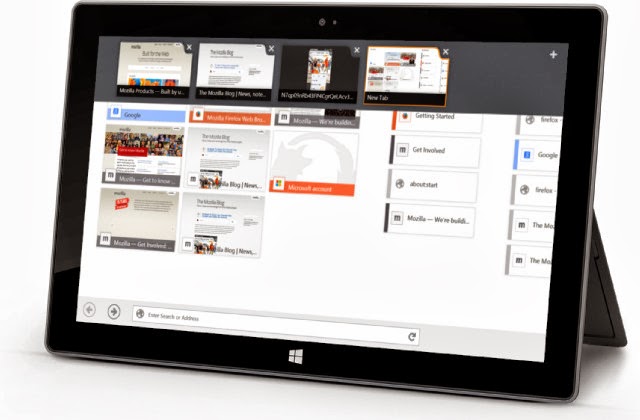
Mozilla has released a beta version of Windows 8 App of Firefox 28. This is adjusted to Microsoft Modern Metro and optimized for touch operation, so that it is of particular interest to focus on Windows 8 tablets. Firefox for Windows 8 Touch, Mozilla calls it as the latest beta version of Firefox 28, which is available as a Windows 8 App.

Thus it differs from the standard Windows Desktop version of Firefox. The typical swiping Windows 8.x as well as pinch-to- zoom are supported, so that with a finger gesture you can move over comfortably into the website, you can zoom in and can be zoom out. The version is therefore primarily intended for owners of Windows 8 tablets or devices with a touch screen.

 " Touch Firefox Beta for Windows 8 has a home screen with direct access to favorites and browsing history. Other features of Firefox, such as the Awesome Bar are always available, “said Mozilla in a statement. The beta version works normally in full screen mode, but can also be placed on the relevant Windows functions in addition to another app, so that both can be viewed simultaneously.

The Metro version of Firefox will bookmark important pages and the course in the form of tiles to blend into the design guidelines from Microsoft. Thus, the operation of the browser should be easier Mozilla promises. The Firefox browser dominates the Windows parts function, so that web pages can be passed on to other apps also. It enables users to use the Metro version of Firefox, must be made Firefox the default browser for Windows 8.

For in the Modern UI world can always use only one browser. Once that's done, a matching Firefox tile is on the home screen of Windows 8 or Windows 8.1. The beta version uses the same browser engine that is also used in the Windows desktop version of Firefox. In the current version of Firefox, the Gamepad API is enabled, VP9 video decoding and Opus in WebM is supported and there is a volume control for HTML5-Audio/-Video.

Under Mac OS X the Notification Center is used for web notification. Since March 2012 Mozilla is working on developing a browser for the new Modern UI interface of Windows 8 alias called Windows 8.1. A first pre-release version of Firefox as Windows 8 app was released in September 2013. Mozilla provides the beta version of Firefox for Windows 8 Touch free to download.

Saturday, 8 February 2014

How To Check If Email Is Opened Or Not!


Yahoo and G mail
As many people would have noticed that, while sending some message via a Facebook, What’s Up when delivered or read by a particular person will status as seen and you can make a confirmation that message was delivered successful. Have you ever had a confirmation status while sending an email? Think so yet now you would have not. And also to make a note for you this feature is not available in Gmail or Yahoo.

Email conformation indeed is not that important till it’s needed to be. For instance when you send some important mail for your family, boss or client, you have to hang around till recipient has received the mail. This case will not be favorable at times and if recipient fails or ignores to send an reply you will surely be in a confused state whether mail is reached or not. So in order to deal with such situation, we will get notified you on sent email.

1. Using Right Box Chrome Extension: 

• By using Chrome extension Rightinbox you can track the sent email.

• On the first you have to install extension on your browser.
• Now open up inbox, if already opened then refresh it.

• Now Pop arises in screen, click the continue button and give access to Rightinbox to contact Gmail.

On completing these steps compose mail recipient and clack on to Track, send the mail. Once the recipient have opened and read your mail, you will be noticed with IP address and location. Hence this is also accommodating you o schedule Emails in future. Further support is Rightinbox send tracking email not based on extension browser. So you will get notification when you access tour mail from any other computer.

2. Banana Tag: 

To track sent mail form Gmail and yahoo anther technique is Banana Tag.

• Do you have an account in BananaTag; else you have to sign up for a new account.

• On completion of registration, you can get BananaTag extension for your browser.

The extension to your browser provided was a free version and you can rack up to only 5 mails per day. If you need to track more than 5 emails per day, all what you have to do is upgrade your account by crediting BananaTag.

Hence this an way to find out status of sent email. Try out and enjoy the new experience.

How to Block Unwanted Calls and SMS in Android Phone

Block Unwanted Calls in Android Phone
Android technology has been constantly increasing over the decades, and also improves various easiness to the users. Having an android smartphone becomes a passion for most of the people around this globe and android devices are considered as smartest gadgets in this world. Most of you have experience unwanted calls for your mobile and also each of you would have think how to block the particular calls on your mobile. In this post, you can easily know how to block a particular mobile number for totally free and you can easily avoid various calls from the telemarketers and also from the spammers in a click. Here I have listed both manual ways and also app-oriented way to block an unwanted call in your mobile.

In the manual way to block an unwanted call, you can do it by your own way and in the app-oriented way, you can easily install an application and using that application, block unwanted calls in your mobile.

Manual Method: Your mobile itself support default blocking mechanism and by using that window, you can easily block various calls in your android mobiles. The mechanism differs from various mobiles and also you can differ refer your device manual for blocking a particular call in your mobile. Here I have listed few applications from which you can easily block various calls in your android device.

1. Mr. Number: Mr. Number is an application for your android mobile which helps you to block unwanted calls in your mobile. Mr. Number also allows you to block the messages that are coming over the mobile. Mr. Number makes you to track the mobile numbers that are in the United States, and also you can download this application for totally free.Mr. Number is an awesome application that makes you to block calls and messages from a particular area. And it also saves your time by avoiding the calls from the telemarketers and from the spammers. It also has reverse look up number feature and also report spam calls to other users very easily.

2. Call Blocker: Call Blocker is an application which allows you to block the calls from the users. It comes in two versions, free versions and also with paid version. If you have paid version, then you can experience more feature with this application. This application also helps you to protect the call logs and also protect your SMS. Call Blocker back up your device contact list to your accounts on the server. So that you cannot lost your contacts at any cost.

3. Call Control: Call Control is a brilliant application which allows your mobile to ring whenever you want. It Blocks the spammers automatically and also you can block text messages and picture messages on your mobile.Call control application is totally free and its 100% free from the adware. This is a brilliant application when comparing to other applications that are available in the Google Playstore.

How to Change Boot Animation of Android Device


Most of you would have felt that how to change the annoying animation which comes in your android smartphone when it gets booted. This is a big issue if you want to experience a faster mobile. You can easily turn your mobile into a fantastic mobile by changing the default boot animation in your mobile. Many of the people asked me how to change the boot animation of the mobile device and here I have listed a way how to change the boot animation of the android mobile.

Disclaimer: Before doing this procedure, kindly make sure that, our blog cannot be responsible for the thing which is going to occur in your mobile, if you were performing this procedure wrongly. We have almost made this post by performing in a mobile and each and every step in this procedure is in its best level.So kindly make sure that, you were performing this device properly.

Pre-Requisite: Before doing this, you need to have these following things. So that, you can very easily perform this procedure.

• You should mainly know that, your mobile devices should be rooted in order to perform this action.

• You need to install applications like Root Explorer in order to access your device internal phone memory.

• In order to change the boot animation, you need a custom animation files for your mobile.

Ways to Change the Boot animation of your android device:

• In order to change the boot animation of the android mobile, you need to Download the Custom Boot Animations for Your android device From Androidbootanimation.com

• Otherwise you can use the custom animation for your device by using the custom animation of any device that is compatible for your device.

• Now using the Root Explorer application, move the bootanimation.zip in the system/media in your internal memory of your android device.

Note:Now you need to Mount the Phone Memory of your mobile, for moving the bootanimation.zip in the /system/media. And you can easily do it very easilyby Pressing Mount R/W Button, which is present on the Top of Root Explorer.

Once the files has been moved into the location, then you need to change the permission for the bootanimation.zip; in order to select the permission, you need to long press the files and select the permission. Give permission as rw-r-r. You can refer the following picture for the reference.

Boot Animation
Now Everything has been over, you need to simply close the root explorer application in your mobile and then restart your mobile. Now you can see the new custom animation in your android mobile. This will gives you a new boot animation for your mobile and also gives you a solid feel when you turn on your mobile. By using this, you can easily prank your friends very easily. Even you can change the animation as per your wish. If you have any problem regarding this, you can ping me through the comment box below.

Friday, 7 February 2014

How to Crack / Unlock Pattern Lock of Your Android Device without using Google Account

Pattern
Have you forgotten your Android Security Lock Pattern? And have you ever tried to unlock the security pattern without knowing the unlocking pattern in the android mobiles. If you were agree for that questions, then you can get the information how to crack the pattern lock of your android mobile. In this post, I have shared a best way to crack the lock without using the Google Account for your smartphone. This trick works in both rooted as well as in the unrooted mobiles / tablets, without internet connection. Simply you need a personal computer with device drivers in it. Kindly don’t use this trick over a theft mobile.

Compatibility: 

The trick to unlocking mobile is work with all sort of Android phone or tablet, which is running over Gingerbread, ICS, and Jelly Bean. No need to root your mobile before doing this, so you no need to bother about the warranty of the device.

Pre-requirement: Before doing this, you need to charge your mobile, if your mobile has low charge. It is strongly advised to keep charge more than 75% before doing this. And one more important is that, USB debugging option should be enabled in the mobile. Without enabling this, you cannot perform this action. If you have any anti-virus application in your personal computer, then disable it in your personal computer. If you have disabled USB debugging, then you need to install Custom Recovery for your mobile.

How to Unlock the Pattern Lock of the Android mobile: 

Download the ADB kit from the Internet. After downloading the ADB kit from the link, then extract the files which you have been downloaded. Now open the Fastboot folder and you will found four files in it. It will haveadb.exe, AdbWinApi.dll, AdbWinUsbApi.dll,fastboot.exe;

Now you need to connect the android mobile to your personal computer. Now open the Fastboot folder and right-click over the empty space, now select Open Command Window Here. Then CMD will open; Now in CMD, type the following code;

adb shell
cd /data/data/com.android.providers.settings/databases
sqlite3 settings.db
update system set value=0 where name=’lock_pattern_autolock’;
update system set value=0 where name=’lockscreen.lockedoutpermanently’;
.quit 

By typing the above code in the command prompt, your device will be automatically cracked. Now your device will be automatically unlocked from the pattern lock from your android mobile. Just restart your mobile to unlock your mobile, now you can see that no lock will be found in the mobile phone. You can easily enter without putting the pattern lock in the cracked mobile. If you want to secure your mobile, then you can easily enable the lock pattern in your android mobile as you do earlier. You can do this mechanism as many as possible if you forget the lock pattern of your android mobile. This one can be used positively as well as negatively which depends upon your mind.

Thursday, 6 February 2014

Archos plans to launch a Windows Phone!


The main problem for lesser models of Windows Phone is the lack of manufactures. They are reluctant because of the overwhelming dominance of Nokia in this segment; Nokia is having more than 90 % market share.

Archos Windows Phone
However, the steady increase in sales of Windows Phone (Windows Phone 9.5 million were sold in the third quarter last against 3.7 million a year earlier) begins to give some value to looking to get out of their addiction to Android. This is the case of Sony, Samsung or ZTE.

The French Archos could also be part of it. The manufacturers, who focuses on Smartphones are, opened the door to windows phones now. "We will launch a Windows Phone device when the time comes," said Loic Poirier, CEO of Archos. Archos interest confirms the growing interest of manufacturers for the windows platform.

Their interest could amplify change in business model soon. Because Microsoft might abandon the system unit license in favor of outright free similar to Android. This is what The Verge reports that this strategy would be driven by Terry Meyerson, head of the Windows division to better compete with Android.

 The transition to free licenses for Windows RT and Windows Phone will be introduce soon and the loss of income could then be painful but remember that Microsoft is raking in hundreds of millions of dollars with royalties that key manufacturers of certain patents used by Android.

Firefox 27 Available Now


Firefox 27
The Firefox 27 is available now with improved security and with good support for social options. The Firefox 27.0 version is now available through the usual channels. The new version brings no apparent changes but more changes are there in its engine.

Security is again in the spotlight with the activation of TLS (Transport Layer Security) protocol that is intended to replace the old SSL (Secure Sockets Layer) for the enhanced security. In terms of new features, the Mozilla Foundation announced that it has strengthened the social interactions from third party applications.

 In the previous year, Mozilla has announced that the Facebook is one of their pillars of social integration, and it was fulfilled today hence the user may be connected in an enhanced security with the social media in this version. And 'Delicious' will allow the users to share their links easily within the Delicious network.

"Delicious backup and organizes all your favorites while you surf the web content - you can easily find this content in the Firefox sidebar. Saavn, the music sharing service is now integrated its side through a Firefox sidebar to view a music stream. Social may give a boost to a slowing Firefox!

Wednesday, 5 February 2014

Emergency patch released by Adobe for Adobe Flash Player


Adobe Flash Player
Adobe Flash player is urgently calling user for a software update. Through an explosive leak in flash player can offer a safe path to the cyber criminals to hack into any of the user’s operating system. The current emergency patch is available for users of the operating systems Windows, OS X and Linux.

Adobe has pointed in its security blog about a critical vulnerability in Flash Player. It is in all versions of Flash Player 12.0.0.43 to 11.2.202.335 for Windows and OS X and Linux hence all users are at risk using the software without updating.

Since the flaw allows hackers to take the control of the operating system remotely hence the users should update the flash player immediately with the emergency update released by the Adobe to close the gap.

Microsoft and Apple customers need to go for the Flash Player 12.0.0.44, users of Linux has to go for the patch 11.2.202.336. You can download it at the following link:

Tuesday, 4 February 2014

How to Find Stolen or Lost Android Mobile Using Android Device Manager

Android Device Manager
You have ever lost your Android Smartphone or tablet without it having a device tracking app installed? Its really a pain if that happens, Don’t worry its not that much pain nowadays, just go through this article, this will be useful for you.

Even if you have not installed any recovery app in your device there is still a option to track your lost phone via Google`s Android Device manager. Google recently released this device tracking tool, called Android Device Manager. Great that Google offers this service to Android users. Android Device Manager is obviously a very straightforward and a very easy-to-use tool to track your lost phone.

 Your android has been Lost, there`s no need to install any software it just has to be connected to your Google account. Though this tool has limited features but still a great tool to track your lost device, So once your device is lost I would recommend you to first check with Android device manager as to where it is located. If you miss your device somewhere this tool gives you option to ring your phone as well.

As per the assumption Google has now probably, installed the Android Device Manager onto your Android phone by now without your knowledge. This has been applied to all android devices which is at least android 2.2 and have Google Play installed on it.

To activate this on your device, go to the Settings > Security > Device Administrators and then tick the Android Device Manager, allow it to do anything it wants. Then open any Web browser, and locate your device via the Web interface. There are some other features too which includes being able to ring your phone at maximum volume when you've misplaced it.

This tool surely helps if you have lost your phone, or if it is stolen. You could actually get close to the phone using the locate feature, then sound the alarm and get ready to run after the theif. Incase you were not able to catch the thief; you also have option to just erase the device completely to keep your data safe. Unfortunately, Google also says that it may not be able to clear the contents of the SD card in your device. Hard luck if anything personal is there, also once the erase is done ADM will not work anymore on your device.

Incase this tool doesn’t works there are possibilities that the device is not connected to the internet, In such case just keep trying to track it until it connects to Google’s services again hopefully it will. This tool works until the thief has logged out your Google account, then its not possible to track it even from Android device manager. So actually this tool is really very handy until someone is too brainy than you.

As of now that’s all for this tool Android Device manager which is quite good and we are waiting for lot of new interesting features which will be updated by Google on this tool.

Top 10 Best iPhone Tips and Tricks

iPhone
iPhone has been an amazing smartphone in this technology world and everyone in this world have a desire to buy this mobile in their lifetime, and also they would love the iPhone very well. Because of the fantastic features and brilliant look made the people to love this mobile. In this post, I have shared few things about the shortcuts which are related to the iPhone and you can use them in your mobile and prank your friends with these awesome tips.

Tip No 1: Reset Your iPhone when it gets stuck: You can easily reset your iPhone when it gets stuck. Don’t get too much of tensed and you can easily reset your mobile phone when it gets stuck. Tip No 2: Set Restrictions for the contents:

This allows you to set various level of restrictions for your contents and this makes other not to use the whole features of the apps without your permission. You can easily set the restrictions by Go to settings and then enter restriction settings to enable this option.

Tip No 3: You can easily download torrents in your iPhone without any sorts of additional clients. Tip No 4: There are several Hidden characters are found in your iPhone, you can easily use the hidden characters by long pressing the keys on the keyboard. You can use these keys to improve your typing speeds and also you can use .net, .edu and .org domains by holding .com button.

Tip No 5: You can Create custom vibration in the iPhone: Like custom ringtones, you can setup the custom vibrations in your iPhone. This helps you to easily identify the callers who were calling you without seeing the mobile. By accessing the sound settings, you can easily set up the custom vibrations as well as the custom ringtones for the callers.

Tip No 6: You can capture your Screen at a click: This option allows you to capture the screen of the iPhone, and also allows you to capture important moments in your iPhone. Simply pressing the Home button and Sleep button will provides you an instant screenshot in your mobile.

Tip No 7: You can easily Hide the SMS preview: This option allows you to prevent the sms preview to show, and you can remove it by accessing the Passcode lock menu and then disable the Show SMS preview option in the iPhone. This gives you a maximum level of privacy in your mobile.

Tip No 8: Do Not Disturb: This option is similar to Silent mode, in this you can set up the settings to do not disturb you while in work or in some meeting.

Tip No 9: Download YouTube Videos in your mobile: This option allows you to download YouTube videosin your mobile by using the MxTube application.

Tip No 10: Lock Screen Orientation: This option allows you to set up the lock screen view and By simply double tapping the Home button, you can see the Lock screen over the mobile.

Experience the Benefits of Cloud Based Phone Systems

Cloud Based Phone Systems
With multiple options made available to people, there are various means of staying connected with individuals at any location, within the quickest span of time. Before the existence of VoIP, all phone systems were on the public switched telephone network but with progress and achievement, improvements have occurred through the internet giving rise to real time communication services as voice, video and communication services over IP based broadband network to telecommunication service provider all across the globe.

 Cloud Phone System, a relatively new phone service which delivers through the internet is much preferred since it has the ability to deliver calls over the internet, route inbound calls to the desired individual within a company as well as provide telephony applications like call recording and voicemail. Service providers have been catering to these requirements with efficiency and accuracy having years of experiences to their credit, providing an excellent method of delivering innovative communication applications to their clients.

They operate, maintaining the network on a single platform which comprises of totally redundant databases, internet connection and server routers making it impossible for any public domain of network components, to fail in communication system. Out of necessity, the competitor communications solution providers are compelled to leverage hostage solutions which rely on the public domain wherein the voice communication traveling over public network, must use public hardware to connect the communication circuit resulting in less secured and reliable means of communications.

The difference between a featured hosted PBX solution and a conventional on-premise enterprise phone system is the area where calls are processed. In the case of hosted scenario, majority of the call handling is virtually processed from the data center of the host instead of routing it through an on-premise phone system in a particular area.

Moreover business callers also have the ability to contact a specific department or a person, leave behind a message, access the name directory or even select from several messages and options. Besides this, the calls routed to one’s office can be sent using the Voice over Internet Protocol technology thereby enabling voice calls to be delivered through a broadband connection instead of the traditional phone services which depended on analog telephone systems.

The hosted PBX solutions offered by them features a state of the art cloud based quality VoIP phone system for businesses. Their inbuilt network based Quality of Services (QoS) enables quality on voice call which is crystal clear and of top priority. It also helps in reducing monthly phone bills; optimizing physical office space where the absence of an expensive and complex phone setting is reduced.

Being a main source for all voice and data communication requirements, provision of twenty four hours service and support is provided by their efficient team on board. They have been offering various small offices, large entrepreneurs as well as independent businesses, the much needed tools to streamline and operate their business which is innovative, cost effective, with highly tested developed tools enabling their clients to enhance their business with complete consumer satisfaction.

Monday, 3 February 2014

How to trim your large movie files to hassle free view in QuickTime Player7

QuickTime Player7
Are you a movie buff? Have you ever wanted to send a movie clip or a certain section of a movie to a friend, but did not how to and ended up sending the entire movie to him/her?

Help is available! In case you did not know, Quick time Player 7 has a great way to do this. It has a fast trim tool, a tool that allows you to cut big files, especially the movie ones, at points you want them to be cut at; thereby reducing file size, if you want to email them. This is basically a trim tool, which allows you to trim files, save them differently, and use them as you would choose to. The QuickTime Player 7 comes with a pro license key.

First, you need to open the movie file. When it starts running, highlight the portion that you want to trim at and save separately. Go to file, Save as, preferably name as Part 1 to avoid any confusions later. This is a great clip, as it would work even if you decide to email it or even shift it to any other device and open it. This has reduced the file size thereby making it easier for you to work on it. Another option is to make a split clipping, for which you choose “Trim to selection” in the Edit Menu and select Save. Voila! First part of the movie is ready to be used.

You have saved the first part of a movie, now you want to save the second part as well. Here, you go to Edit menu, Undo Trim to selection and your movie clip is back to normal self, with the selection marks clearly visible. Go to Edit Menu again and choose Cut, first part is cut and the second part, is sitting on your window, loud and clear. Save as Part 2, and now you have a huge movie file cut into two parts. You want to send them by email, edit and club with some thing else? Do what you want to.

This is a wonderful visual tool, which means it gives you a clear glimpse as to where the file is being trimmed or cut, and makes it easier to describe to others in case you are sending them these truncated files. You can use this tool to trim movie files to more than two portions, smaller clips that you could use for advertising or editing purposes, club with trimmed portion of another file and create spoofs and collages. The options are endless, given the tricks that can be undertaken with video files and editing thereon.


Best Android and iPhone Apps to Make Money and Earn Rewards


Gigwalk
Nowadays everyone is using an Android phone or a iPhone, they have become a common thing among the mobile users now, people spend lot of money to get an android device and even spend a lot for apps. Do you know if your android phones are used sensibly, you can earn your pocket money from it that can actually help you in the cost of your phone bill?

There are actually some apps which pay you for using their services or performing market research, this extra money will be worth your minimal effort you put while using your device. I have collected some details about those few apps which will help you earn money and rewards.

Gigwalk: Gigwalk has described itself as a mobile work marketplace. You can earn a second paycheck by using Gigwalk's iPhone or Android mobile apps and by performing simple field work, like mystery shopping, testing mobile apps, delivering items, taking photos, and many more. Gigwalk is available in major US metro areas,Gigwalk pays you from $3 to $90 per task, that actually depends on your experience and reputation.

Field Agent: Its Similar to gigwalk which turns the iphone users into mobile workers, Users will get instructions of what they need to do and where they need to go, places like any local shopping mall, grocery store, or any other location. The task must be completed within 2 hours, and this is on a first come, first served basis. Each job is worth between $2 and $12 which is paid via paypal.Its available on iOS platform.


WeReward: Another rewarding app WeReward, gives you points for completing the tasks or just checking in at specific locations. These points are redeemable for cash (1,000 points = $10, so a penny per point). It is available for both android and iphone users and you'll also need a Twitter or Facebook account.


EasyShift: Another iOS platform app which asks you to complete simple assignments such as taking various photos, sharing an opinion, or recording the price of a particular product. Once you complete those tasks, you will be promoted and then you will be able to unlock assignments which will pay you higher.Payments will be made via PayPal and this can be processed within 48 hours.

App Trailers: Preview trailers about various apps and earn points for it. Also Help the app makers to improve their app trailers by sharing your honest reviews about it and what can be done to improve it. You will be paid half a cent for each video you watch. You can also try out demo apps for that you will be paid between 9 cents to a dollar. You will get 50 points if joined through referral of any friend. This is available for both android and iOS platforms.

Mylikes: Setup an account in mylikes and link it to your twitter, facebook, youtube or any other social medias account,According to your profile mylikes creates Campaings, Just share that link or video in your profile.You will be paid cash in PayPal account or Amazon gift cards. You are actually paid for number of likes or views. This is best for a regular social media user.

These are easy tasks which can be done without taking lot of effort, who doesn’t wants some extra money? Try out these and happy earning.

How about Live Streaming

Traditionally, the only way to view live video was on TV, and the Internet was able to handle text, image and audio content. However, when Internet speeds began to increase after the year 2000 or so, it became possible to download audio and video files directly to a computer before playing them - bitrates also improved over this period of time to offer this content in excellent definition and detail. The natural evolution of this process came with the introduction of broadband and fibre optic data services, and access speeds became fast enough to stream content in real-time without having to wait for a file to finish downloading.

This improved technology has now enabled broadcasters to provide live audio and video, and it is adaptable to various broadband speeds. In any developed nation, there will always be large fluctuations in connection speeds, but everyone can have the chance to access the same live content with variable quality settings. When a user starts to watch a live broadcast, an initial speed test is carried out in the background, and an image and audio bitrate is delivered to the user that streams as smoothly as possible. In the event that the feed begins to break up or buffer, the content will automatically step-down in quality. This technology to enhance the user experience is already in place for the major Video on Demand providers, and smaller operations can now use it to deliver programmes to their own fans as well.

Live streaming has also been developed to allow viewers flexibility over what they are watching - if the broadcaster decides to offer some extra features. It is possible to incorporate technology that pauses and rewinds live content, along with a facility to simply return to the live action with the click on a button. This is a great feature for live sporting events, as it gives the viewer their own 'Instant Replay' facility, and it is equally useful when the phone rings! Users can also be allowed to scroll through a live broadcast that is already in progress, which is useful if they need to catch up quickly.

This form of online broadcasting has to potential to be used by a wide variety of businesses, organisations and individuals, and it allows the public to engage in a way that only used to be possible with expensive investment in TV equipment. Bands and artists use it to provide intimate access to concerts and rehearsal sessions, while a business may decide to broadcast keynote speeches and press conferences. The Internet makes it possible for live streams to be accessed anywhere in the world - 24 hours a day, seven days a week. Content can be made entirely public, or access can be offered to selected users if that is more desirable using the same technology that protects conventional web pages. With HD technology becoming commonplace in this area, it has already caught up with regular broadcast television in a number of respects, and it is only a matter of time before it becomes the medium of choice for many.
Martin Jonson is director of the UK's Digital Downloading company providing exceptional quality at the lowest UK prices. He will complete your job quickly with the greatest care. You can connect with him on Google+.

Thursday, 30 January 2014

Cross-Platform Java Bot Used for DDoS Attacks


Java
The java platform is used in DDOS attacks by bot. The malicious Java application can be run on Windows, OS X and Linux machines. Kaspersky Lab researchers analyzed a malware that infects computers to form a botnet - a network of zombie computers - and use it in attacks distributed denial of service.

This botnet is controlled via IRC protocol to conduct targeted attacks on IP addresses. Attackers can adjust the intensity of the attack and its duration. It uses a data stream via HTTP or UDP. At least one target of this botnet was an email service.

The malware behind the botnet is written entirely in Java. Through this platform, it can be run on Windows, OS X and Linux. Still, it runs a Java vulnerability for which a patch exists since June 2013.

This vulnerability is present in the Java Runtime Environment with Oracle Java SE 7 Update 21 and earlier, and Java 6 Update 45 and earlier. This is not the first time a botnet infects the three most popular operating systems.

Opera 19 with Bookmark API Released!


Opera 19

Opera has been released its browser in a new version Opera 19 . The Opera19 web browser has the latest release of some interesting features that Google Chrome have already.

 Among other things, there is a new Bookmarks Bar for managing bookmarks, wallpapers for the individual design of the browser extensions and a new section for advanced user’s settings. According to the developer's blog, the new stable release will be presented with the version number 19.0.1326.47.

Opera thus offers very similar features, such as based on the same rendering engine flashing Chrome browser. The new bookmarks API brings a one - collapsible bookmark bar which can be operated under Windows simply by dragging and dropping. With the reintroduction of bookmarks a basic function comes back; which was completely lacked since version 15. Now Photos can be used in the browser as wallpaper (right click on photos that are opened in the browser - "Use Image as Theme" > ).

 In the available extensions, there are two major innovations; first one is, there is a blacklisting of add- ons as well as an inline -install option. On the other hand, there are still a number of smaller improvements that have been set out in detail in the change log.

In addition, Opera Software announced that it has provided a more than 700 enhancements in total for users benefit. Opera have currently created a few new settings with the Opera 19.0.1326.47 and Opera has made available the new version for OS X too. The updates are now available for free.

New Strontium Atomic Clock sets new world records in term of precision up to 5 billion years


 New Strontium Atomic Clock
The Atomic Clock model of National Institute of Standards and Technology works with Strontium. Many of the current technological devices use Coordinated Universal Time (UTC); which is one of the international unit of measure made reliable by atomic clocks around the world. But a revolution will perhaps take place in this area: a new type of clock that will pass the time; for a long time, even until the end of our time. JILA laboratory at the University Of Boulder, Colorado, has a unique design of its kind of Atomic clock.

It looks little bit strange but this clock is obviously not like the others. It is a new model of atomic clock, giving the most accurate time in the world! This clock was unveiled in the journal Nature and operates like other atomic clocks, with a jet of atoms, moving from an excited state to another (by stimulated by a laser), gives a frequency electromagnetism frequency which will define a second reference. This can be seconds, subsequently calculated the minutes and hours.

The set of more than 300 atomic clocks scattered on Earth and in orbit around the Earth to form a network giving the International Atomic Time, which is a yardstick used to disseminate the Coordinated Universal Time (UTC), itself is used to satellites, GPS, watches and other computers and everything in the planet. More than 300 atomic clocks in the world but the Boulder the new atomic clock differs here. Boulder first uses a material which is not listed as used in the process of other atomic clocks. This is a clock Strontium, while other atomic clocks using cesium.

It promises a still life and calculates the exact time upto5 billion years! And yet, the results are there and can be further refined, as explained by Jun Ye, the Department Head Search Clock affiliated with National Institute of Standards and Technology U.S. He told that they ready have plans to push performance even further progress in their clocks in the next five to ten years, he promised.

And if 5 billion years may seem sufficient precision for the common man in the search, whether the infinitely large or small, every second counts, and the technology in this field will be reliable, the more it will achieve positive results. By comparison, the atomic clock of the Observatory of Paris, which is one of the most successful operating Cesium clocks, could give the second with precision about 300,000 million years. Now, officials and the new NIST atomic clock model will apply to ask to accept the strontium in addition to or in place of cesium and it is only a matter of time!

Wednesday, 29 January 2014

Alleged fake WhatsApp Application brings banking Trojan


WhatsApp
Kaspersky warns of a new spam wave that attracts users with an alleged WhatsApp version for the PC. An alleged fake WhatsApp campaign reaches users via e –mail and the downloaded PC version turns out to be banking Trojan. They are sending mail stating that “Finally WhatsApp for PC and eleven pending friend requests are waiting for you!” This looks s sort of the youngest Hoax of cyber criminals out of users reached by e-mail, and points to a download of the alleged first official PC version of WhatsApp.

But instead of downloading the messenger they downloaded software which includes a dangerous banking Trojan, it steels the the private online banking information and passwords from the victim once downloaded and sends back to the culprit. Malware expert Dmitry Bestuzhev of Kaspersky Labs already last week warned in their website SecureList before the spam email campaign. So far, there is no official announcement of WhatsApp PC popular messaging service officially only and it is only as a mobile version.

So if you find one in Portuguese written message from Whatsapp in your mail inbox, then it could be a by a deceptive hoax that roams currently in the network. Instead of a Messenger download it downloads a hide PC Trojan. The email makes reference to a dubious download link that says “Download now ". The malware is disguised as a 2.5 megabyte MP3 file and not only sends private data to the criminals, but also invites up to ten megabytes of viruses and other malicious programs on the computer.

Perhaps the Brazilian WhatsApp users were the target of the attack, according to their post. Note: As long as you do not click on the download link, you are safe. Since the Trojans need to be installed manually in order to get into the computer.

Microsoft SkyDrive is renamed OneDrive

OneDrive
As part of the renaming campaign, Microsoft is apparently feeling generous and have been given 20 GB of extra storage for one year. However, it is not yet clear how Microsoft selected this “valued customer“. The software giant Microsoft has entered in to the conflict with the British TV channel Sky and has to change the name of its cloud storage SkyDrive.

It is still unclear whether SkyDrive should be renamed only in Britain, else throughout the globe. In future the SkyDrive will be called as OneDrive making the name similar to their game console Xbox One and the Domain onedrive.com will soon replace the skydrive.com and already a promotional video has been published.

The agreement entered with Sky Broadcasting Group has given reasonable time to migrate to the new name and the whether the agreement include cash payment was not yet known. This is the second set back for Microsoft earlier it was forced to retire from use of “Metro” in the user interface of Windows 8 since the Metro AG group challenged the use.

Defeated in court by British TV channel Sky in 2013, Microsoft was forced to abandon to SkyDrive brand. Hence online storage file services of Microsoft’s SkyDrive, name will be changed. This was formally announced by Ryan Gavin, head of services and applications, in a blog post without giving much detail.

Samsung Disables Third-Party Accessories In Galaxy Note 3 with KitKat Update


Galaxy Note 3
The Galaxy Note 3 will be the first Samsung device, which only works with licensed accessories and disables the third party accessories. If third-party accessories offered without a matching chip, special functions are no longer available after the update has been deployed on Android 4.4. In U.S., Samsung distributed already the update for the Galaxy Note 3 to the latest Android 4.4 Kitkat.

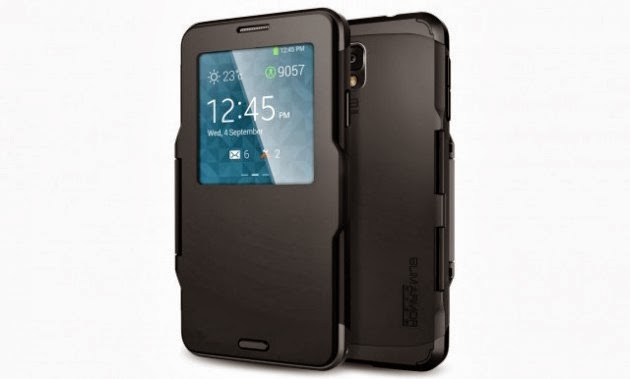
After the update the third-party accessories may no longer work. Note that you may watch that the people are complaining in xda forum. The users report that the Galaxy Note 3 is no longer reasonable to work with Android 4.4 with a special S -View case. The shell supports the S -view window function to display information on the cover.

In addition there is a transparent area on the screen coverage is reduced when closing the cover. Exactly this function no longer works correctly after recording the update. In addition, the cover has a special home button, which also is not working as desired after the update. Reason for this is that the Spigen sleeve is missing a Samsung chip. A user at xda - forum has taken the chip from an original Samsung Case and incorporated into the Spigen cover.

Then the S- Window function was active again, but the home button on the jacket still refused their service. Already in October 2013, there were initial reports that Samsung uses a special chip which will allow only licensed accessories. This project used by Samsung for the first time with the Kitkat update for the Galaxy Note 3. It is assumed that similar changes occur also for other Galaxy devices soon. When Galaxy Note 3 is rooted provided with Android Kitkat; the query for the Samsung chip can be disabled so that the S -View- Windows function runs again.