Saturday, 15 March 2014

Handy Apps to Connect Your Computer To Android Devices

Airdroid Apps
In the present scenario of connectivity, users have been switching from Smartphone to tablet to computer throughout the day for various reasons either to get in touch with someone and stay connected, to play games and much more. There may be times when one may like to have more control over a mobile device right from the computer and with upgrades on the rise, all these functions have been improving making most of our system of working much easier and faster with advanced apps enabling us to transfer control from Android device to the computer. There are apps which help to transfer control from an Android device to the computer enabling the user to make changes to their phone from their computer. These applications help in various functions namely sending mobile messages from the PC, push files, to receive notifications for phone on the desktop, custom messages to and from PC and Android devices. All these apps have helped users in numerous ways enhancing the system of connectivity and the overall working system.

Airstream without any transfer Problems

Airstream helps to stream out all the files on the desktop to an Android device along with access to one’s folders wherein one can get access to any files stored on the computer besides songs and videos. The server needs to be run on the computer followed by the app on the Android device to access the computer without any limits or transfer problems.

Airdroid Apps for Wirelessly Transfers of Files

Another easier method of wirelessly transferring of file from an Android device to the desktop is the AirDroid which helps to connect the computer to the phone via the free Airdroid app. Users can utilize the web interface to view videos, photos, take screenshots, move or delete files in the Android device and also send SMS.

Polkast – Secret Tunnel

Polkast is another amazing app which creates a secret tunnel between the Android device and the computer for secure and easy access to the files. It also has a super search feature which enables the user to search anything on the computer right from an Android device. Moreover it also has a Smart Cache feature for only cache files that can be downloaded and delete older files making space for the latest ones.

TeamViewers – Remote Access

Users can remotely access their computers while they are away with the TeamViewer app for Android. With the use of multi touch functions, files can be transferred from Android device to any computer by easily editing documents or accessing particular software and one can download TeamViewer from Google Play Store.

PocketCloud Remote RDP/VNC

Users can access files on remote Mac or Windows computer with PocketCloud Remote RDP/VNC wherein they can get hold of important documents, presentations and reports. They can do the editing and email documents from any location since PocketCloud have the capabilities to connect to computers running VNC or RDP. Moreover, the set up process is also simple wherein the user can punch in the IP address to get connected and this app can be downloaded from Google Play Store.

Control computer’s Desktop with Android VNC Viewer 

Control on computer’s desktop from Android device can be done with Android VNC Viewer which comes with a trackpad style mouse for easy use of tap and drag gestures to control areas on the screen. This can be connected to any Mac OS X, Windows, Linus or UNIX computer with the help of a VNC server and this app can also be downloaded from Google Play Store.

Mobizen App controls Android Device on PC

Mobizen app helps the user to control their Android device on their PC enabling them to transfer files, screen capture and recording, backup and restore, onscreen drawing together with handling notifications on their Android device. Besides this, the app also has the capabilities of sending text messages from the PC.

Mighty Text for small keyboard

With small keyboard on Android device making it difficult to edit long text messages, MightyText helps to write the same on the computer and send it to the recipient. This app can be installed and connected to a Google account and the web app can be accessed from the given url. Pop up on browser on incoming messages will show up which can also be used as a backup for restoring SMS or MMS messages should some problem arise on the device. Besides this, conversations also on the phone will be automatically synced.

Message Beam, a Browser Extension

Message Beam, being a browser extension is also available as an app which can be used to send a title, line or an URL from the PC to an Android device. This can be done by copying and pasting the line to the required field and sent across.

Pushbullet an Amazing app

Pushbullet is another popular app which has come up from merely pushing files, addresses or information to an Android device to mirroring Android device notification to the PC while dismissing phone notifications from the PC. Moreover, one can also push files to a friend’s phone, storing uploaded files in their server making it easy to push out.

Convenient Online Recharge

Communication has been playing a very important role in our daily functions and with the entry of mobile phones; our life style has also been enhanced to a great extent. With the entry of the mobile, it is now possible to connect with family members and friends from any location of the world. With the use of mobile phones which are a constant mode of communication, users also have the need of recharging the services from time to time. With the use of the internet, online recharge is made possible to the user which is an easy and convenient option to recharge at anytime from any location. Easy mobile recharge is made available to the user through various options like Net Banking, through Debit Card or Credit Card as well as through Mobikwik wallet. Mobikwik is considered to be India’s first Online recharge site for Vodafone, Airtel, Tata Indicom, Reliance, Virgin Mobile BSNL, Loop, Tata Docomo and Aircel which does not charge the user over any recharges done. Free recharge can be done at this site, where time, money and efforts can be saved. Users could browse for the cheapest plan available at the site and make a choice as per their requirement.


Airtel users can get their airtel online recharge done with ease which is available 24x7 with options of recharging through debit, credit card or online net banking and once the airtel easy online recharge has been done, the prepaid account balance automatically get updated. Airtel mobile recharge is available via online airtel recharge system at any hour which can be done through the internet at one’s convenience and one can get their recharge done through a leading online recharge portal, Mobikwik. This portal offers recharge plans along with validity offers, SMS pack, night packs STD plan and much more which could be very beneficial to the user according to their requirements. Users could avail the facility at this portal for recharges which is the quickest and easiest way in getting the recharge done and stay connected with their friends and family members, far and near with Airtel network.

Specification Of Google Smartwatch Nicknamed As "Gem"


GEM
According to several reports available in the net, Google reportedly working on its own Smart Watch. Now there are first technical details of the SmartWatch, which could be built by LG.

As the well known mobile phone leaker evleaks reported that the SmartWatch will have a 1.65 inch display with LCD technology. The resolution should be 280 x 280 pixels. Next the SmartWatch to be installed with a 4 GB of internal memory and 512 MB RAM. About the processor, no further information is known till now.

Google is reportedly working for some time on a SmartWatch. After the acquisition, the WIMM Labs already in 2011 first came to the news, which again received similar details of a prototype from Motorola, which Google had meanwhile advanced in its groundwork.

According to the latest information, LG Electronics is again going to supply the hardware. Even with the naming of the clock, there are different approaches. So the led under the code name “Gem " device will probably will not get the name Nexus and the branding will be more guided only by the name Google Watch or Google SmartWatch.

Friday, 14 March 2014

Both Google and Microsoft do not want dual OS !

Asus Transformer TD300
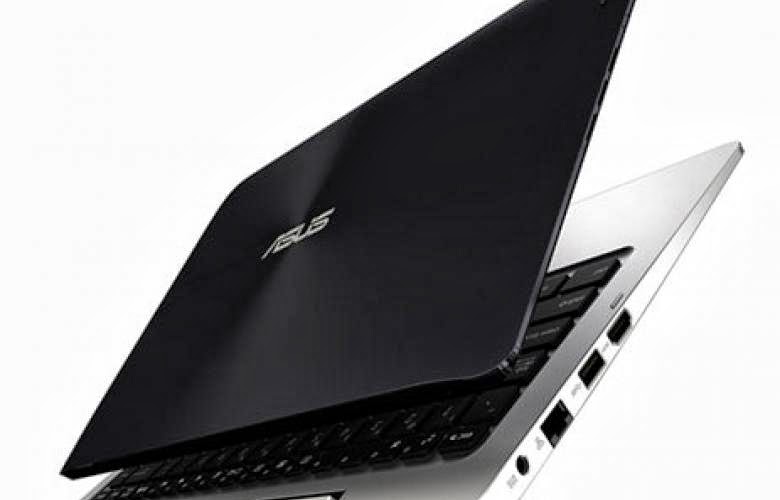
Marketing of hybrid Asus Transformer TD300 which was to offer both Windows and Android is indeed stopped under pressure from Google and Microsoft. At CES Las Vegas 2014, the manufacturer prestigiously announced Asus Transformer hybrid TD300, which had the distinction of taking both Android and Windows to switch from one to the other in seconds.

This device rather special was designed in collaboration with Intel and must show the flexible use of Intel processors can handle both OS with the same chipset. However, that Google was not very enthusiastic about the idea, fearing perhaps that will promote the interests of Microsoft. The Wall Street Journal, however, reported that the group Redmond has also lobbied opposite for the hybrid Asus Transformer TD300.

In his case, he would fear to see Google may invite fresh competition on the market for business computers, is trying to protect Microsoft marketing efforts. Asus should also stop marketing its computers Asus All in One P1801 and p1802 which also proposed Dual OS, due to a change in policy of Microsoft it will no longer show its support to this type of system.

These conflicts may be related to the Group's strategy of Redmond seeking royalties from all stakeholders the Android ecosystem with respect to its patents. Intel’s idea is to offer processors from which manufacturers could for example allow their customers to choose their OS at the time of purchase, which is always better than from getting caught up in a single partnership. Note this is the trend of dual OS which is going to finds its way on Smartphones also between Android and Windows Phone; Karbonn and manufacturers Huawei is ready to launch their product.

Thursday, 13 March 2014

WhatsApp Update Brings New Features


WhatsApp
Android users can pay the WhatsApp subscription for their friends now. In addition, the update brings more data protection and eliminates errors in Samsung and Sony handsets. For users with Android Smartphones, a new version of WhatsApp Instant Messenger is available for download in Google's Play Store.

In contrast to the usual updates the fresh version brings a whole bunch of new feature to your Smartphone. So you finally fit in the privacy options of the app to who can see when you online including your profile picture and your status. In addition to the basic setting "Everyone" now have the options "My Contacts" and "No” to choose from your list.

The second major innovation was recently acquired by Facebook company introduces the ability to take on the resulting cost of service for a friend. For Android users to use this service a year for free of charge. Subsequently, a fee of 0.89 Euro per year will be charged.

 In addition to some bug fixes for Smartphones from Sony and Samsung, the makers have improved the delivery of images by means of new camera shortcuts. In addition, advertises the update with the improved preview feature of video in chat messages, and a new widget to display unread messages on the home screen.

However, these special features will function on the device of at least Android 3.0 installed. In addition, the update let you save profile pictures and group icons and share them with friends now.

Google Docs Is Expanding Extensions To Counter Office 365


Google Docs
Google planning to face to counter the competition faced Office 365 moreover Microsoft is developing the capabilities of its desktop service Docs and Sheets through the extensions developed by third-party vendors support. The functionality of desktop services by Google does is not explained more exclusively.

Docs and Sheets (word processing and spreadsheet) can now be functionally enriched by third parties through extensions or add-ons. Google has indeed formalized tools designed by partner developer’s support. To view these applications and integrate them into his office, it is sufficient for the user to click on a new menu “Add-On" in the taskbar.

The only thing remaining is to choose among the extensions and install them and then to exploit the functions they provide. The principle is similar to that of extensions for Chrome – and is preparing it for any other browser. Available modules are around 30 now, and these can be used to perform very specific tasks such as import names and addresses from a spreadsheet into a Docs document, for printing purposes.

Thanks to these third-party extensions , Google should enrich its competitors Office Web applications and make even more serious alternatives to the Microsoft Office Suite, particularly in the context of the business offer Google Apps.

Microsoft unleashes Office 365 Android SDK for developers

Office 365
Microsoft has released an SDK open source through which Android developers will be able to introduce Office 365 support data in their applications.

Microsoft Open Technologies, responsible for creating a bridge between Microsoft products and other technologies via open source tools and open standards branch, has unveiled a new development kit for Office 365 to Android.

A preview of the SDK open source (Apache 2.0 license) is available on GitHub platform. Developers will be able to allow applications to access Office 365 data through links to SharePoint and Exchange servers.

Applications will include access to SharePoint lists and files, calendars, contacts and Exchange messaging. The SDK is compatible with Android versions ranging from KitKat. Those wishing to contribute to the project must sign a licensing agreement Microsoft Open Technologies Contributor.

Miracle Machine Turns Water Into Wine

Miracle Machine
If you are a wine lover, then I assure you this post will be interest you to the highest point. Two researchers have created an incredible object, capable of turning water into wine, and in just a few days.

They subtly named the Miracle Machine, referring to one of the very first famous miracle of Jesus Christ. Kevin Boyer Philip and James have developed this artificial wine that requires the machine is very amazing, yes it needs a Smartphone and water.

The dedicated mobile application allows you to select the type of wine you want to make and then tells you what ingredients placed in the object to create the drink. The software connects to the Miracle Machine via Bluetooth and monitors the progress of the wine preventing it to mature. It takes approximately three days to taste your wine prepared.

Do not be afraid to find yourself short of ingredients to launch the production only it needs grape concentrate, yeast and other few necessary spices. The Miracle Machine consists of a fermentation chamber, heater, thermometer, blender, a microprocessor to oversee the process and finally a Bluetooth antenna to connect to your Smartphone.

Although the idea behind this device is not new (there are already gadgets to make your own beer), the manufacturing method of this wine can easily be confusing. The project will soon be launched via a Kick starter page, where interested people can participate in the financing.

The expected price for the Miracle Machine amounts to 499 dollars, 359 Euros. We were very surprised to learn that such a gadget will soon be appearing in the market and we are very curious to see what it is capable of.

Wednesday, 12 March 2014

Sony Working On Blu-ray Successor “Archival Disc” With Terabyte Storage

Archival Disc
Sony and Panasonic to present the "Archival Disc" the potential successor to the Blu -ray Disc with a capacity of up to one terabyte. Sony and Panasonic are working on this one- terabyte data store.

In the summer of 2015 they will start the new generation of data storage; Sony and Panasonic potter along on the successor model Blu- ray disc, introduced in 2006. This successor disc will initially appear with 300 gigabytes of capacity, followed by other models.

According to Sony, soon the new technology will continue to evolve, in a next step, a 500 -gigabyte disc model will arise. And their goal is the introduction of a one- terabyte disc in a few years. The Archival Disc is writable on both sides, on each side there are three layers, each with an initial 50 gigabytes.

To write to the disc, there will be special burner. According to Sony; the discs will be particularly resistant for dust and water. And Sony mentioned at this moment the cost of this archival disc is quite high. Hence the target group for the archival disc is thus initially probably only the professional environment and not the public masses. A specific release date or price is not yet known. And the announcement will be by summer 2015.

Twitter Launches Click To Call Option In Their Advertisements


twitter
The social network is currently experimenting "click to call" with some of the advertisements, including Google and Yelp button.

This feature should be introduced in the coming months. Twitter has confirmed that it is currently testing a button “click to call“that appears on some advertisements to allow users to contact the advertiser directly by phone. This new feature will help micro blogging service to hold it in the segment of local advertising.

For example any business can use this type of advertisements to reach their target audience more effectively. With this function twitter will help the advertiser to get their targeted audience from a relevant geographic targeting to reach the right audience.

To do this, advertisers can use the postcode particulars. Twitter so far does not mention the brands participating in this experiment, but the Wall Street Journal mentioned that Google and Yelp are participating. This new option of contact should be commissioned in the forthcoming months.

Soon Can Send Scented SMS With oPhone

oPhone
U.S. researchers have developed a new phone called oPhone, a novel technology for sending perfumed SMS via Smartphone messages to your friends and relatives.

With a small cylindrical object attached to your Smartphone you will soon send perfume smells with your Smartphone. This has designed by the American scientist David Edwards and the Laboratory of Paris; oPhone could be a new form of communication with fragrant smell. The oPhone will especially seduce you with its ease of use.

To send your best scented messages, you can simply connect your oPhone with your Smartphone and choose your recipient. Thanks to a dedicated application designed for this purpose, you can select and configure the smells that you want to send.

 Its operation is very easy and simple to operate. The system contains a so-called "printer" that activates odor cartridges which can thus combine new scents. Lovers may send their better halves with delicate aromas of rose and that will turn to sweeter flavors.

Still the product is in development phase and you may expect the oPhone in the market by middle of the 2014. The oPhone will eventually accompanied by a catalog of nearly 10,000 varieties of smells. We were impressed by this innovation and we look forward to supporting our messages more intoxicating as each other odors. In writing, we would love to send messages to the delicate rose scent to our beloved!

What is Predictive Dialler Software?

The myriad of offers for Predictive Dialler Software is baffling and will surely spark even the savviest and most tech aware businessman’s curiosity because in reality, its purpose and features remain unknown to a vast majority of people, despite the fact that they are widely used in business-client communication.

Description

To lay confusion to rest, Predictive Diallers are outbound call processing systems specifically designed for elevated levels of activity and are proven cost effective solutions for contact centres. Not to be confused with ‘automatic phone dialler’ or ‘preview dialler’, which allow you to manage salesperson’s calls, a predictive dialler is capable of automatically making telephone calls to a list of numbers, screening any irrelevant or unfeasible calls such as the ones that return busy signals or answering machine messages. The diallers will then connect the customers with assigned representatives and will repeat the process to maximize the company’s potential for dealing with a high volume of calls, improving employee productivity.

Types

There are various devices that will perform similar actions, such as off-the-shelf modems and bygone telephony boards, but the high maintenance costs and prices involved make them inefficient. Predictive Dialler Software, on the other hand, is at the forefront of telemarketing, survey, payment collection and service follow-up solutions, as it bypasses up-front capital expense and consistent resource-drenching costs of hardware-based diallers.

As such, there is a large array of hosted dialler software available on the market, for instance, the ability to integrate with CRMs, with dashboards and customer reports, real-time caller count, average handle time reports, tablet and mobile app features, lead generators and so on. Bursting at the seams with forefront technological features, this software is absolutely vital for contact centres that need to be in permanent contact with their customers.

Regulation

In the UK, predictive dialler technology is regulated by Ofcom to abandon no more than 3 per cent of its answered calls on a daily basis. The regulatory authority also mandates that a call should be considered ‘abandoned’ if an agent or caller is not assigned to the call within 2 seconds. In such cases, an automated message is to be played to the customer, in which the identity of the company, the purpose of the call, as well as a standard rate or a free phone number to call back should be provided. Further prohibition applies to the content of the message, in that there should be no form of marketing included. Additionally, the call back number given to the customers is to provide him with the opportunity to have their numbers removed from the calling list and the conversation must be entirely void of marketing content. Additionally, the ‘abandoned’ calls must not be redialled until 72 hours have expired, unless an agent is assigned.

Advantages Of Predictive Dialler Software

The obvious advantage of using Predictive Dialling Software is the fact that a consistent flow of outbound calls are made, keeping agents constantly busy and productive, increasing call turnaround and allowing contact centres to maximize their output, attracting more and more clients and customers. What's more, these systems will automatically. By recording important information concerning agents' performance, the system also ensures that their efforts are rewarded based on report results, consequently maintaining company standards and improving quality performance indicators. Additionally, by avoiding unfeasible calls, contact centres avoid dealing with disgruntled clients who appreciate a peaceful, quiet life, free of distractions such as constant telephone rings.

Intel's New 800 Gbps MXC Cable Will Speed Up Data Centers

MXC cable with 800 Gb/s
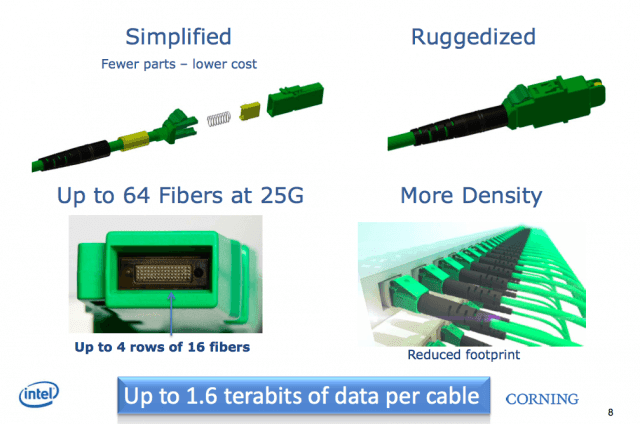
Intel's Silicon Photonics project will be come to the end of reality. Famous for gorilla glass manufacturer Corning will sell the cable, which then allow in a data center bendable connections with up to 800 Gbit / s . Intel's MXC cables are gradually becoming a reality. The Silicon Photonics technology is to be brought in the third quarter of 2014 to the market and sell it according to some media reports.

Upto 300 meter long cables with a data throughput of 800 Gbit/s are possible now with these. To achieve high speeds Intel is by the dozen bundle glass fiber strands into a single cable and reach as per direction 800 Gbit/s output. The bundling of strands in it is nothing special. For a long time, there is the problem of insufficient bandwidth over fiber, so about QSFP was developed as a standard, the switch and server connections with 40 Gbit / s allows using Ethernet, the data direction uses two fibers and also for other standards such as Fiber Channel is used.

The enormously high integration of Intel, however, is something special and should be affordable anyway. Whole 64 fiber connections means Intel is in a small plug. Currently, just 25 Gbit / s per fiber are provided. When calculated the 1.6 Tbit / s that go in full duplex mode over the cable or rather the wiring harness. Intel is already planning to double the bandwidth to 50 Gb/s on each direction and then 1.6 Tbit/s can be reached. A high degree of integration is not only in the cables necessary, but also to the transceiver section. Intel also promises an easy deploy ability.

The cables may be more bent than conventional fiber optic cable. The bending radius is specified with only 7.5 mm. Also, foreign bodies can no longer influence the signal quality, since the light beam was increased. The Intel has been presented at the recent Intel Developer Forum in September 2013. It is part of the field Silicon Photonics and provides a connector with the name MXC.

Multimode fibers are used, which are commonly used for short-range and 1310 nm wavelength light. The cables are to be used primarily for connections in data centers. For more information on MXC - compounds can be found in an older MXC White Paper in PDF format from Intel and Corning.

Clearview Clio, Hardly Noticeable


Clearview Clio
Clearview Clio is a one of the best novel gadget in the living room; a device which is hardly noticeable Space filling staff panoramic sound to Clio deliver according to the manufacturer Clearview . Here, the speaker may looks unimpressive but it is almost invisible in your living room.

Visually, it blends with the environment and adapts to any background. For most of its surface is made of plexiglass. The one millimeter thick slice is used as a membrane which oscillates on both sides and so will be able to fill a space with a stereo sound.

 The piezo - electric driver that will enable those acrylic membrane vibrations are hidden in not noticeable stand, which is produced in the colors of silver, bronze and anthracite. Despite its small size of only 23.5 x 32.1 x 9.5 centimeters Clio is a clear, more powerful amazing sound producer with lot of bass.

For the low notes a downward bass speaker makes a diameter of 5.1 centimeters. An audio source can be connected via a 3.5-millimeter jack on the Clio, or via Bluetooth version 2.1. Up to eight audio sources can be connected via Bluetooth with the Clearview Clio speakers, including Smartphones, tablets and computers.

Android Powered Soap Smart Router To Operate At Your Fingertips

Soap Router
This router is operated by touch screen and to be designed as more user friendly than any other Routers. The router is going to play a dominant role in our homes. The Router is a middleman between the Internet and all other connecting devices in the home or office who want to access it. Most of the set up of the router is only once and then hope that they never have to do something about it unless otherwise needed to modify.

The Soap smart router will now not very much can, but has also remain particularly easy to use. It is powered by Android and thereby controlled by Smartphone, tablet, PC, or in the top model with an integrated touch screen 7 inch wide. The Soap router sees itself in addition to the traditional Wi -Fi up to the latest standard 802.11ac also on numerous wireless protocols that are required for some smart light switches, light bulbs and similar devices.

These include Zigbee and Z -Wave. And for those who prefer the classic cable there are four Gigabit Ethernet ports in the face. Above all it is designed by creators to safety of the user; more precisely the user can specify which web sites may be called in just like "white list” or which are not to be called in "blacklist". You can set access restrictions, and can even see who is looking at what is on the net for children in the household. In addition, the router Soap protects loud its inventors also against “threats from the network“. He is making fools of, for example, hackers, in which he feigns vulnerability, which is none at all.

Malware and phishing attacks it filters according to the maker of active. These features, however, are neither new nor sensational; many routers offer these and other things. The Soap settings can be do via Android and touch screen very easy and can use many of the features. In addition to the touch screen you can use the soap also as a Smartphone app that will give it for Android and the iPhone.

And who wants to save a little money, can order now the Soap model called Soap Essentials which is available without display. Soap Touch is of 135 Euros and the devices will be available in the market from October 2014. Now the project is of Kick starter and need more finance.

Earclip type Wearable PC

Earclip
Japanese scientists developed a computer available to users as an ear clip or a headset that can wear on your head. The device can be controlled with an eye wink or with the tongue.

It is a remarkable device, at first glance it looks like a large hearing aid or a headset for your cell phone, but it is a small personal computer that Kazuhiro Taniguchi has evolved from the Hiroshima City University with his team. Currently it is in test phase. The 17 -gram device should be equipped with Bluetooth, among other things, it has GPS and data storage, speakers and microphone feature.

It can be able to connect to a mobile device; the operation can be controlled with the facial expressions or mouth, for example, on the movements of the tongue or raising an eyebrow. Apparently corresponding sensors can detect muscle movements and act accordingly to the command. The hands of the user need not require navigating in any case for the operation of the system, for example, when climbing or on a motorbike could use and should also be suitable for people with disabilities, the makers advertise their prototypes.

It is similar to Google Glass in which a small computer an attempt as close as possible to the human body and make it portable accessories. The ear clip computer can also check the health of the user who carries it. It is suitable to use as a hearing aid and can monitor the body functions of the user, such as tracking the pulse or body temperature and record how often the user eats something or sneeze.

Even if the user crashes, the device should be able to find the same and can possibly call an ambulance or notify relatives, the makers promise. The bulky working title for the device currently reads “Earclip -type Wearable PC”, a portable personal computer which is like an ear clip. Taniguchi and his team plan to develop the device with in years and ready to bring in the April 2016 to the market.

Tuesday, 11 March 2014

Product review – The Asus Transformer Pad TF7101T.

If you are in the market for a hybrid device that adds versatility to your everyday tasks, Asus recently released an Android version of the Transformer Pad with new tech upgrades and features.
For fans of Asus tablet devices, it may be worthwhile to take a look at the new Asus Transformer Pad TF7101T hybrid tablet PC. The TF7101T has carried over a lot of the features included in previous versions of the Transformer, with new features that include more power and a higher resolution screen.

What is the Asus Transformer Pad TF7101T?

The Transformer Pad TF7101T is the latest hybrid device from Asus that offers sleek styling and versatility. The TF7101T has also hit the market with a higher performance tablet and detachable keyboard dock that provides a second battery, resulting in an impressive battery life. Asus has also returned to the Android operating system after offering Windows 8 in some of its previous devices.

When you look beyond the stylish chassis, the TF7101T is designed with performance in mind with a more powerful processor than previous Transformer Pads.  The tablet portion of the device is designed with a higher resolution IPS capacitive touchscreen which brings images to life with vivid colors and exceptional contrast.

In terms of design and aesthetics, there is a lot to like about the stylish look of the TF7101T.  The tablet is finished with a classy brushed aluminum backing with a texture that displays flashy circles when you move the device at different angles.  The keyboard dock has the same upscale brushed aluminum finish with full-sized keyboard that converts the Transformer Pad into a portable Android laptop.

The hinge that connects the keyboard dock to the tablet is a standout feature due its strength and durability.  When used as a laptop, this allows you to hold the device at virtually any type of angle without having to worry about damaging the hinge mechanism.

Asus has also kept the plastic materials to a minimum with a plastic frame around the camera lens.  This is not a bad feature since a completely aluminum chassis can compromise your Wi-Fi signal and potentially interfere with GPS performance.

What are the Technical Specifications?

The new Asus Transformer Pad TF7101T is designed with a new and improved 10.1-inch display with 2560 x 1600 resolution and 299 ppi.  The 10.1-inch screen size has been carried over from other Transformer Pads however, there is a noticeable difference in the display which is designed with IPS (In-Plane Switching) and a 16:10 aspect ratio. The IPS panel also uses Super IPS plus which is the same technology used in the Apple iPad.  This feature produces a stunning display that surpasses the Transformer predecessors with an impressive viewing angle of up to 178 degrees.

Another interesting feature in the display screen is the inclusion of IGZO (Indium Gallium Zinc Oxide) technology which produces a higher than normal Liquid Crystal Display (LCD) with lower power consumption.  IGZO technology is created by Sharp and uses an OLED (Organic Light Emitting Diode) approach which produces a wider scope of colors at a lower cost with a thicker and more durable screen.
Other specifications include:

Processing Performance:  The Transformer Pad TF7101T is equipped with a NVIDIA Tegra 4 T40X chipset and ARM Cortex-A15 quad-core processor running at 1.9GHz with 2GB of DDR3 Random Access Memory (RAM). There is also 32GB of internal storage and a 72 core GeForce ULP Graphics Processing Unit (GPU).

Port Connectivity:  The TF7101T is equipped is equipped with one USB 3.0 port for connecting USB peripherals, microSD card slot which supports up to 64GB of storage, micro HDMI port for video output to a flat screen TV, and a 3.5mm headphone jack.  The USB port and microSD card slot are located on the keyboard portion of the device.  There is no microUSB port for charging the battery or transferring data since there is a proprietary one located on the bottom of the device near the hinge stabilizers.

Wi-Fi Connectivity: Internet connectivity is achieved with dual band Wi-Fi that operates on the 802.11 a/b/g/n standards and Miracast for wireless delivery of video from your mobile phone or other device.  The Transformer Pad TF7101T is also equipped with GPS capability for convenient use as a GPS device in your car, and Bluetooth 3.0 capability for connecting Bluetooth-enabled devices.  There is no mobile 3G or 4G Internet connectivity included in this model.

Keyboard:  The TF7101T keyboard features a full-sized QWERTY keyboard with keys that are slightly smaller than what you would find in a conventional keyboard design.  There is also a generously sized touchpad constructed of a durable plastic with mouse buttons on either side.  Although the touchpad is plastic, it still provides great response and functionality which is paralleled with the glass touchpads on other similar devices on the market. The mouse buttons are a bit stiff at first and its take a little time to adjust to their performance.

When you type on the keyboard the action is rather stiff with limited traveling space.Still you get a nice response with a tactile click with each keystroke. In addition to typing, there is also access to a variety of functions on the top row of the keyboard including Android shortcuts, adjustments for screen brightness, Wi-Fi controls, and quick access to your web browser, multimedia controls, and more.
On the tablet portion of the Transformer Pad, there is a virtual onscreen keyboard which allows you to type faster, thanks to the main panel which displays both numbers and letters together.This saves time and hassles with switching back and forth while you enjoy improved productivity with ultra-responsive keyboard functionality.

Camera:  There is one front facing 5 megapixel camera on the tablet portion of the Transformer Pad TF7101T which provides average performance.  There is no flash capability but images come out relatively decent when you use the camera in well-lit environments.  The camera also functions well for video chats with video capability that is average for this type of device.

Audio:  The TF7101T features just one speaker which is located on one end on the back of the tablet.  The speaker is drilled into the aluminum casing which allows for some sound reverberation before it exits through the grille. The result is a relatively decent sound quality for a tablet device. There is also a control panel for adjusting the audio for playing games or listening to music. The audio panel is also installed as an overlay which means you can access it from any location.

Battery Life:  The Transformer Pad TF7101T offers two batteries which provide an exceptional battery life.  The tablet is equipped with a 7820 mAh (Milliamp Hour) battery which provides up to 9 hours of life with normal usage, even when you are streaming video.  The battery life is about 3 hours less when you engage in processor-intensive video games.  When the keyboard is connected, the battery adds up to four more hours of battery life which is somewhat less when engaging in video games. The keyboard dock also charges the device with a complete charge for both the keyboard and tablet achieved in less than three hours.  There is also a selection of power and audio modes to allow you to get more out of the battery life.

Dimensions and Weight: The keyboard dock adds a bit more weight to the Transformer Pad at 1.3 pounds or 585g.  This is not exactly bulky but slightly weightier than other hybrid devices of this caliber. Dimensions are 10.40 x 7.10 x 0.40 inches (L x W x H) or 180.8 x 263 x 8.9 mm.

In terms of price, the Transformer Pad TF7101T is priced at a lower cost than the previous Transformer Pad Infinity at approximately £430 depending upon where you make your purchase (business usersd can get a discount - this IT Vendor in London for example offers discounted Asus products). The price is also competitive with the iPad and other higher end tablet devices on the market.

What Operating System Does It Use?

The Asus Transformer Pad TF7101T runs on Android 4.2.2 Jelly Bean with the option to upgrade to Android 4.3.  The interface has undergone a few minor changes which allow you to run a series of apps simultaneously, thanks to a utility tray that can also function as widget overlays. The utilities include a video player, calculator, countdown, unit converter, compass, dictionary, stopwatch, and audio settings.

There is also a quick launch tool which is accessed by holding down the Home button.  After you press the button down, a circular icon appears that allows you to quickly access your favorite apps in addition to an app menu.  Asus has also added some of its own apps and graphical elements such as SuperNote (see the play store) which is a note taking app and App Locker, which allows you to control access to specific apps according to user.

The multimedia experience in the operating system is also rather pleasant with minimal latency for processor-intensive applications.  The loading of web pages is speedy and smooth and high definition videos run seamlessly with immaculate viewing on the high resolution screen.

What are the pros and cons?

The Transformer Pad TF7101 is a very functional and versatile device with an impressive battery life which sets it apart from its competitors. To help you learn more, here are a few pros and cons:

Pros

Improved processing power with Tegra 4 provides a pleasant computing and multimedia experience.
The design and finish is top quality and mimics some of the top end devices on the market.
GPS function is speedy and accurate.
Impressive screen with super sharp colors and images.
Keyboard and tablet provide top-notch fast response.

Cons

Asus still needs to improve the outdated thick screen bezel.
Inconvenient speaker location for audio.
Highly reflective screen may make viewing difficult in certain environments.

Conclusion

If you are looking for a hybrid device that is versatile with a sharp screen, faster processing performance, and great battery life, the Transformer Pad TF7101T is a remarkable device that will meet your expectations. It is also offered at a great price point which is less than the Transformer Pad Infinity and competitive with the iPad. Plus, you get the versatility and improved performance.

If design is of extreme importance, you may find the thick screen bezel and other features to be slightly outdated.  Asus has not changed much in this area but, perhaps future devices will be sporting a new design to maintain competitiveness in the design department.

Overall, the Asus Transformer Pad TF701T offers everything that you may like about the Infinity if you are a fan of that device, adds updates and improved performance, and at a lower price.  This makes for an all-around decent hybrid that is both functional and affordable.

Helpful resources.

The official Asus Transformer Pad page – click here
Claire is an IT enthusiast with now over 5 years’ experience writing articles and product reviews for blogs across the UK and overseas. In her spare time, Claire likes to spend time on her new xBox One!

Top 10 - Chat Tools For Effective Communication

Google hangout
We live in a fast track world with various options in improving our system of working with the help of advanced technology. In the present scenario where communication takes priority in every system of working, technology plays a very important role in the overall system with the internet giving way to the quickest means of communication anywhere across the globe and for an efficient way of working it is essential to stay in touch, coordinate and implement the necessary output needed for smooth functioning. With the choice of various options now made available for better communication, we have some of the best and popular communications tools which include old as well as new tools that can help to stay in touch from any location of the world and since each communication tool differs from the other one can make the choice in selecting the best way suitable to stay in touch with effective communication.

Google Chat Service
 
Google Chat presently is one of those popular chat services and is directly integrated with Gmail and Google Apps inbox. Users can also add Google Talk to Pidgin or other popular chat application or their desktop app though it works amazingly from the browser. Moreover the user can also engage in voice as well as video call from Gmail in their browser where their chat logs can also be saved in Gmail inbox.

Skype Communication
 
Skype, best known for cost cutting voice calls over the internet to traditional phones is also great for video chats. One can have the option of group video chats up to 10 individuals at a time and this is one of the most favored choices among many users. Another feature of Skype text chats is that the user can send messages even when the other is offline bringing the convenience of email to IM.

HipChat Applications
 
Another fast growing option for team collaboration is HipChat which offers more than a chat interface. One can share files with the help of this application for mobile, web or desktop computers. Moreover the group chat is also beneficial since users can embed photos or various other media intending to be shared.

Yammer Private group communication
 
Users who do not want their communications to be public will find the Yammer tool appropriate for their private group communication which permits only people with company email addresses to sign into their network. Once it is set up, the user can engage in its simple micro blogging services by updating the status, send messages and even form groups for private team communication within the company.

Jaconda – a Classic team Chat Solution 
 
Jaconda is a good choice for a classic team chat solution which is free for thirty days though it does have some costs along with a paid account. Their services feature a number of chat rooms with support for very large teams and medium to large company.

Podio – Full backend Management Suite
 
Podio another solution is a full backend management suite for project which needs to handle various users where the signup is free under a five member team. Users can try out their large number of application using the free account where apps like, to do task, calendars and chatrooms are available.

Twitter Connect 
 
Twitter is increasingly gaining popularity helping many to get connected with most of them joining Twitter to follow popular writers and celebrities besides friends, family and coworkers. It is a great way of keeping in touch and getting to know quickly on what is going on or even to send a private direct message for things which need not be public, to see what is being said about products and services and an opportunity to directly support customers.

Azendoo Free Personal Service
 
Azendoo is a free personal service with a project management service enabling a full company-wide group managing individual projects where the chat system is the same as Facebook wherein users can get private messages as well as notifications. The user also has the options to leave comments based on certain projects within the group.

Hall – Solution for Project Management
 
Hall is an appropriate choice in solving project management and the application is free for personal account which is worth signing up and getting familiar with the interface. Hall offers both group chat as well as private chat together with video conferencing where all the products of the chats are saved. In advanced paid plans, users can also search through chat logs for any specific keywords and the first five users have the facility of free accounts, with 1 GB free storage and one on one video.

Flowdock – Constant means of Communication
 
Flowdock is branded as a `team inbox with chat’ offering desktop and mobile application. It has some good features which helps to work as a constant means of communication and is very slim with features in comparison to full project management tools. Below five users, in the team can use this app for free and once the user limit is crossed, a charge of $3 per head per month is applicable which can work well for medium sized team.

How to backup data with EaseUS backup software

What if the worst happens and you lose all you important data, images, videos, and documents from your computer. The thought is scary, right? Thinking of such a situation is so dangerous, what will happen if it happens to you? For this purpose, there is an option called the backup of the file that automatically make the copies of the documents, files, images, videos and whatever it is and stores them elsewhere on your hard disk or any other device. So that in case on any accident, you do not lose your important data. The reasons of data loss may be virus attack, hardware failure, human error or any potential danger. So it is better if you have already made a backup of your files timely. Backing up your system file is really easy but only if you choose the backup software wisely. There is a number of software in the market that will promise to create a safe backup of your file but, are not trust worthy and reliable. Some of the software is paid while the others are free backup software. So why you need to waste money if it is available for free. We are here with the best backup software that will guarantee the best backup of all your files.


EaseUS free backup software
 
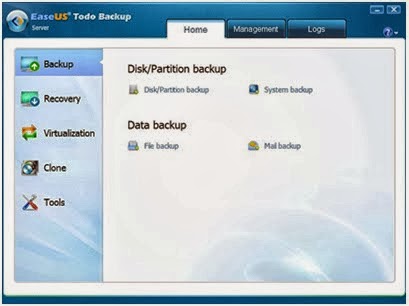
EaseUS free backup software is the best backup software available in the market and is trusted by many users across the world. It is available for free whether you want to create a backup of the PC or the server. Billions of home users have already used it and they seem to be quite happy with the results. For the professional purposes, the paid version of the software is also available as they need a much more accuracy as compared to the home purposes. So whenever any tragedy occurs, you just need one single click to restore all your data back.

Top features
 
The most important feature of EaseUS backup softwareis that whenever you want the data back from the backup, you do not need to reinstall the windows as in the case of some other backup software. There are many different modules to create a backup such as system, hard disk, partition or individual files backup. So you are the one who can decide what kind of backup you want to create. Now the new features has been added to the software in which you can even backup your contacts, call logs, documents and even images and videos in the android devices. In just few simple steps, you can create a backup and recovery back your files without any skill required. So it is easy to use, can be automatically updated for free, available in multiple languages and even work automatically if the backup job is assigned to it.Even after that if you encounter any sort of problem, the technical team is available day and night to help you out. You can contact the customer care anytime you want.

Razer Launched Their Own Mechanical Switches For Gaming Keyboards

Razer 1
Razer 2
Razer 3
With the new technology the Razer has busy - and develops new switches that are optimized especially for gamers. But it can be also useful for other PC users. Most of the higher-quality keyboards very often come from the German manufacturer Cherry’s switches and Razer also use the same in his keyboards to date on the technology of the Upper Palatinate company.

It turns Razer just before a new design for the interior of the buttons, called switches. Razer has developed two slightly different versions of the switch: the clicky Razer Green Switch requires triggering a force of 50 g, while the rather quiet Razer Orange Switch needs a force of 45 g to trigger. The signal point to be achieved in both models compared to 1.9 mm, while two competing models used for comparison 2.2mm and 2.0mm need - Razer does not mention any manufacturer, but probably they are the products of Cherry.

The reset point is the green switch by Razer 0.4 mm long and the orange Switch 0.05 mm. With these values Razer sees his keyboards especially for use in computer games at an advantage, for example when it comes to fast double clicks. But the lifetime should be longer than the nameless competitors.

The green and orange Razer indicates 60 million each clicks, the competitor creates depending on the model only 20 million or 50 million. Razer can produce its switches from a third party, but they are having their own experts to ensure the quality on site.

The two new keys should be used for the first time in the series keyboard Black Widow 2014. Other manufacturers of keyboards should be able to install keys in their models. A reader has alerted us that the 2014er models of the Black Widow keyboards already in the online store of Razer on pre-order. Deliveries are scheduled to begin in mid- March 2014, the cheapest model costs around 100 Euros.

LG 34UM95, Cinemascope Screen With 34 Inches


LG 34UM95
LG has unveiled a 34 -inch display with an aspect ratio of 21:9, on which, for example, several documents can be displayed side by side. The displays have replaced by two screens in the 4:3 format. The 34UM95 is not LG's first display in 21:9 formats.

Already in 2012, the company launched such a screen on the market. The new 34UM95 achieves a resolution of 3,440 x 1,440 pixels and is equipped with an AH - IPS panel with a contrast ratio of 1,000:1. The brightness is given with 320 candelas per square meter. The display offers a DisplayPort 1.2, two HDMI ports and two Thunderbolt connectors as well as USB 3.0.

With stand, the screen measures an impressive 829.9 x 468.9 x 173 mm and requires about 80 watts in operation. The price is about € 1,000. In April, the LG should 34UM95 will be available in the market. In addition, LG still offers the UM65, which is also held in 21:9 formats and is available in three sizes 25, 29 and 34 inches.

The smallest model has a resolution of 2,560 x 1,080 pixels and a brightness of 300 candelas. The AH - IPS display is selectively connected via DisplayPort 1.2, two HDMI inputs or DVI-D Dual Link to the computer. The LG UM65 with 29 inch and 34 inch with 34UM65 are larger, but the other hardware detail remains the same.

The LG 34UM65 costs about 610 Euros, the 25UM65 to be offered for 280 Euros and 450 Euros for the 29UM65 model.

Fantastic Plugins to enhance the functionality of WordPress

Beta Tester and Regenerate Thumbnails

Plugins could be of immense help for websites on WordPress and handy plugins could prove to be helpful in enhancing its capabilities with great functionality without much strain though one would wonder which of these plugins would be useful for their site. It is essential to understand its need for specific site and add them depending on their requirements with the WordPress installation, most of which tend to become very useful on any WP site. Viewers could check on these plugins and opt for the ones most essential in running their website according to their requirements. At times, some of the functions in WordPress are not recommended for usage and the Log Deprecated Notices plugin provides a list of functions in the plugin or theme with suitable alternatives for usage.

Theme Check

Theme Check is one of the essential and most important plugins for WordPress developers which measures against the prevailing WordPress coding standards as well as its practices. While creating the theme, it helps in verifying the code making sure that it meets the review standard of the WordPress themes directory and creates a fresh menu item under the setting of Appearance. Its capabilities are that one can run over 8000 tests on any installed available themes resulting in a list of recommendations, errors and information messages. If the user has the inclination of submitting the theme to WordPress.org repository, the need to eliminate the errors is essential since Theme Check which is active during submission does not proceed any further, even if a single error is detected.

Besides this, Theme Check’s recommendations can also help in providing ideas for the theme with the maximum advantage on its functionality such as post formats and thumbnails and by eliminating all the recommendation the user can benefit with the latest features to turn off the same. If showcasing themes to clients or for colleague’s feedback and testing, the Theme Demo Bar enables a single WordPress installation, presenting more than one theme where these plugins are common on theme market places and theme shops. These are much easier than setting different environment for various themes though it does not have the flexibility of different content for different theme.

Beta Tester and Regenerate Thumbnails

Updating to WordPress Beta, Nightly version or Release Candidate (RC) with Beta Tester enables to test the compatibility of the theme or plugins, with the latest upcoming versions while Regenerate Thumbnails can be useful in setting a new size of image thumbnail which enable the user to regenerate the thumbnail images in the library according to the size of one’s choice with a single click though the process may take its time depending on the number of images especially from a live site.

Debogger

Debogger helps in dealing with debug messages, warnings and notices in WP, helping in showing the debug notices at the bottom of the page with the query counts, page load time and peak memory usage making it easy for performance tuning. It also checks the markup for W3C validity and for its function, one need to run on the server which is accessible by the W3C validation service. Another alternative is the Debug Bar that adds a Debug menu to the admin bar for easy access to cache, queries as well as other useful information. The two useful plugins which are alongside each other are the Debug Bar and Debug Bar Extender where the former give information about memory, request etc. while the later gives a better insight on what is prevailing under the hood, inclusive of cache hits or misses, clear profiler with back trace of all functions as well as SQL queries.

User Switching

One can switch between registered users without the need of repeating the usernames and passwords with the User Switching which, once activated will give a new menu named Switch off in the admin bar and if a plugin to create new role with a set of new capabilities is needed, this plugin would be of great help.

Disable Core Updates

Users often working with plugins and themes and probably testing them in various versions of WP of different set of plugins as well as setup configurations come across new versions available which can cause interruption in their working system. The Disable Core Updates plugin thus helps in turning them off.

Backup to Dropbox

Back up of the content is very vital and offsite backups are essential when one would not have the time to download a backup and reload the same to a cloud storage service. WordPress Backup to Dropbox helps in saving the same to the dropbox account instead of downloading a backup using the OAuth, keeping the details safe with its simple and sleek UI, customizable backup settings and cross browser compatibility.

Better WordPress Security

This plugin provides various WP security features and techniques which are essential for securing a WP site combining them into an easy to use plugin by working in obscuring sensitive information, increasing security of passwords, blocking unauthorized users and detecting attempts in finding vulnerabilities. Moreover it also makes regular backups of the site enabling the user to be online quickly should they face any kind of an attack Mono-live is a great eye opener on some fantastic latest technology information which provides immense insight to the user.

Saturday, 8 March 2014

KO- TAG; New system warns drivers of pedestrians


KO- TAG
An embedded system alerts the driver about the risk of collision and automatically activates the brakes of the vehicle of its own. Through Wi-Fi waves that the embedded the system identifies the presence of pedestrians equipped with tag (transponder). KO- TAG It is through Wi-Fi waves that the embedded system identifies the presence of pedestrians equipped with the tag. It is equipped with an automatic detection and tracking of ultra- sophisticated pedestrian spotted the child while he was still walking on the sidewalk, hidden behind parked vehicles.

The car stops instantly, avoiding the collision. This is a scene that going to takes place in a few years as the technology is still in the prototype stage. It has been submitted by Erwin Biebl team at the Technical University of Munich (Germany). Its principle is based on the wave communication between pedestrians or cyclists and the car in motion. The latter has an embedded system consisting of a set of antennas that emit a radio signal. The advantage of this technology is that it is not hindered by the presence of obstacles like cars, bus etc. Pedestrians are the ones equipped with a transponder.

 The transponder, a kind of beacon and when it receives signals from the car, it immediately sends back a similar signal indicating its presence. This signal is then picked up and located by the embedded antennas. The transponder comprises in addition a small inertial unit which measures in real time the movements of the person. Valuable information continuously feeds to the car. The onboard computer can calculate precisely the movement of the individual and define when there is a risk of collision.

If the time before the impact is greater than a second, the system sounds an alarm to warn the driver of imminent danger. If this time is less, this is the car that makes the decision to apply brake to avoid the collision, even if the pedestrian is not yet visible to the driver in the seat. It is this anticipation that makes the difference with existing detection technologies.

The technology available now is based on the use of a camera which identifies the pedestrian or cyclist and steps to monitor its behavior to initiate, if necessary, an emergency brake. “But if the pedestrian is hidden behind an obstacle, such as a parked car, it cannot be detected by the camera," said Erwin Biebl. But in this prototype model of Erwin Biebl the pedestrian and his movement can be identified and monitored by the on board system accurately. It will take some time before you see the new technology into the catalog of manufacturers. According to Erwin Biebl it will be marketed in 2020.

Lotus C-01 Superbike: Science Fiction Comes To Reality


Lotus C-01 Superbike

Lotus C-01 Superbike
The famous futuristic Superbike from the movie Tron was recently made but it is still in the prototype stage, this beautiful vehicle will be produced in only 100 in numbers and those lucky hundred discover this marvel of technology and design!

Lotus British brand has partnered with designer Daniel Simon to develop a model of bike very much inspired by the film Tron. The C-01 superbike looks like a fantasy designer, yet the concept is now a reality. Lotus has even planned to make a hundred aftershocks in partnership with the German manufacturer Kodewa.

The two companies have collaborated in the past on racing cars projects. Mr. Simon told that the creative process of the C- 01 has been borrowing a lot of love. They worked hard to create a motorcycle with very special features, such as highly refined body, a very low profile, sleek position, unique air intakes and with a clean design.

The super bike is available in three colors, the classic British racing green and Martini colors, the car develops 200 pounds in a stroke and it is a 200 horsepower four-stroke engine. At the moment, no price was given, but it is likely that the C-01 will not be affordable for everyone. We believe this bike clearly deserves to be in the list of most beautiful cars ever made. Of course, we are under no illusions about its price certainly likely to be exorbitant.

Friday, 7 March 2014

3D Printing Can Create Human Tissue To Heal Wounds

3D printers are able to manufacture spare parts for satellites, food and even human organs. Today, the world of fashion began to use 3D printing and designs luxurious rooms also. 3D printing is diversified more. This is explained by the improvement of materials incorporating different metals and materials such as plastic, wood or nylon. Jewelry and accessories 3D printed are already marketed. An Atlanta entrepreneur currently testing a printer that allows you to create unique garments from fabrics polymer material based on carbon.3D printers never cease to amaze us!

After the ability to print food, dentures or even houses, a new stage has been reached, that of bio-printing In other words, the creation of human tissues in 3D. The bio-printing is a matter of well-known research for the scientists and functional technology is already exists with pre-established patterns. The latter is however very demanding and allows no margin of error or modified during printing.

The apparatus used consists of two tanks containing stem cells bathed in culture medium. This method may be about to be replaced by another discovery by laboratories of Carnegie Mellon and Brigham and Women's Hospital in Boston. It is based on the micro -robot capable of assembling different materials, in order to repair human tissues. Researchers led by Savas Tasoglu and Utkan Demirciont developed a hydrogel material a liquid portion and a solid portion similar to contact lenses which are found in living cells.

It is then necessary to control micro- robot remotely using magnetic fields capable of moving between different hydrogels to build cell structures. It is very difficult to realize that human tissue is composed of many types of cells operation. Scientists have still managed to catalog several materials they need to print in 3D to develop these structures such as copper rods, polystyrene beads, silicon chips and the famous hydrogels. The whole is dipped in a liquid to maintain the cells to be alive.

This approach is more accurate than the old method used previously when it comes to print components. It also makes it possible combining flexible and rigid materials together, all at a scale of the order of tens of microns of size, which is adjustable by the micro- robot. Metin Sitti, the professor of Mechanical engineering head of the Laboratory Nanrobitcs Carnegie Mellon told that their work will revolutionize the precision assembly of blocks of complex and heterogeneous tissues in three dimensions and facilitate the understanding of tissue engineering systems.

The encoding method and manipulation developed here may find wide applications in areas such as diagnostics, regenerative medicine, engineering micro physiological systems, pharmaceutical and biological research, and manufacture microscopic according to Utkan Demirci.

 The micro- robot can analyze cells, manipulate eliminate targets or change direction on a scale that we could not reach before and it can be regarded as a microscopic clamp capable of gripping and moving individual cells or groups in a 3D environment.

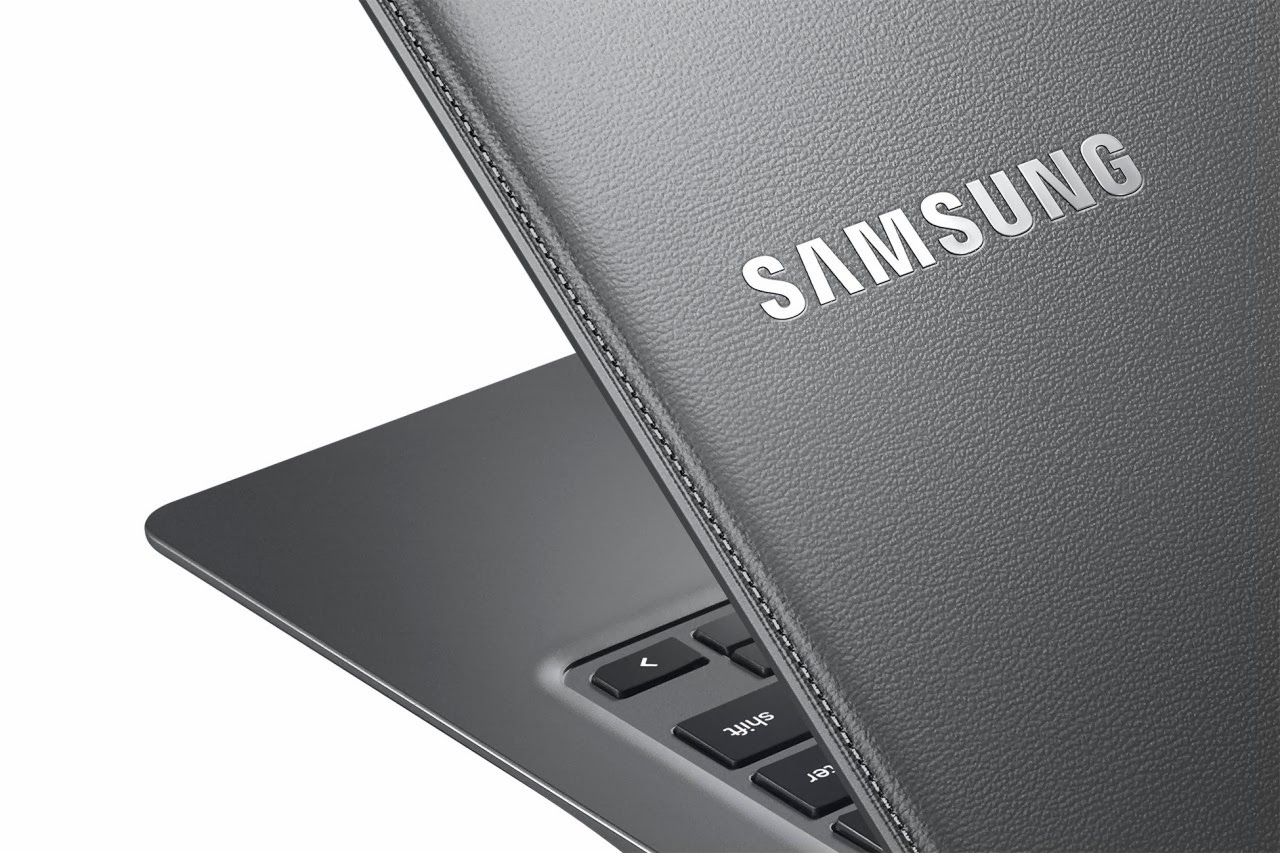
Samsung Announces New Chromebook 2 Series in Leather Finish

Chromebook 2
The new entry-level notebooks from Samsung with Google's operating system, called Chrome books, will provide housing cover with leather. Samsung has done away with all the internet rumors and his second Chromebook Series announced: The new models with Chrome OS available in two sizes 11.6 and 13.3 inches, and they stand out by their cover in leather look.

The devices cost 230-290 Euros and come in April in the U.S. market. The Samsung Chromebook 2 with a 13.3 -inch display has a 1920x1080 Full HD resolution. Inside the model tinkers an Exynos -5- Octa- processor from Samsung with four cores and 2.1 GHz. Four gigabytes DDR3L memory ensures a brisk speed with low power consumption. Samsung indicates that the batteries of the Chormebooks can support 8.5 hours backup.

The unit has been marked with the price tag of 290 euros, comes in gray in color and weighs around 1.4 kg. The smaller of the two new Samsung Chromebook has a HD resolution of 1366x768 on 11.6- inch display. It has the same memory and processor as the 13.3- inch version, but the processor has a lower clock speed of 1.9 gigahertz. The laptop battery lasts up to eight hours of operation according to Samsung. The Chromebook is available in black and white, it weighs 1.1 kg and costs around 230 Euros.

Both Chormebooks Series 2 are Chromebook typically equipped with a meager 16 gigabytes of storage, and it can be expandable by cloud storage. The other features are an HDMI, USB 2.0, USB 3.0 port, microSD slot and a 720p webcam. Samsung is the leading manufacturer in the market for Chromebooks in the United States and in 2013 alone 60 percent of the Chromebooks originated from the South Korean manufacturer, the first laptop with Chrome OS released in 2011.

Microsoft Announces DirectX 12 On March 20

DirectX 12
The Game Developers Conference to be host the late giant, which must unveil the new version of the API dedicated to the video game. The Windows - maker Microsoft has announced a new version of its graphics platform DirectX - DirectX 12 In a blog entry on the developer side of the Microsoft Developer Network, this is the company’s first published preliminary info. Microsoft will announce on March 20 the new version of DirectX API dedicated to video game developed over the years by the giant.

He unveiled at the Game Developers Conference (GDC) in San Francisco, during a session on the future of DirectX. According Polygon, eight workshops dedicated to Microsoft DirectX 11, but prepare the future. The giant did not hide it also, which gave appointment on the date specified by the newspaper on MSDN. Microsoft made a trailer focused on machine performance, and their exploitation by video games. Several presentations sessions of GDC are however state the future of graphics, Direct3D, etc.

Each time, they promise the developers for a unprecedented level of control equipment and increased to a broad hardware ecosystem performance. In short, if you are sure that the new version of the API will be presented on March 20 - and that's a good thing, the previous major version for Windows from before 2009 - there are quite a few details the direction taken by Microsoft.

Microsoft announces new graphics platform DirectX 12. Microsoft's announcement page shows next to the DirectX logo and the logos of AMD's graphics division, Intel, Nvidia and Qualcomm – The good thing is it is likely to be that DirectX 12 will be equipped on desktop computers and mobile platforms such as Smartphones and tablets with new graphics capabilities.

Thursday, 6 March 2014

Opera 20 With Better Speed Dial Operation

Opera 20
Opera Software has released new version Opera 20 of their browser, which relies on Google's Chromium engine for some time. Above all, there are improvements in the speed dial operation and drag-and- drop capability also has been enhanced. With Opera 20, the Norwegian browser receives once again features the owners of Presto - execution have long been accustomed to.

Since Opera is changed months ago on Google's Chromium engine, the manufacturer is busy trying to integrate the functions of Opera 12.x in the new product. Many features are still missing the with the Chromium version that users of the Presto version have long been known. The latest version brings new features, especially around the speed-dial operation and bookmark management.

The speed dial settings have been updated and the user can change the size of the speed dial icons in the Chromium version. This setting is especially useful for users who have a lot of speed-dial entries and this can reduce accordingly in order to have in view as far as possible all. Speed Dial entries can be moved by drag -and-drop with the mouse in the bookmark bar.

Conversely, it is now possible to conveniently store this as the new speed dial entry that an open web page with the mouse. Was also expanded the Opera menu in order to access frequently used functions directly above it can. On Mac systems, a confirmation dialog can be activated when the browser using keyboard shortcuts Command -Q quits. This is to prevent that the browser is accidentally terminated. In addition browser -Themes load faster and bugs have been fixed.

Opera 20 is available free for Windows and Mac OS X and available for download. The Linux version of Opera does not exist with Chromium engine. In recent years, there have been too few new features. Opera has squandered his reputation, to be considered as manufacturer of a fast browser with special abilities. Since then, Opera Software has changed to the Chromium engine that finds no more development on the browser instead of Presto engine.

Microsoft Plans Language Assistant Cortana For Windows Phone!

Cortana
Microsoft wants Windows Phone 8.1 to install a language assistant who carries the name Cortana in it. It is said that it is similar to Siri on iPhones and Google Now on Android Smartphones. With the update to Windows Phone 8.1 Smartphones get with Microsoft's mobile operating system a language assistant that is designed to provide the functions of Siri and Google Now, The Verge has learned from people who are familiar with Microsoft's plans.

The designation is based on the computer game series Halo, in which there is the AI Cortana character. On Windows Phone Cortana is only an animated icon and not a female character as in the Halo games. The approach of Cortana is a similar virtual personality as with Apple's Siri. Moreover Cortana collects data from Bing, Foursquare and other services in order to offer comparable performance to Google Now.

The user will thus find all relevant information in Cortana to simplify his use of Smartphones. A sub- function of Cortana is called notebook and is used to control the data flow with matching privacy settings. The user should therefore be set in the notebook, which data sources may use Cortana. So Cortana can on location information, personal data, reminders and contact access. In addition, the function can monitor the user behavior and show based on that information or make suggestions.

Depending on the chosen notebook settings to the Windows Phone Assistant noted the information in question. The user should edit later stored within the notebook information or delete, so that a privacy setting in the base can be changed at any time later. Moreover Cortana can be used to remove the user tasks. For example, if a message comes is asking in for a meeting at 19:00 clock, offers the wizard to create a matching calendar entry.

In addition, a Do Not Disturb mode is scheduled to appear in the notifications. The user may specify a specific user group, which is not affected by the Do Not Disturb mode. News of these individuals appointment would then continue to appear. It is expected that a first preliminary version of the update version will be come to the market only at the beginning of April 2014 is shown at Microsoft's Build conference. When Smartphone owners will get the update is still not known.

Wednesday, 5 March 2014

Microsoft would offer a free version of Windows 8.1 with Bing

Windows 8.1 with Bing
Windows 8.1 is currently the latest version of Microsoft's operating system Windows 8. Microsoft currently experimenting with a free version of its operating system for PCs. According to unconfirmed sources, Microsoft could offer a free version or low cost of its OS called "Windows 8.1 with Bing", and integrating key services and applications.

It would be an update designed to attract users of Windows 7. Exactly one year before the Wall Street Journal quoted that Microsoft has decided to lower the price of Windows 8 and Office for OEMs licenses. The Verge now evokes an experimental project of Redmond called " Windows 8.1 with Bing " which would be a free or low-cost version of the update for users of Windows 7 operating system.

The Verge indicates the exact intentions of Microsoft are not yet finalized and that experimentation is part of a series of initiatives to monetize cloud services and applications of the publisher. According to The Verge, the free version called "Windows 8.1 with Bing” and is currently in development. Hence, they also contain the most important Microsoft apps and services and put an emphasis on the search engine Bing. In addition, Microsoft is targeting apparently from it, to win by no or low price more users for Windows 8. Early versions of Windows 8.1 with Bing are leaked on the internet and the familiar Windows Leaks website WZor.net already published screenshots of the software installed .

The Verge goes on to write that Windows 7 users might get the upgrade to Windows 8.1 with Bing free or very cheap. Another possibility is that the operating system is also available to PC manufacturers on favorable terms. The focus is to get as many new Windows 8 users. This information last week via Bloomberg that Microsoft would charge more for Windows 8.1 license of $ 15 on devices sold in more than 250 dollars. Service Pack 1 for Windows 8.1 is expected in early April.

 Now Windows 8.1 download costs currently around 120 Euros for individuals. It is therefore questionable how Microsoft makes money when it offers (nearly) the operating system and key applications for free. The Verge suspected that the company wants to move to new customers to use its fee-based additional services, such as major cloud storage. Details of these plans of Microsoft may known public at developer conference which will be held in San Francisco on of 2 up to 4 April.

Specialized Audio Components For Custom automotive Sound Systems

Audio Components
Many consumers put a lot of time, effort, and resources into their automobile, and one way that many enhance their car or truck is through enhanced audio components and sound systems. The electronics in a particular vehicle may actually surpass in value that of the car itself, making this an important investment for the owner. Furthermore, there are some savvy shoppers seeking to augment existing systems with very specialized, particular products that might be difficult to find in local retail venues.

There are some dedicated sites and merchants that are most likely to yield a more favorable selection for distinctive buyers, and that offer a wide range of innovative and technologically-advanced products. These items might be offered in a wider range of sizes or styles, or they simply might be goods that are nearly impossible to find and purchase off-the-shelf in an auto or electronics retailer nearby. The access to these fine quality products ensures optimal sound and performance for those seeking uncompromised audio in their vehicle, while also offering competitive pricing to lure and satisfy potential customers.

Many of the sites found that focus on these needs may provide some buyer incentives that make purchasing new and exciting elements more feasible; this may be demonstrated in discounts for first-time shoppers or deferred shipping when purchases meet a required minimum. One site with some enticing offers is pacificstereo.com, which provides new customers a flat percentage off of their initial order. This makes it viable to spruce-up existing sound systems in time for spring!